Loading
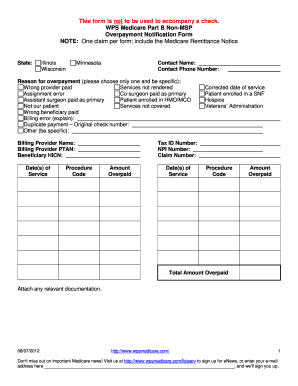
Get Wps Medicare Overpayment Notification Form
How it works
-

Open form follow the instructions
-

Easily sign the form with your finger
-

Send filled & signed form or save
How to fill out the Wps Medicare Overpayment Notification Form online
Filling out the Wps Medicare Overpayment Notification Form is essential for notifying Medicare of an overpayment. This guide provides detailed steps to help you accurately complete the form online.
Follow the steps to fill out the Wps Medicare Overpayment Notification Form online.
- Click ‘Get Form’ button to obtain the form and open it in the editor.
- Begin by entering the state where the overpayment occurred. Select from Illinois, Wisconsin, or Minnesota.
- Provide your contact name and phone number to allow Medicare to reach you for any follow-up questions.
- In the reason for overpayment section, choose only one reason from the provided list, being specific about the issue.
- Fill in the billing provider name and PTAN, along with the beneficiary HICN.
- Document the date(s) of service and associated procedure codes for services related to the overpayment.
- If applicable, enter the corrected dates of service and indicate if the patient is enrolled in a skilled nursing facility (SNF) or hospice.
- Input the tax ID number, NPI number, claim number, and the amount overpaid for the specific dates of service.
- Ensure to calculate and enter the total amount overpaid in the designated section.
- Once all fields are complete and accurate, attach any relevant documentation as required.
- Finally, save the changes, and choose to download, print, or share the completed form as needed.
Complete your Wps Medicare Overpayment Notification Form online today to ensure a smooth communication process with Medicare.
To notify Medicare of an overpayment, you should fill out the WPS Medicare Overpayment Notification Form. This form allows you to formally detail the overpayment situation and request a refund. After completing the form, submit it directly to the relevant Medicare department. It’s also helpful to keep copies of all submitted documents for your records.