We use cookies to improve security, personalize the user experience, enhance our marketing activities (including cooperating with our marketing partners) and for other business use.
Click "here" to read our Cookie Policy. By clicking "Accept" you agree to the use of cookies. Read less
Read more
Accept
Loading
Form preview
  • US Legal Forms
  • Form Library
  • More Forms
  • More Uncategorized Forms
  • (hsa) Signature Card Form - The Bancorp Bank Hsa

Get (hsa) Signature Card Form - The Bancorp Bank Hsa

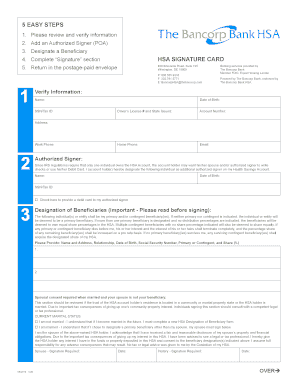
Driver's License # and State Issued: Account Number: Address: Work Phone: ... in the future, I must complete a new HSA Designation of Beneficiary form.

How it works

  1. Open form

    Open form follow the instructions

  2. Easily sign form

    Easily sign the form with your finger

  3. Share form

    Send filled & signed form or save

*How to fill out the (HSA) Signature Card Form - The Bancorp Bank HSA online*

Filling out the (HSA) Signature Card Form for The Bancorp Bank online is an essential step in managing your health savings account. This guide provides clear, step-by-step instructions to help you navigate the process seamlessly.

Follow the steps to complete the form accurately.

  1. Click ‘Get Form’ button to obtain the form and open it in the editor.
  2. Verify your information in the designated fields. Ensure that your name, social security number or tax ID, date of birth, driver’s license number and state, account number, home phone, email, and address are accurate and complete.
  3. Add an authorized signer, if desired. Designate an individual who may have access to your HSA by filling in their name, date of birth, and social security number or tax ID. Check the optional box if you wish to provide a debit card to the authorized signer.
  4. Designate your beneficiaries carefully. List their names, addresses, relationships to you, dates of birth, and social security numbers in the provided fields, while indicating if they are primary or contingent beneficiaries and specifying their share percentages.
  5. Complete the signature section. Acknowledge your understanding of the eligibility requirements and terms by signing and dating the form. If designated, your authorized signer must also sign.
  6. Once all sections are completed and verified, return the form in the postage-paid envelope provided, or mail it to The Bancorp Bank HSA at the address listed.

Begin filling out your HSA Signature Card Form online today for seamless account management.

Get form

Experience a faster way to fill out and sign forms on the web. Access the most extensive library of templates available.
Get form

Related content

2020 American Fidelity HSA Application...
HEALTH SAVINGS ACCOUNT (HSA) APPLICATION ... (The requested effective date cannot be...
Learn more
IBX_HSA_Bancorp_Application.pdf - Bryn Mawr...
Do not include HSA contributions or send this application to Bancorp – this will delay...
Learn more

Related links form

KY OL-3A - Louisville 2024 Aetna Electronic Funds Transfer (EFT) Authorization Form 2019 Live Scan Service Request (Applicant/Petitioner) - RE 237 (Rev 12/24) KY OL-3 - Louisville 2023

Questions & Answers

Get answers to your most pressing questions about US Legal Forms API.

Contact support

Typically, you cannot use an HSA debit card for groceries unless the items purchased qualify as eligible medical expenses. The (HSA) Signature Card Form - The Bancorp Bank HSA links your account to these eligible purchases, helping you manage your funds efficiently. It is essential to keep track of what qualifies to maximize your Health Savings Account benefits. For further clarity on eligible expenses, uslegalforms can assist you in understanding what qualifies under IRS guidelines.

Yes, the Bancorp refers to Bancorp Bank, which is the financial institution behind the (HSA) Signature Card Form - The Bancorp Bank HSA. This bank is known for offering various banking services, including Health Savings Accounts. Understanding this relationship can help you navigate your options and resources effectively. If you need more information or assistance, check out uslegalforms for guidance on bank forms and processes.

The form for HSA contributions is the (HSA) Signature Card Form - The Bancorp Bank HSA. This form allows you to authorize your contributions to your Health Savings Account, ensuring that your deposits are properly tracked and managed. By using this form, you can facilitate seamless transactions, making it easier to contribute and maximize your HSA benefits. For further assistance, consider exploring uslegalforms, which offers solutions for obtaining and filling out the necessary documents.

An HSA account with The Bancorp Bank indeed comes with a debit card, making it easier to access your HSA funds. This card simplifies the payment process for qualified medical expenses, allowing you to use it directly at the point of service. Choose the (HSA) Signature Card Form - The Bancorp Bank HSA for an efficient and user-friendly experience in managing your healthcare finances.

Typically, after you complete the application process for your HSA account, your card will arrive within 7 to 14 business days. This timeframe ensures that your HSA is set up correctly and that your card is activated for use. Once you receive your (HSA) Signature Card Form - The Bancorp Bank HSA, you can start using it immediately for eligible medical expenses.

Yes, when you open an HSA account with The Bancorp Bank, you will receive a card associated with your HSA. This card provides easy access to your funds for qualified medical expenses. By using the (HSA) Signature Card Form - The Bancorp Bank HSA, you can effectively manage your healthcare expenses with convenience and security.

You need to have a high deductible health plan (HDHP) to get an HSA. This means that in 2021 your deductible must be at least $1,400 if you have single coverage, and at least $2,800 if you're a family.

Your HSA card can only be used for eligible expenses at specific healthcare-related service providers or merchants where you can purchase healthcare goods or services. Your HSA card has no cash access.

What Can You Pay for With an HSA? Sunscreen. Over-the-counter pain relievers, cold medicines and stomach remedies. Air purifiers and filters. Feminine hygiene products. Birth control. First aid supplies, including bandages. Orthotics, orthopedic braces and wraps. Pregnancy and fertility tests.

If you use your HSA for an expense other than eligible medical expenses you can subject yourself to significant IRS penalties. Inappropriate use of your HSA funds may also leave you without money to pay for your eligible medical expenses in the future.

Get This Form Now!

Use professional pre-built templates to fill in and sign documents online faster. Get access to thousands of forms.
Get form
If you believe that this page should be taken down, please follow our DMCA take down processhere.

Industry-leading security and compliance

US Legal Forms protects your data by complying with industry-specific security standards.
  • In businnes since 1997
    25+ years providing professional legal documents.
  • Accredited business
    Guarantees that a business meets BBB accreditation standards in the US and Canada.
  • Secured by Braintree
    Validated Level 1 PCI DSS compliant payment gateway that accepts most major credit and debit card brands from across the globe.
Get (HSA) Signature Card Form - The Bancorp Bank HSA
Get form
Form Packages
Adoption
Bankruptcy
Contractors
Divorce
Home Sales
Employment
Identity Theft
Incorporation
Landlord Tenant
Living Trust
Name Change
Personal Planning
Small Business
Wills & Estates
Packages A-Z
Form Categories
Affidavits
Bankruptcy
Bill of Sale
Corporate - LLC
Divorce
Employment
Identity Theft
Internet Technology
Landlord Tenant
Living Wills
Name Change
Power of Attorney
Real Estate
Small Estates
Wills
All Forms
Forms A-Z
Form Library
Customer Service
Terms of Service
Privacy Notice
Legal Hub
Content Takedown Policy
Bug Bounty Program
About Us
Help Portal
Legal Resources
Blog
Affiliates
Contact Us
Delete My Account
Site Map
Industries
Forms in Spanish
Localized Forms
State-specific Forms
Forms Kit
Legal Guides
Real Estate Handbook
All Guides
Prepared for You
Notarize
Incorporation services
Our Customers
For Consumers
For Small Business
For Attorneys
Our Sites
US Legal Forms
USLegal
FormsPass
pdfFiller
signNow
airSlate WorkFlow
DocHub
Instapage
Social Media
Call us now toll free:
+1 833 426 79 33
As seen in:
  • USA Today logo picture
  • CBC News logo picture
  • LA Times logo picture
  • The Washington Post logo picture
  • AP logo picture
  • Forbes logo picture
© Copyright 1997-2025
airSlate Legal Forms, Inc.
3720 Flowood Dr, Flowood, Mississippi 39232
Form Packages
Adoption
Bankruptcy
Contractors
Divorce
Home Sales
Employment
Identity Theft
Incorporation
Landlord Tenant
Living Trust
Name Change
Personal Planning
Small Business
Wills & Estates
Packages A-Z
Form Categories
Affidavits
Bankruptcy
Bill of Sale
Corporate - LLC
Divorce
Employment
Identity Theft
Internet Technology
Landlord Tenant
Living Wills
Name Change
Power of Attorney
Real Estate
Small Estates
Wills
All Forms
Forms A-Z
Form Library
Customer Service
Terms of Service
Privacy Notice
Legal Hub
Content Takedown Policy
Bug Bounty Program
About Us
Help Portal
Legal Resources
Blog
Affiliates
Contact Us
Delete My Account
Site Map
Industries
Forms in Spanish
Localized Forms
State-specific Forms
Forms Kit
Legal Guides
Real Estate Handbook
All Guides
Prepared for You
Notarize
Incorporation services
Our Customers
For Consumers
For Small Business
For Attorneys
Our Sites
US Legal Forms
USLegal
FormsPass
pdfFiller
signNow
airSlate WorkFlow
DocHub
Instapage
Social Media
Call us now toll free:
+1 833 426 79 33
As seen in:
  • USA Today logo picture
  • CBC News logo picture
  • LA Times logo picture
  • The Washington Post logo picture
  • AP logo picture
  • Forbes logo picture
© Copyright 1997-2025
airSlate Legal Forms, Inc.
3720 Flowood Dr, Flowood, Mississippi 39232