Loading
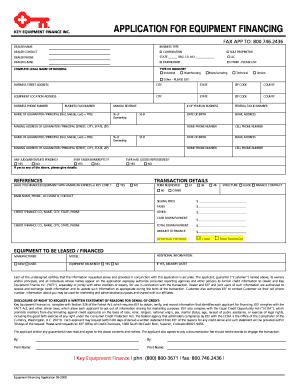
Get Keybankonline Form
How it works
-

Open form follow the instructions
-

Easily sign the form with your finger
-

Send filled & signed form or save
How to fill out the Keybankonline Form online
This guide provides a clear and supportive approach to completing the Keybankonline Form. Whether you are familiar with online forms or just starting, this comprehensive guide covers every step you'll need to take.
Follow the steps to successfully complete the Keybankonline Form.
- Click ‘Get Form’ button to secure the form and access it in your preferred editor.
- Begin by filling out the dealer name and contact details. Indicate the business type by selecting one of the options provided, such as Corporation, LLC, Partnership, or Sole Proprietor.
- Next, complete the complete legal name of the business and type of industry. This section helps define your business within the relevant categories, such as industrial or manufacturing.
- Provide the business street address, city, state, zip code, and county. Additionally, include the equipment location address, if different.
- Fill in the business phone and fax numbers, along with the annual revenue estimate to provide a comprehensive financial overview.
- Enter the information for the guarantor or principal. This includes their full name, title, date of birth, ownership percentage, and social security number.
- Input the mailing address for the guarantor or principal, including the street, city, state, and zip code.
- Respond to the questions regarding any judgments, suits pending, or bankruptcy history by answering yes or no. If applicable, provide further details.
- Complete the references section, including past financing information, the term requested, and the structure of the financing arrangement.
- Fill out the equipment details you wish to finance, including the manufacturer, model, and whether the equipment is new or used.
- At the end of the form, review your entries for accuracy. Then save the changes, and you will have options to download, print, or share the completed form.
Complete your Keybankonline Form online today to get started on your equipment financing journey.
To fill out the deposit form, first gather your banking details, including your account and routing numbers. Next, clearly write your personal information at the top of the form. Make sure to double-check each entry for accuracy before submitting it to ensure there are no delays in processing. The Keybankonline Form simplifies this task by guiding you through each required section effortlessly.