Loading
Form preview
  • US Legal Forms
  • Form Library
  • More Forms
  • More Uncategorized Forms
  • Famguardian

Get Famguardian

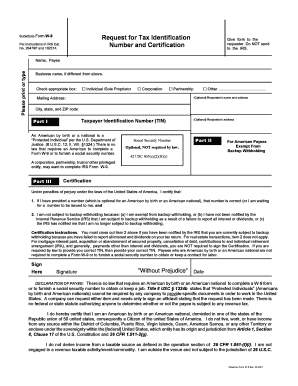
Nd to the IRS. Please print or type Name, Payee Business name, if different from above. Check appropriate box: G Individual /Sole Proprietor G Corporation G Partnership G Other ............................................ (Optional) Requester s name and address Mailing Address: City, state, and ZIP code Part I Taxpayer Identification Number (TIN) An American by birth or a national is a Protected Individual per the U.S. Department of Justice. (8 U.S.C. 12, II, VIII, 1324.) Th.

How it works

  1. Open form

    Open form follow the instructions

  2. Easily sign form

    Easily sign the form with your finger

  3. Share form

    Send filled & signed form or save

How to fill out the Famguardian online

Filling out the Famguardian form is an essential step for tax compliance and record-keeping. This guide will provide you with clear and concise instructions to help you navigate each section of the form with confidence.

Follow the steps to complete the Famguardian form accurately.

  1. Press the ‘Get Form’ button to access the Famguardian form and open it for editing.
  2. Begin by entering your name in the designated field labeled 'Name, Payee.' If applicable, include a business name in the provided space.
  3. Select the appropriate checkbox corresponding to your status: Individual/Sole Proprietor, Corporation, Partnership, or Other.
  4. Provide the optional requester’s name and address if required, followed by your complete mailing address, including city, state, and ZIP code.
  5. In Part I, enter your Taxpayer Identification Number (TIN). If you are an American by birth or a national, you are not legally required to provide this information.
  6. Part II is optional. If you believe you are exempt from backup withholding, you may choose to fill this section out.
  7. In the Certification section, confirm the accuracy of the information provided. If relevant, cross out item 2 if you have been notified by the IRS regarding backup withholding.
  8. Complete the signature field by signing and dating the form, ensuring that you comply with your responsibilities accurately.
  9. Once all sections are filled in, save your changes, and choose to download, print, or share the form as needed.

Start completing your Famguardian form online today for a seamless experience.

Get form

Experience a faster way to fill out and sign forms on the web. Access the most extensive library of templates available.
Get form

Related content

Family Guardian
4 of-mouth, live seminars, and his websites www.famguardian.org and www.sedm.org.*. Hansen...
Learn more
University of California, Davis | None...
Disclaimer: Disclaimer: https://famguardian.org/disclaimer.htm Family Guardian Fellowship...
Learn more
Private prosecution - Wikipedia
A private prosecution is a criminal proceeding initiated by an individual private citizen...
Learn more

Related links form

Georgetown University Athletics Womens Golf Questionnaire 2018 Mayo Clinic School Of Graduate Medical Education Letterhead 2018 Eastern Kentucky University Staff Leased Laptop Request/Justification 2018 Canada Anglican Church Diocese/Employer Approval Form 2010

Questions & Answers

Get answers to your most pressing questions about US Legal Forms API.

Contact support

When deciding whether to claim 0 or 1 on your W-4, consider your total income, tax deductions, and whether you expect to owe taxes at the end of the year. Claiming 0 means more tax will be withheld, while claiming 1 allows for less withholding. You can use Famguardian’s resources to analyze your financial circumstances and make an informed choice. Ultimately, selecting the right claim will help you manage your tax burden effectively throughout the year.

To fill out your withholding form, start by determining your filing status and the number of allowances you wish to claim. Consider your financial situation for the current year to help choose the correct amount of withholding. Utilizing Famguardian can provide you with tools and resources to evaluate your tax situation accurately while ensuring you complete the form correctly. After filling it out, submit the form to your employer so they can withhold the appropriate amount from your paycheck.

Filling out a guarantor form requires you to provide personal information about the guarantor, including their name, address, and financial details. Make sure all sections are completed accurately to help establish the guarantor's ability to cover any obligations. Famguardian simplifies this task with templates and step-by-step instructions that guide you through the specifics of what needs to be included. Always double-check the form for errors before submission to ensure it meets any requirements.

Yes, guardians may qualify for the child tax credit if they meet certain criteria set by the IRS. To be eligible, the child must live with the guardian for more than half of the year and meet age requirements. Utilizing Famguardian can help you determine your eligibility and guide you through the application process for the child tax credit.

Yes, you can complete the FAFSA without your parents' tax information if you meet specific criteria, such as being an independent student. However, having the financial information can benefit your application by providing a clearer picture of your financial situation. Famguardian offers resources to help you navigate this process and understand your options for funding your education.

Receiving a $10,000 tax refund often involves strategic tax planning and accurate filing. To increase your chances, consider contributing to retirement accounts or claiming all qualifying credits, such as the Earned Income Tax Credit. Famguardian can assist you in navigating these options, providing resources and tools to ensure you are maximizing your tax return.

To maximize your tax refund with Famguardian, it's crucial to take advantage of all eligible deductions and credits. Start by gathering all necessary documents, such as W-2s and 1099s, ensuring you don’t miss out on any income sources. Using a platform like uslegalforms can guide you through the process, helping you identify applicable tax benefits while filing your return.

Add Bates Numbering Choose Organize > Bates Numbering > Add. In the “Add Bates Numbering” dialog box, add files (from local drives or ECM), folders or opened files by clicking Add Files, Add Folders or Add Open Files. ... Click Output Options.

5 simple steps to add bates to file names on Windows: You can add MSG, EML, EMLC, PST, MBOX files. Select the Destination folder for output PDF files. Click File name inlay. Select Replace file names with starting and ending bates number option.

Here's how to add Bates numbering: Select the Edit ribbon. ... Click "Add Files" in the new dialog box and select all the files that you wish to number. ... Click "Output" to open the Output Rules dialog. Set your output options, including where to save the new files and whether to append Bates numbers to the file names.

Get This Form Now!

Use professional pre-built templates to fill in and sign documents online faster. Get access to thousands of forms.
Get form
If you believe that this page should be taken down, please follow our DMCA take down processhere.

Industry-leading security and compliance

US Legal Forms protects your data by complying with industry-specific security standards.
  • In businnes since 1997
    25+ years providing professional legal documents.
  • Accredited business
    Guarantees that a business meets BBB accreditation standards in the US and Canada.
  • Secured by Braintree
    Validated Level 1 PCI DSS compliant payment gateway that accepts most major credit and debit card brands from across the globe.
Get Famguardian
Get form
  • Adoption
  • Bankruptcy
  • Contractors
  • Divorce
  • Home Sales
  • Employment
  • Identity Theft
  • Incorporation
  • Landlord Tenant
  • Living Trust
  • Name Change
  • Personal Planning
  • Small Business
  • Wills & Estates
  • Packages A-Z
  • Affidavits
  • Bankruptcy
  • Bill of Sale
  • Corporate - LLC
  • Divorce
  • Employment
  • Identity Theft
  • Internet Technology
  • Landlord Tenant
  • Living Wills
  • Name Change
  • Power of Attorney
  • Real Estate
  • Small Estates
  • Wills
  • All Forms
  • Forms A-Z
  • Form Library
  • Legal Hub
  • About Us
  • Help Portal
  • Legal Resources
  • Blog
  • Affiliates
  • Contact Us
  • Delete My Account
  • Site Map
  • Industries
  • Forms in Spanish
  • Localized Forms
  • State-specific Forms
  • Forms Kit
  • Real Estate Handbook
  • All Guides
  • Notarize
  • Incorporation services
  • For Consumers
  • For Small Business
  • For Attorneys
  • USLegal
  • FormsPass
  • pdfFiller
  • signNow
  • altaFlow
  • DocHub
  • Instapage
Form Packages
  • Adoption
  • Bankruptcy
  • Contractors
  • Divorce
  • Home Sales
  • Employment
  • Identity Theft
  • Incorporation
  • Landlord Tenant
  • Living Trust
  • Name Change
  • Personal Planning
  • Small Business
  • Wills & Estates
  • Packages A-Z
Form Categories
  • Affidavits
  • Bankruptcy
  • Bill of Sale
  • Corporate - LLC
  • Divorce
  • Employment
  • Identity Theft
  • Internet Technology
  • Landlord Tenant
  • Living Wills
  • Name Change
  • Power of Attorney
  • Real Estate
  • Small Estates
  • Wills
  • All Forms
  • Forms A-Z
  • Form Library
Customer Service
  • Legal Hub
  • About Us
  • Help Portal
  • Legal Resources
  • Blog
  • Affiliates
  • Contact Us
  • Delete My Account
  • Site Map
  • Industries
  • Forms in Spanish
  • Localized Forms
  • State-specific Forms
  • Forms Kit
Legal Guides
  • Real Estate Handbook
  • All Guides
Prepared for you
  • Notarize
  • Incorporation services
Our Customers
  • For Consumers
  • For Small Business
  • For Attorneys
Our Sites
  • USLegal
  • FormsPass
  • pdfFiller
  • signNow
  • altaFlow
  • DocHub
  • Instapage
Social Media
Call us now toll free:
+1 833 426 79 33
As seen in:
© Copyright 1999-2026 airSlate Legal Forms, Inc. 3720 Flowood Dr, Flowood, Mississippi 39232
  • Your Privacy Choices
  • Terms of Service
  • Privacy Notice
  • Content Takedown Policy
  • Bug Bounty Program