Loading
Form preview
  • US Legal Forms
  • Other Templates
  • More Forms
  • More Uncategorized Forms
  • Hostos Financial Aid Office Hours Form

Get Hostos Financial Aid Office Hours Form

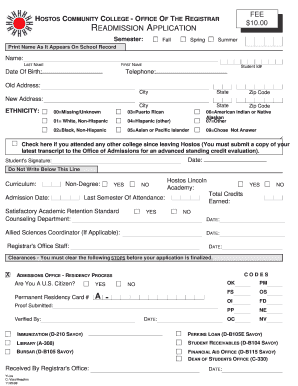
E Of Birth: Student Id# Telephone: Old Address: City State Zip Code State Zip Code New Address: City ETHNICITY: 00 Missing/Unknown 03 Puerto Rican 01 White, Non-Hispanic 04 Hispanic (other) 06 American Indian or Native Alaskan 07 Other 02 Black, Non-Hispanic 05 Asian or Pacific Islander 09 Chose Not Answer Check here if you attended any other college since leaving Hostos (You must submit a copy of your latest transcript to the Office of Admissions for an advanced standing cred.

How it works

  1. Open form

    Open form follow the instructions

  2. Easily sign form

    Easily sign the form with your finger

  3. Share form

    Send filled & signed form or save

How to fill out the Hostos Financial Aid Office Hours Form online

Filling out the Hostos Financial Aid Office Hours Form online is a straightforward process that allows you to provide necessary information efficiently. This guide will walk you through each step, ensuring you complete the form accurately and submit it without any issues.

Follow the steps to complete the form online easily.

  1. Click ‘Get Form’ button to obtain the form and open it in the editor.
  2. Fill in your semester of readmission by selecting from the options: Fall, Spring, or Summer. Make sure to check the appropriate box.
  3. Print your name as it appears in the school records, entering your last name and first name clearly.
  4. Provide your date of birth and student ID number in the designated fields.
  5. Enter your telephone number, current address, city, state, and zip code in the new address section.
  6. In the ethnicity section, select the appropriate code that represents your ethnicity from the provided list.
  7. If you attended any other college since leaving Hostos, check the box and ensure to submit a copy of your latest transcript for evaluation.
  8. Sign the form in the designated area for the student’s signature to authenticate it.
  9. Fill in any additional required information such as curriculum, non-degree status, admission date, total credits earned, and last semester of attendance.
  10. Review all information for accuracy and completeness before proceeding.
  11. Upon finalizing the form, you can save changes, download, print, or share the form as required.

Complete your Hostos Financial Aid Office Hours Form online today for a smooth and efficient process.

Get form

Experience a faster way to fill out and sign forms on the web. Access the most extensive library of templates available.
Get form

Related content

CUNY Hostos Community College | College Scorecard
Department of Education Seal ... CUNY Hostos Community College ... Don't forget: Do fill...
Learn more
Financial Aid - Hostos Community College
Welcome to the Office of Financial Aid at Hostos Community College. ... Financial Aid...
Learn more
Bootstrapping - Wikipedia
In general, bootstrapping usually refers to a self-starting process that is supposed to...
Learn more

Related links form

Department Travel Request Form - Pittsburg State University - Pittstate Table Sign Up Form - Pittstate English Department Grade Appeal Soares Electrical Grounding And Bonding - Pittsburg State University

Questions & Answers

Get answers to your most pressing questions about US Legal Forms API.

Contact support

Getting into Hostos Community College is generally not considered hard, as they aim to provide educational opportunities to a diverse range of students. The admissions process focuses on helping individuals further their education regardless of their background. To enhance your enrollment chances and understand financial aid options, refer to the Hostos Financial Aid Office Hours Form for timely assistance.

When you call the financial aid office, start by introducing yourself and stating your student ID if you have one. Clearly explain your reason for calling, whether it’s about your application, eligibility, or specific forms. The financial aid staff is there to assist you, so having the Hostos Financial Aid Office Hours Form handy will help you get the support you need when it matters most.

You can contact the financial aid office at Hostos Community College by phone or email. Their direct phone line is available on the college’s official website, along with an email address for inquiries. For your convenience, checking the Hostos Financial Aid Office Hours Form can help ensure you reach out during open hours.

The average GPA for students attending Hostos Community College tends to be around 2.7. However, this can vary depending on the specific program of study. If you need guidance on how your GPA affects financial aid eligibility or academic standing, you can consult with the financial aid office, and don't forget to check the Hostos Financial Aid Office Hours Form.

The financial aid code, also known as the FAFSA school code, for Hostos Community College is 007900. This code is essential for students applying for federal aid, as it directs your financial information to the correct institution. Remember to include it on your FAFSA form to facilitate the process, and always refer to the Hostos Financial Aid Office Hours Form for assistance in case you have questions.

The financial aid office at Hostos Community College is located within the main campus building. You can find it on the first floor, easily accessible for all students. When you visit, be sure to check the posted Hostos Financial Aid Office Hours Form for the most accurate times and availability.

The financial aid office at LaGuardia usually opens at AM, providing ample time for students to seek assistance with their financial aid applications and inquiries. It’s advisable to check the latest schedule on their website as hours may vary. For more specific details, consider filling out the Hostos Financial Aid Office Hours Form to get the most current information. They are there to help you navigate your financial options.

When writing an email to the financial aid office, be sure to include your full name, student ID, and your specific question or concern. Start with a polite greeting, and clearly state the purpose of your email. Remember to close with a thank you and provide your contact information if necessary. Utilizing the Hostos Financial Aid Office Hours Form can guide you in framing your queries efficiently.

Writing an email to a financial aid office can be straightforward when you include key information. Start with a clear subject line that indicates your request or question. In the body, briefly introduce yourself, explain your purpose, and provide any necessary details, such as your student ID. To ensure a prompt response, consider mentioning the Hostos Financial Aid Office Hours Form for specific inquiries related to your financial aid status.

The Help Desk – 718-518-6646. The Student Help Lab in C-595....Hostos CUNYfirst Help Desk. Phone:(718) 518-6646Email:cunyfirsthelp@hostos.cuny.eduLocations:C-595: Students + Faculty B-420: Staff + Faculty

Get This Form Now!

Use professional pre-built templates to fill in and sign documents online faster. Get access to thousands of forms.
Get form
If you believe that this page should be taken down, please follow our DMCA take down processhere.
Get Hostos Financial Aid Office Hours Form
Get form
  • Adoption
  • Bankruptcy
  • Contractors
  • Divorce
  • Home Sales
  • Employment
  • Identity Theft
  • Incorporation
  • Landlord Tenant
  • Living Trust
  • Name Change
  • Personal Planning
  • Small Business
  • Wills & Estates
  • Packages A-Z
  • Affidavits
  • Bankruptcy
  • Bill of Sale
  • Corporate - LLC
  • Divorce
  • Employment
  • Identity Theft
  • Internet Technology
  • Landlord Tenant
  • Living Wills
  • Name Change
  • Power of Attorney
  • Real Estate
  • Small Estates
  • Wills
  • All Forms
  • Forms A-Z
  • Other Templates
  • Legal Hub
  • About Us
  • Help Portal
  • Legal Resources
  • Blog
  • Affiliates
  • Contact Us
  • Delete My Account
  • Site Map
  • Industries
  • Forms in Spanish
  • Localized Forms
  • State-specific Forms
  • Forms Kit
  • Real Estate Handbook
  • All Guides
  • Notarize
  • Incorporation services
  • For Consumers
  • For Small Business
  • For Attorneys
  • USLegal
  • FormsPass
  • pdfFiller
  • signNow
  • altaFlow
  • DocHub
  • Instapage
Form Packages
  • Adoption
  • Bankruptcy
  • Contractors
  • Divorce
  • Home Sales
  • Employment
  • Identity Theft
  • Incorporation
  • Landlord Tenant
  • Living Trust
  • Name Change
  • Personal Planning
  • Small Business
  • Wills & Estates
  • Packages A-Z
Form Categories
  • Affidavits
  • Bankruptcy
  • Bill of Sale
  • Corporate - LLC
  • Divorce
  • Employment
  • Identity Theft
  • Internet Technology
  • Landlord Tenant
  • Living Wills
  • Name Change
  • Power of Attorney
  • Real Estate
  • Small Estates
  • Wills
  • All Forms
  • Forms A-Z
  • Other Templates
Customer Service
  • Legal Hub
  • About Us
  • Help Portal
  • Legal Resources
  • Blog
  • Affiliates
  • Contact Us
  • Delete My Account
  • Site Map
  • Industries
  • Forms in Spanish
  • Localized Forms
  • State-specific Forms
  • Forms Kit
Legal Guides
  • Real Estate Handbook
  • All Guides
Prepared for you
  • Notarize
  • Incorporation services
Our Customers
  • For Consumers
  • For Small Business
  • For Attorneys
Our Sites
  • USLegal
  • FormsPass
  • pdfFiller
  • signNow
  • altaFlow
  • DocHub
  • Instapage
Social Media
Call us now toll free:
+1 833 426 79 33
As seen in:
© Copyright 1999-2026 airSlate Legal Forms, Inc. 17 Station Street, Ste. 203, Brookline, MA 02445
  • Your Privacy Choices
  • Terms of Service
  • Privacy Notice
  • Content Takedown Policy
  • Bug Bounty Program