Loading
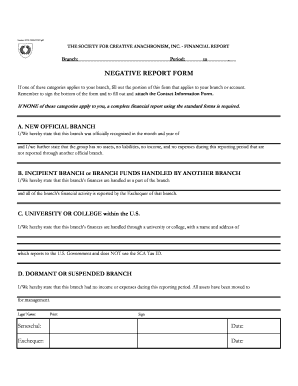
Get Sca Negative Financial Report - Sca
How it works
-

Open form follow the instructions
-

Easily sign the form with your finger
-

Send filled & signed form or save
How to fill out the SCA Negative Financial Report - Sca online
Filling out the SCA Negative Financial Report - Sca online can seem daunting, but this guide will provide clear and supportive instructions to help you navigate each component of the document. By following these steps, you can ensure that your report is completed accurately and efficiently.
Follow the steps to successfully complete the financial report.
- Click the ‘Get Form’ button to access the SCA Negative Financial Report - Sca and open it in your online editor.
- Begin by filling in the 'Branch' field with the name of your branch. This identifies the specific division of the Society for Creative Anachronism that the report pertains to.
- In the 'Period' field, specify the reporting period by entering the starting and ending dates. This information is crucial for accurate record-keeping.
- Select the appropriate category that applies to your branch from the four options: New Official Branch, Incipient Branch or Branch Funds Handled by Another Branch, University or College within the U.S., or Dormant or Suspended Branch. Fill in the relevant details corresponding to the selected category.
- For the selected category, provide any necessary statements or details in the designated sections, ensuring that all information is accurate and complete.
- Completed forms must include a signature from both the Seneschal and the Exchequer, along with the respective dates. Be sure to sign the document at the bottom.
- After signing, complete the Contact Information Form, including details like legal name, address, and contact numbers of the Chancellor of the Exchequer. If there are deputies, ensure their information is also provided.
- Finally, review all entries for accuracy. Save your changes, download the document, or print it out according to your preference. Ensure that all required forms are attached before submission.
Complete your SCA Negative Financial Report - Sca online today to ensure your branch's financial status is reported accurately.
-A- Affiant – The person who makes and swears to an affidavit. Affidavit – A written statement confirmed by oath or affirmation for use as evidence in court.