Loading
Form preview
  • US Legal Forms
  • Form Library
  • More Forms
  • More Uncategorized Forms
  • Major/minor Change Form - Uwf

Get Major/minor Change Form - Uwf

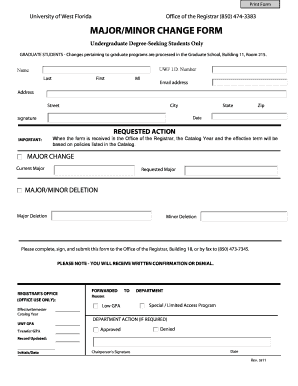
Programs are processed in the Graduate School, Building 11, Room 215. UWF I.D. Number Name Last First MI Email address Address Street City Signature State Zip Date REQUESTED ACTION IMPORTANT: When the form is received in the Office of the Registrar, the Catalog Year and the effective term will be based on policies listed in the Catalog. MAJOR CHANGE Current Major Requested Major MAJOR/MINOR DELETION Major Deletion Minor Deletion Please complete, sign, and submit this form to.

How it works

  1. Open form

    Open form follow the instructions

  2. Easily sign form

    Easily sign the form with your finger

  3. Share form

    Send filled & signed form or save

How to fill out the MAJOR/MINOR CHANGE FORM - Uwf online

This guide provides a comprehensive overview of how to accurately complete the MAJOR/MINOR CHANGE FORM for undergraduate degree-seeking students at the University of West Florida. By following these straightforward steps, you can ensure your request is processed effectively.

Follow the steps to complete the MAJOR/MINOR CHANGE FORM online.

  1. Click ‘Get Form’ button to obtain the form and open it in the editor.
  2. Begin by entering your UWF I.D. number in the designated field. This number is crucial for identifying your records in the system.
  3. Next, fill in your name. Include your last name, first name, and middle initial in the respective fields as they appear on your official documents.
  4. Provide your email address, ensuring it is one you regularly check, as any correspondence about your request will be sent there.
  5. Enter your complete address, including street, city, state, and zip code. This information helps verify your identity and residency.
  6. Sign and date the form at the bottom. Your signature certifies the accuracy of the information provided and your intention to request changes.
  7. Indicate your requested action by selecting either a major change, deletion of a major, or deletion of a minor. Clearly specify your current and requested majors, if applicable.
  8. Be aware that upon receipt in the Office of the Registrar, your catalog year and effective term will adhere to the university's policies as listed in the catalog.
  9. After ensuring all fields are complete and accurate, save your changes. You may download a copy, print it for your records, or share it with the appropriate department as needed.

Complete your MAJOR/MINOR CHANGE FORM online to ensure a smooth and efficient processing experience.

Get form

Experience a faster way to fill out and sign forms on the web. Access the most extensive library of templates available.
Get form

Related content

the university of west florida - ERIC - US...
Change. Degree Programs Offered. 2012 Carnegie Classifications. TOTAL ... 5 in the U.S...
Learn more
Forms | University of West Florida
Jump to Skip to main content — Change of Major/Minor (Current Undergraduates) - Only the...
Learn more
Florida State University - Wikipedia
Florida State University (Florida State or FSU) is a public research university in...
Learn more

Related links form

Student Dependency Confirmation Form Print Form F7 Affirmative Action FINAL RECOMMENDATION FORM Date: Department: Position: Search Nursing Assistant Student Handbook - Indian River State College - Irsc Human Resources Reference Check Sheet

Questions & Answers

Get answers to your most pressing questions about US Legal Forms API.

Contact support

The acceptance timeline for UWF can vary depending on various factors, including application volume. Generally, you can expect to receive a decision within a few weeks of submitting your application. If you have any questions regarding your application status, consider reaching out to the admissions office for assistance. Remember, proper completion of the MAJOR/MINOR CHANGE FORM - Uwf is essential for the future changes you may want to make after acceptance.

To send your transcripts to UWF, you can submit them to the Office of Admissions. You can also request that your previous institution sends your transcripts directly. Ensure you include any pertinent information with your MAJOR/MINOR CHANGE FORM - Uwf if you are changing your major concurrently.

If you wish to change your major after applying to UWF, first check your application status with the admissions office. You may need to complete the MAJOR/MINOR CHANGE FORM - Uwf to make this adjustment officially. Additionally, consult with an academic advisor to understand how this change might affect your admission and future coursework. Timely communication is essential for a smooth transition.

Declaring a minor at UWF is a straightforward process. Start by reviewing the available minors with your academic advisor to ensure it aligns with your major and career goals. To declare, complete the MAJOR/MINOR CHANGE FORM - Uwf and submit it to your academic department. Following this, you can incorporate the minor courses into your academic plan.

UWF is recognized for its strong academic programs and commitment to student success. The university provides various resources to support students in their educational journey. Additionally, earning a degree from UWF can enhance your career prospects. Its growing reputation reflects its dedication to quality education in the region.

Switching majors at UF involves several steps, starting with a meeting with your academic advisor. They will guide you through the process and help you fill out the MAJOR/MINOR CHANGE FORM - Uwf. Be sure to check the prerequisites for your new major and get any additional approvals if needed. Submitting this form will launch your transition to the new program.

To change your major at UWF, first consult with your academic advisor to discuss your options. Next, complete the MAJOR/MINOR CHANGE FORM - Uwf, available on the university's website or academic office. Ensure you meet the requirements for the new major, as some programs may have specific criteria. Finally, submit the completed form to formally initiate your major change.

Yes, you can double major at UWF, provided you meet the requirements for both programs. Each major will have specific criteria, so it’s essential to review them before proceeding. You will need to complete the major/minor change form - UWF to initiate the process. Consulting with academic advisors will help you balance the coursework and ensure you stay on track for graduation.

To email UWF undergraduate admissions, simply locate their contact information on the university's official website. Write a clear and concise email stating your questions or concerns regarding admissions. The admissions team is dedicated to assisting you with all inquiries related to your academic path. Utilize this direct communication to get the answers you need.

To change your major, you should first research the requirements of your new major. Complete the major/minor change form - UWF found on the UWF website. After consulting with an academic advisor for guidance, submit the form to ensure a smooth transition. This process is designed to support your academic journey effectively.

Get This Form Now!

Use professional pre-built templates to fill in and sign documents online faster. Get access to thousands of forms.
Get form
If you believe that this page should be taken down, please follow our DMCA take down processhere.

Industry-leading security and compliance

US Legal Forms protects your data by complying with industry-specific security standards.
  • In businnes since 1997
    25+ years providing professional legal documents.
  • Accredited business
    Guarantees that a business meets BBB accreditation standards in the US and Canada.
  • Secured by Braintree
    Validated Level 1 PCI DSS compliant payment gateway that accepts most major credit and debit card brands from across the globe.
Get MAJOR/MINOR CHANGE FORM - Uwf
Get form
  • Adoption
  • Bankruptcy
  • Contractors
  • Divorce
  • Home Sales
  • Employment
  • Identity Theft
  • Incorporation
  • Landlord Tenant
  • Living Trust
  • Name Change
  • Personal Planning
  • Small Business
  • Wills & Estates
  • Packages A-Z
  • Affidavits
  • Bankruptcy
  • Bill of Sale
  • Corporate - LLC
  • Divorce
  • Employment
  • Identity Theft
  • Internet Technology
  • Landlord Tenant
  • Living Wills
  • Name Change
  • Power of Attorney
  • Real Estate
  • Small Estates
  • Wills
  • All Forms
  • Forms A-Z
  • Form Library
  • Legal Hub
  • About Us
  • Help Portal
  • Legal Resources
  • Blog
  • Affiliates
  • Contact Us
  • Delete My Account
  • Site Map
  • Industries
  • Forms in Spanish
  • Localized Forms
  • State-specific Forms
  • Forms Kit
  • Real Estate Handbook
  • All Guides
  • Notarize
  • Incorporation services
  • For Consumers
  • For Small Business
  • For Attorneys
  • USLegal
  • FormsPass
  • pdfFiller
  • signNow
  • altaFlow
  • DocHub
  • Instapage
Form Packages
  • Adoption
  • Bankruptcy
  • Contractors
  • Divorce
  • Home Sales
  • Employment
  • Identity Theft
  • Incorporation
  • Landlord Tenant
  • Living Trust
  • Name Change
  • Personal Planning
  • Small Business
  • Wills & Estates
  • Packages A-Z
Form Categories
  • Affidavits
  • Bankruptcy
  • Bill of Sale
  • Corporate - LLC
  • Divorce
  • Employment
  • Identity Theft
  • Internet Technology
  • Landlord Tenant
  • Living Wills
  • Name Change
  • Power of Attorney
  • Real Estate
  • Small Estates
  • Wills
  • All Forms
  • Forms A-Z
  • Form Library
Customer Service
  • Legal Hub
  • About Us
  • Help Portal
  • Legal Resources
  • Blog
  • Affiliates
  • Contact Us
  • Delete My Account
  • Site Map
  • Industries
  • Forms in Spanish
  • Localized Forms
  • State-specific Forms
  • Forms Kit
Legal Guides
  • Real Estate Handbook
  • All Guides
Prepared for you
  • Notarize
  • Incorporation services
Our Customers
  • For Consumers
  • For Small Business
  • For Attorneys
Our Sites
  • USLegal
  • FormsPass
  • pdfFiller
  • signNow
  • altaFlow
  • DocHub
  • Instapage
Social Media
Call us now toll free:
+1 833 426 79 33
As seen in:
© Copyright 1999-2026 airSlate Legal Forms, Inc. 3720 Flowood Dr, Flowood, Mississippi 39232
  • Your Privacy Choices
  • Terms of Service
  • Privacy Notice
  • Content Takedown Policy
  • Bug Bounty Program