Loading
Form preview
  • US Legal Forms
  • Other Templates
  • More Forms
  • More Uncategorized Forms
  • Va Form 10-0455

Get Va Form 10-0455

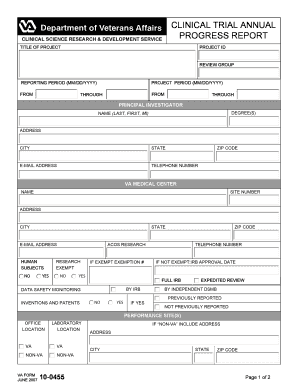
ACOS RESEARCH RESEARCH EXEMPT NO IF EXEMPT EXEMPTION # YES IF NOT EXEMPT:IRB APPROVAL DATE FULL IRB BY IRB DATA SAFETY MONITORING INVENTIONS AND PATENTS TELEPHONE NUMBER NO YES IF YES EXPEDITED REVIEW BY INDEPENDENT DSMB PREVIOUSLY REPORTED NOT PREVIOUSLY REPORTED PERFORMANCE SITE(S) OFFICE LOCATION LABORATORY LOCATION VA VA NON-VA NON-VA VA FORM JUNE 2007 10-0455 IF NON-VA INCLUDE ADDRESS ADDRESS CITY STATE ZIP CODE Page 1 of 2 PROGRESS REPORT SUMMARY PERIOD C.

How it works

  1. Open form

    Open form follow the instructions

  2. Easily sign form

    Easily sign the form with your finger

  3. Share form

    Send filled & signed form or save

How to fill out the VA Form 10-0455 online

The VA Form 10-0455 is essential for submitting clinical trial progress reports within the VA system. This guide will assist you in navigating the form seamlessly online, ensuring you understand each required section.

Follow the steps to complete the form effectively.

  1. Press the ‘Get Form’ button to obtain the form, making it accessible for online completion.
  2. Complete the basic identification fields, including the title of your project, project ID, review group, and the reporting period. Ensure that these are filled out accurately to avoid any delays.
  3. In the principal investigator section, provide your name (last, first, middle initial), degrees, address, city, state, zip code, email address, and telephone number.
  4. Fill in the details of the VA medical center involved in the research, including its name, site number, and address.
  5. Indicate whether human subjects are involved in your research by selecting 'Yes' or 'No'. If yes, further details may be requested.
  6. Document whether the research is exempt and provide the exemption number if applicable. If not exempt, include the IRB approval date.
  7. For data safety monitoring, indicate any inventions and patents and whether they were previously reported. If yes, provide further details about the expedited review.
  8. Describe the progress report summary, limited to 500 words, including major findings, recruitment difficulties, and recommendations from the most recent IRB and/or DSMB meeting.
  9. Indicate the number of related publications submitted, accepted, or in press during the reporting period.
  10. If applicable, provide citations for the primary outcome publication and attach any additional required files, such as the IRB and/or DSMB minutes.
  11. Once completed, review all the information carefully. You can then save changes, download, print, or share the form as needed.

Complete your VA Form 10-0455 online today to ensure timely submission of your clinical trial progress report.

Get form

Experience a faster way to fill out and sign forms on the web. Access the most extensive library of templates available.
Get form

Related content

VA Form 10-0455 - Veterans Affairs
This site provides public access to all VA forms that are appropriate to be on the web.
Learn more
Running the Gamut from A to B: Federal Trademark...
Lanham Act: A Puzzle in the Law of Deception, 78 VA. L. REV. ... form the Law of Perjury...
Learn more

Related links form

Turbine Maker To Bring Jobs To Muncie Area - Bureau Of Business ... - Cber Iweb Bsu PUR 330 C 110218 ZMR - Veterans Plaza. Commission Report - Nyc PROVIDERS - New York City Department Of Education - NYC . Gov - Schools Nyc

Questions & Answers

Get answers to your most pressing questions about US Legal Forms API.

Contact support

To obtain a VA rating letter, you can request it through the VA website or by contacting your local VA office directly. If you have submitted a VA Form 10-0455, it may help speed up your request process. Additionally, you can access your rating letter through the eBenefits portal, making it easy to receive this important document.

You can request your VA/C file online by visiting the VA's official site and accessing the eBenefits portal. Make sure to have your VA Form 10-0455 and other identifying information ready, such as your Social Security number. Follow the prompts to submit your request electronically and track its status conveniently online.

To get reimbursed from ChampVA, first, ensure you have completed the necessary forms, including any relevant details from your VA Form 10-0455. Then, submit your claim through the ChampVA online portal or by mail, along with any required documentation such as bills and receipts. Once your claim is processed, you will receive a reimbursement based on the covered services.

To find your intent to file date with the VA, you can log into your VA account. Once logged in, navigate to the 'Claims' section to view your application history. If you submitted a VA Form 10-0455, it should indicate your filing intent date. This information is essential for understanding the timeline of your claims process.

The five stages of the VA claim process include filing your claim, receiving a decision, appealing if necessary, ongoing follow-ups, and finalizing your benefits. Effective use of VA Form 10-0455 can help clarify your intentions during the first stage. Understanding these stages will help you navigate the process more effectively.

Starting an intent to file with the VA involves submitting a notice indicating your wish to apply for benefits. You can use VA Form 10-0455 for this purpose and submit it online or by mail. Doing this will help secure your benefits from the date you file your intent, so consider acting promptly.

The statement in support of claim for PTSD helps veterans provide additional details about their symptoms and experiences. You can complement your PTSD claim with VA Form 10-0455, ensuring you cover all necessary aspects. This statement is crucial in demonstrating how your military service contributes to your current condition.

Many veterans find it challenging to get claims for conditions like PTSD approved, due to the need for strong evidence and documentation. Successfully navigating this requires thorough medical records and possibly using the VA Form 10-0455 to detail your situation. Focus on gathering complete information to support your claim.

Submitting a VA form is straightforward. You can complete VA Form 10-0455 online or print it and submit it by mail. Ensure that you review the instructions carefully to include all necessary information, and consider using electronic submission for faster processing.

The best way to file a VA disability claim is to do so online through the VA's website or by using VA Form 10-0455. This method allows for better tracking of your claim. Be sure to provide complete documentation of your service-related conditions to ensure a smoother review process.

Get This Form Now!

Use professional pre-built templates to fill in and sign documents online faster. Get access to thousands of forms.
Get form
If you believe that this page should be taken down, please follow our DMCA take down processhere.
Get VA Form 10-0455
Get form
  • Adoption
  • Bankruptcy
  • Contractors
  • Divorce
  • Home Sales
  • Employment
  • Identity Theft
  • Incorporation
  • Landlord Tenant
  • Living Trust
  • Name Change
  • Personal Planning
  • Small Business
  • Wills & Estates
  • Packages A-Z
  • Affidavits
  • Bankruptcy
  • Bill of Sale
  • Corporate - LLC
  • Divorce
  • Employment
  • Identity Theft
  • Internet Technology
  • Landlord Tenant
  • Living Wills
  • Name Change
  • Power of Attorney
  • Real Estate
  • Small Estates
  • Wills
  • All Forms
  • Forms A-Z
  • Other Templates
  • Legal Hub
  • About Us
  • Help Portal
  • Legal Resources
  • Blog
  • Affiliates
  • Contact Us
  • Delete My Account
  • Site Map
  • Industries
  • Forms in Spanish
  • Localized Forms
  • State-specific Forms
  • Forms Kit
  • Real Estate Handbook
  • All Guides
  • Notarize
  • Incorporation services
  • For Consumers
  • For Small Business
  • For Attorneys
  • USLegal
  • FormsPass
  • pdfFiller
  • signNow
  • altaFlow
  • DocHub
  • Instapage
Form Packages
  • Adoption
  • Bankruptcy
  • Contractors
  • Divorce
  • Home Sales
  • Employment
  • Identity Theft
  • Incorporation
  • Landlord Tenant
  • Living Trust
  • Name Change
  • Personal Planning
  • Small Business
  • Wills & Estates
  • Packages A-Z
Form Categories
  • Affidavits
  • Bankruptcy
  • Bill of Sale
  • Corporate - LLC
  • Divorce
  • Employment
  • Identity Theft
  • Internet Technology
  • Landlord Tenant
  • Living Wills
  • Name Change
  • Power of Attorney
  • Real Estate
  • Small Estates
  • Wills
  • All Forms
  • Forms A-Z
  • Other Templates
Customer Service
  • Legal Hub
  • About Us
  • Help Portal
  • Legal Resources
  • Blog
  • Affiliates
  • Contact Us
  • Delete My Account
  • Site Map
  • Industries
  • Forms in Spanish
  • Localized Forms
  • State-specific Forms
  • Forms Kit
Legal Guides
  • Real Estate Handbook
  • All Guides
Prepared for you
  • Notarize
  • Incorporation services
Our Customers
  • For Consumers
  • For Small Business
  • For Attorneys
Our Sites
  • USLegal
  • FormsPass
  • pdfFiller
  • signNow
  • altaFlow
  • DocHub
  • Instapage
Social Media
Call us now toll free:
+1 833 426 79 33
As seen in:
© Copyright 1999-2026 airSlate Legal Forms, Inc. 17 Station Street, Suite 303, Brookline, MA 02445
  • Your Privacy Choices
  • Terms of Service
  • Privacy Notice
  • Content Takedown Policy
  • Bug Bounty Program