Loading
Form preview
  • US Legal Forms
  • Form Library
  • More Forms
  • More Uncategorized Forms
  • Homelink Fax Form

Get Homelink Fax Form

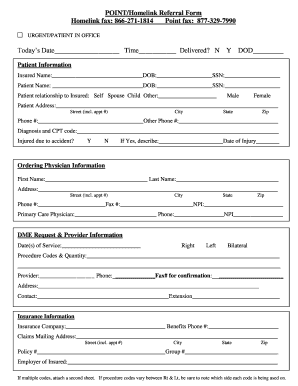
POINT/Homelink Referral Form Homelink fax: 866-271-1814 Point fax: 877-329-7990 URGENT/PATIENT IN OFFICE Today's Date Time Delivered? N Y DOD Patient Information Insured Name: DOB: SSN: Patient Name:.

How it works

  1. Open form

    Open form follow the instructions

  2. Easily sign form

    Easily sign the form with your finger

  3. Share form

    Send filled & signed form or save

How to fill out the Homelink Fax Form online

Completing the Homelink Fax Form online can streamline the process of submitting important patient information. This guide will walk you through each section and field of the form to ensure you provide all necessary details accurately.

Follow the steps to complete the Homelink Fax Form.

  1. Click the ‘Get Form’ button to obtain the form and open it for editing.
  2. Start by entering the ‘Today’s Date’ and ‘Time’ at the top of the form, making sure to mark if the information has been delivered.
  3. In the ‘Patient Information’ section, fill out the insured name, date of birth, social security number, and patient name. Specify the patient’s relationship to the insured and select their gender.
  4. Provide the patient’s address, including street, city, state, and zip code, along with their phone number and any alternative contact number.
  5. Indicate the diagnosis along with the required CPT code. Specify if the patient was injured due to an accident and provide details if applicable.
  6. Complete the ‘Ordering Physician Information’ section by entering the physician's first and last name, address, phone number, fax number, and NPI number. Also provide the primary care physician's contact information.
  7. In the ‘DME Request & Provider Information’ area, fill in the date(s) of service, select the side (right, left, or bilateral), and include the procedure codes along with their respective quantities. Provide the provider's information and contact details.
  8. Lastly, in the ‘Insurance Information’ section, enter the insurance company name, benefits phone number, claims mailing address, policy number, group number, and the employer of the insured. If you have multiple codes, make sure to attach a second sheet with additional codes.
  9. Once all fields are completed, you can save the form, download it, print it for faxing, or share it as needed.

Complete your Homelink Fax Form online today for a seamless submission process.

Get form

Experience a faster way to fill out and sign forms on the web. Access the most extensive library of templates available.
Get form

Related content

DWC Form RFA
Attach the Doctor's First Report of Occupational Injury or Illness, Form DLSR 5021,...
Learn more
HomeLink / Overview - Lake Stevens School District
HomeLink Parent Partnership is a public school option for Kindergarten ... like more...
Learn more
Linear 113917 MVP Gate Receiver and Transmitters...
configuring the HomeLink® transmitter and to ... MVP Radio Controls are compatible with...
Learn more

Related links form

CallforPresenters1.doc - Doe Virginia 2004 PRINCIPALS NEEDS ASSESSMENT - Virginia Department Of ... - Doe Virginia Attach B - Application - Virginia Department Of Education - Doe Virginia Attachment 2004 Commonwealth Talent Pool - Virginia Department ... - Doe Virginia

Questions & Answers

Get answers to your most pressing questions about US Legal Forms API.

Contact support

VGM Group, Inc. is owned by Van G. Miller, who founded the company to support providers of healthcare products and services. VGM has grown into a comprehensive resource for home medical equipment businesses and related services. Their focus on community support and education aligns well with tools like the Homelink Fax Form, which can streamline documentation processes for providers across the industry.

HomeLink is developed and managed by HomeLink Corp, a recognized leader in healthcare communication solutions. They create tools such as the HomeLink Fax Form to assist healthcare professionals in transmitting patient information effectively. Their focus remains on enhancing communication methods within the medical environment.

HomeLink is owned by HomeLink Corp, which is dedicated to improving communication between healthcare providers. This ownership reflects the company's commitment to delivering reliable solutions like the HomeLink Fax Form. Their goal is to make patient data sharing seamless and secure.

HomeLink Corp specializes in healthcare communication solutions, including the widely recognized HomeLink Fax Form. The company focuses on improving the sharing of medical data among professionals, which optimizes the patient care process. Their solutions aim to facilitate reliable and secure exchanges in the medical community.

To fax patient information, first fill out the HomeLink Fax Form accurately with the required details. Next, ensure you have the correct fax number of the recipient. Finally, send the completed form via a secure fax machine to protect patient confidentiality.

HomeLink is a service that enables the efficient sharing of patient information among healthcare providers. By utilizing the HomeLink Fax Form, providers can securely transmit patient documents and data, ensuring privacy and compliance with regulations. This service streamlines communication, enhances patient care, and reduces delays in treatment.

Activating HomeLink is quite simple. Begin by identifying the buttons on the HomeLink system in your vehicle, then press and hold the desired button while following the programming steps outlined in your vehicle’s manual. If you encounter any challenges during the process, the Homelink Fax Form on US Legal Forms can provide necessary guidance and support documentation for activation.

HomeLink is a product developed by Gentex Corporation, a company known for its high-quality automotive products. They pioneered the technology to integrate garage door controls into vehicles. By using HomeLink, you can enjoy the convenience of operating your garage door seamlessly from your car. To learn more about this innovation, consider checking the Homelink Fax Form available on US Legal Forms.

Syncing your garage door opener with your car involves a few simple steps. Start by placing your garage door remote close to your vehicle, and then press the button on the remote while holding down the designated HomeLink button in your car. Once successfully linked, the HomeLink indicator light will change, confirming the sync is complete. For additional support, you can refer to the Homelink Fax Form on US Legal Forms for more detailed instructions.

To get HomeLink working, start by clearing existing programming from the system. Press and hold the HomeLink button until the indicator light starts blinking, then follow the steps to pair it with your garage door opener. If you need detailed instructions, the Homelink Fax Form on the US Legal Forms website offers a straightforward guide. This resource can make the process much smoother for you.

Get This Form Now!

Use professional pre-built templates to fill in and sign documents online faster. Get access to thousands of forms.
Get form
If you believe that this page should be taken down, please follow our DMCA take down processhere.

Industry-leading security and compliance

US Legal Forms protects your data by complying with industry-specific security standards.
  • In businnes since 1997
    25+ years providing professional legal documents.
  • Accredited business
    Guarantees that a business meets BBB accreditation standards in the US and Canada.
  • Secured by Braintree
    Validated Level 1 PCI DSS compliant payment gateway that accepts most major credit and debit card brands from across the globe.
Get Homelink Fax Form
Get form
  • Adoption
  • Bankruptcy
  • Contractors
  • Divorce
  • Home Sales
  • Employment
  • Identity Theft
  • Incorporation
  • Landlord Tenant
  • Living Trust
  • Name Change
  • Personal Planning
  • Small Business
  • Wills & Estates
  • Packages A-Z
  • Affidavits
  • Bankruptcy
  • Bill of Sale
  • Corporate - LLC
  • Divorce
  • Employment
  • Identity Theft
  • Internet Technology
  • Landlord Tenant
  • Living Wills
  • Name Change
  • Power of Attorney
  • Real Estate
  • Small Estates
  • Wills
  • All Forms
  • Forms A-Z
  • Form Library
  • Legal Hub
  • About Us
  • Help Portal
  • Legal Resources
  • Blog
  • Affiliates
  • Contact Us
  • Delete My Account
  • Site Map
  • Industries
  • Forms in Spanish
  • Localized Forms
  • State-specific Forms
  • Forms Kit
  • Real Estate Handbook
  • All Guides
  • Notarize
  • Incorporation services
  • For Consumers
  • For Small Business
  • For Attorneys
  • USLegal
  • FormsPass
  • pdfFiller
  • signNow
  • altaFlow
  • DocHub
  • Instapage
Form Packages
  • Adoption
  • Bankruptcy
  • Contractors
  • Divorce
  • Home Sales
  • Employment
  • Identity Theft
  • Incorporation
  • Landlord Tenant
  • Living Trust
  • Name Change
  • Personal Planning
  • Small Business
  • Wills & Estates
  • Packages A-Z
Form Categories
  • Affidavits
  • Bankruptcy
  • Bill of Sale
  • Corporate - LLC
  • Divorce
  • Employment
  • Identity Theft
  • Internet Technology
  • Landlord Tenant
  • Living Wills
  • Name Change
  • Power of Attorney
  • Real Estate
  • Small Estates
  • Wills
  • All Forms
  • Forms A-Z
  • Form Library
Customer Service
  • Legal Hub
  • About Us
  • Help Portal
  • Legal Resources
  • Blog
  • Affiliates
  • Contact Us
  • Delete My Account
  • Site Map
  • Industries
  • Forms in Spanish
  • Localized Forms
  • State-specific Forms
  • Forms Kit
Legal Guides
  • Real Estate Handbook
  • All Guides
Prepared for you
  • Notarize
  • Incorporation services
Our Customers
  • For Consumers
  • For Small Business
  • For Attorneys
Our Sites
  • USLegal
  • FormsPass
  • pdfFiller
  • signNow
  • altaFlow
  • DocHub
  • Instapage
Social Media
Call us now toll free:
+1 833 426 79 33
As seen in:
© Copyright 1999-2026 airSlate Legal Forms, Inc. 3720 Flowood Dr, Flowood, Mississippi 39232
  • Your Privacy Choices
  • Terms of Service
  • Privacy Notice
  • Content Takedown Policy
  • Bug Bounty Program