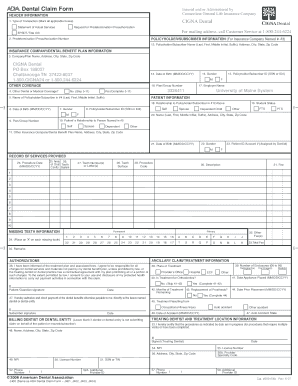
Get Cigna Dental Form Umaine
How it works
-

Open form follow the instructions
-

Easily sign the form with your finger
-

Send filled & signed form or save
How to fill out the Cigna Dental Form Umaine online
Filling out the Cigna Dental Form Umaine online can seem daunting, but with a clear guide, the process will be straightforward. This document provides step-by-step instructions to help you complete the form accurately and efficiently.
Follow the steps to successfully complete the Cigna Dental Form Umaine online.
- Press the ‘Get Form’ button to access the form and open it in your selected editor.
- Begin with the header information. Indicate the type of transaction by marking all applicable boxes: 'Statement of Actual Services' or 'Request for Predetermination / Preauthorization' as needed. For mailing address inquiries, contact Customer Service at 1-800-244-6224.
- In the Insurance Company/Dental Benefit Plan Information section, fill out the company/plan name as well as its address details. Specifically for Cigna Dental, use the provided address: PO Box 188037, Chattanooga, TN 37422-8037.
- Proceed to the Patient Information section. Fill in the name of the policyholder/subscriber and indicate the patient’s relationship to the policyholder by marking the appropriate option (e.g. self, spouse, dependent child).
- Continue to the Record of Services Provided. Input the procedure date, the area of oral cavity, tooth number(s), procedure code, description, and the fee for each service provided. Complete up to 10 entries.
- Complete the Missing Teeth Information section by placing an 'X' next to each missing tooth as needed.
- In the Authorizations section, confirm that you have been informed about the treatment plan and associated fees. Provide your signature and the date to authorize payment directly to the dentist or dental entity if applicable.
- If necessary, fill out the Treating Dentist and Treatment Location Information section with the dentist's details including name, address, phone number, and NPI.
- Once all sections are completed, review the form for accuracy. Save your changes, and download, print, or share the form as required.
Start filling out your Cigna Dental Form Umaine online today to ensure your dental claims are processed smoothly.
You can get a prior authorization form from Cigna by visiting their official website where you can download the Cigna Dental Form Umaine. If you prefer a more personalized approach, contacting Cigna customer service can help ensure that you receive the correct form. In addition, consider using platforms like uslegalforms for efficient retrieval of necessary legal documents related to your dental claims.