Loading
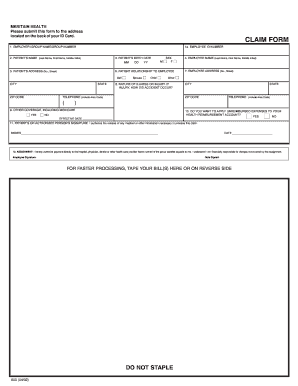
Get Meritain Benefit Enrollment Form Fillable
How it works
-

Open form follow the instructions
-

Easily sign the form with your finger
-

Send filled & signed form or save
How to fill out the Meritain Benefit Enrollment Form Fillable online
Filling out the Meritain Benefit Enrollment Form online is a straightforward process designed to facilitate your benefits enrollment. This guide provides clear instructions to help you complete each section accurately and efficiently.
Follow the steps to complete your Meritain Benefit Enrollment Form online.
- Click the ‘Get Form’ button to access the Meritain Benefit Enrollment Form. This will open the form in an editable format, allowing you to fill it out easily.
- Begin by entering your employee ID number in the designated field. This is essential for identifying your account.
- Next, provide the employer or group name along with the group number. This information connects your enrollment to your workplace or health plan.
- Complete the patient’s name section by inputting the last name, first name, and middle initial of the person for whom you are enrolling benefits.
- Enter the patient's birth date using the MM/DD/YY format. Ensure accuracy to avoid any processing issues.
- Fill out the patient’s sex by selecting the appropriate box for either male or female.
- In the patient relationship section, indicate your relationship to the patient. Available options include self, spouse, or child.
- Provide the patient’s complete address, including street number, city, state, and ZIP code. This is necessary for record-keeping and correspondence.
- Input your telephone number, including the area code, so that the benefits administrator can contact you if needed.
- If applicable, specify whether the patient has other coverage, including Medicare, by selecting 'Yes' or 'No'.
- Describe the nature of the illness or injury in the provided space. If there was an accident, briefly explain how it occurred.
- Select whether you wish to apply unreimbursed expenses to your health reimbursement account with a simple 'Yes' or 'No'.
- Review the effective date section, ensuring it is formatted correctly.
- The patient or authorized person's signature is required for submission. Sign and date the form in the provided fields.
- Finally, save your changes, and you may choose to download, print, or share the completed form as needed for submission.
Complete your Meritain Benefit Enrollment Form online today and ensure that your benefits enrollment is managed smoothly.
Although Aetna and Meritain are affiliated, they are not the same entity. Aetna is the parent company, while Meritain Health operates as a separate entity providing specific administrative services. If you are navigating your benefits, using the Meritain Benefit Enrollment Form Fillable will guide you through Aetna's policies effectively, ensuring you understand your coverage.