Loading
Form preview
  • US Legal Forms
  • Other Templates
  • More Forms
  • More Uncategorized Forms
  • Act 48 Form - Temple University - Temple

Get Act 48 Form - Temple University - Temple

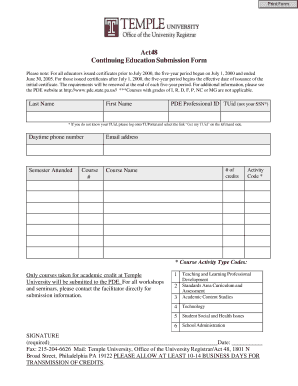
Ed certificates after July 1, 2000, the five-year period begins the effective date of issuance of the initial certificate. The requirements will be renewed at the end of each five-year period. For additional information, please see the PDE website at http://www.pde.state.pa.us// ***Courses with grades of I, R, D, F, P, NC or MG are not applicable. Last Name First Name PDE Professional ID TUid (not your SSN*) * If you do not know your TUid, please log onto TUPortal and select the link Get.

How it works

  1. Open form

    Open form follow the instructions

  2. Easily sign form

    Easily sign the form with your finger

  3. Share form

    Send filled & signed form or save

How to fill out the Act 48 Form - Temple University - Temple online

This guide provides a comprehensive overview of the Act 48 Form required by Temple University. Designed to support educators in the continuing education submission process, this step-by-step instruction offers clarity on how to complete the form accurately.

Follow the steps to complete the Act 48 Form with confidence.

  1. Press the ‘Get Form’ button to access the Act 48 Form. This step allows you to retrieve the form and open it for editing.
  2. In the provided fields, enter your last name and first name as they appear on your official documents.
  3. Input your PDE Professional ID TUid, ensuring not to confuse it with your Social Security Number. If you are unsure of your TUid, please log into TUPortal and select the link for obtaining your TUid.
  4. Provide your daytime phone number to facilitate any necessary communication regarding your submission.
  5. Indicate the semester you attended the courses by selecting the appropriate option from the dropdown menu.
  6. Enter the course number to identify the specific class completed for continuing education.
  7. Fill in your email address to receive updates or confirmations about your submission.
  8. Specify the number of credits earned for the course, ensuring accuracy for your records.
  9. Provide the course name as listed in your academic records.
  10. Input the Activity Code, which corresponds to the type of course taken. Make sure to only use codes for courses taken for academic credit at Temple University.
  11. Affix your signature in the designated area to validate your submission. Include the date of signing.
  12. Choose to fax your form to 215-204-6626 or mail it to Temple University, Office of the University Registrar/Act 48, with the address specified. Allow at least 10-14 business days for credits to be processed.

Complete your Act 48 Form online today to ensure your continuing education credits are submitted efficiently.

Get form

Experience a faster way to fill out and sign forms on the web. Access the most extensive library of templates available.
Get form

Related content

Temple University - US Department of Education
Feb 19, 2016 — 8. Other Narrative Form e48. Attachment - 1 (Appendix B Providence Center...
Learn more
Act 48 | Office of the Registrar | Temple...
In 1999, the Governor signed into law House Bill 8, now known as Act 48, ... of Education...
Learn more
Philadelphia - Wikipedia
Philadelphia, colloquially Philly, is the largest city in the U.S. state of Pennsylvania...
Learn more

Related links form

2023 IL-1120-ST-VIllinois Department Of Revenue How To Use NEW Input System Package! (Unity Tutorial NY DTF IT-370-PF 2023 Evaluation Of The Maine Historic Rehabilitation Tax Credit ...

Questions & Answers

Get answers to your most pressing questions about US Legal Forms API.

Contact support

While a 2.9 GPA may be below the average for admitted students, you can still be considered for admission if you have strong test scores or a compelling personal statement. Highlight any unique experiences or achievements that differentiate you from other applicants. For personalized advice on your application, consider visiting the Act 48 Form - Temple University - Temple section for resources.

Temple University generally requires a completed application form, transcripts, and standardized test scores if applicable. You'll also need a personal statement and letters of recommendation, depending on your program. It’s advisable to check the Act 48 Form - Temple University - Temple for detailed requirements specific to your intended field of study.

To increase your chances of getting accepted into Temple University, focus on maintaining a strong GPA and engaging in extracurricular activities. Prepare a compelling personal statement that highlights your unique experiences. Additionally, don’t forget to review the Act 48 Form - Temple University - Temple for specific application requirements and deadlines.

As previously mentioned, Temple University currently follows a test-optional policy for incoming students. This means you don't have to submit your ACT scores as part of your application. Nevertheless, if you excelled in your ACT, including your scores could strengthen your application. Always consult the Act 48 Form - Temple University - Temple to stay updated.

Yes, Temple University offers a highly regarded acting program through its School of Theater, Film and Media Arts. The program focuses on developing both practical skills and theoretical knowledge to prepare students for diverse careers in performance. Alumni of the program have gone on to achieve success in various fields, so consider applying if you have a passion for acting. Don't forget to check out the Act 48 Form - Temple University - Temple for more insights.

Temple University has adopted a test-optional policy for undergraduate admissions, meaning you may choose not to submit ACT scores. However, submitting an ACT score can enhance your application, particularly if your GPA does not reflect your potential. Always refer to the Act 48 Form - Temple University - Temple for the latest admissions requirements.

To send your transcripts to Temple University, you should request your current institution to send them directly to the admissions office. Include your full name and student ID if applicable. Ensure that your transcripts are sent in a sealed envelope or electronically through a secure service. For further assistance, check the Act 48 Form - Temple University - Temple guidelines.

To appeal financial aid at Temple University, start by reviewing your financial aid award letter. Collect all necessary documentation that supports your appeal and submit a formal appeal letter to the financial aid office. They will guide you through the process, ensuring you understand how adjustments can be made, particularly if impacted by requirements related to the Act 48 Form - Temple University - Temple.

The application deadline for Temple University typically falls in early January for regular admission. Be sure to check their official website for the most current deadlines, as they can vary by program. Staying organized and submitting your application early helps you focus on achieving a smooth admission process, especially when completing the Act 48 Form - Temple University - Temple.

To check your Pennsylvania ACT 48 hours, visit the Pennsylvania Department of Education’s official website. Here, you can access the required services to verify your hours online. Alternatively, you may contact your educational institution for direct assistance regarding your ACT 48 status related to the Act 48 Form - Temple University - Temple.

Get This Form Now!

Use professional pre-built templates to fill in and sign documents online faster. Get access to thousands of forms.
Get form
If you believe that this page should be taken down, please follow our DMCA take down processhere.
Get Act 48 Form - Temple University - Temple
Get form
  • Adoption
  • Bankruptcy
  • Contractors
  • Divorce
  • Home Sales
  • Employment
  • Identity Theft
  • Incorporation
  • Landlord Tenant
  • Living Trust
  • Name Change
  • Personal Planning
  • Small Business
  • Wills & Estates
  • Packages A-Z
  • Affidavits
  • Bankruptcy
  • Bill of Sale
  • Corporate - LLC
  • Divorce
  • Employment
  • Identity Theft
  • Internet Technology
  • Landlord Tenant
  • Living Wills
  • Name Change
  • Power of Attorney
  • Real Estate
  • Small Estates
  • Wills
  • All Forms
  • Forms A-Z
  • Other Templates
  • Legal Hub
  • About Us
  • Help Portal
  • Legal Resources
  • Blog
  • Affiliates
  • Contact Us
  • Delete My Account
  • Site Map
  • Industries
  • Forms in Spanish
  • Localized Forms
  • State-specific Forms
  • Forms Kit
  • Real Estate Handbook
  • All Guides
  • Notarize
  • Incorporation services
  • For Consumers
  • For Small Business
  • For Attorneys
  • USLegal
  • FormsPass
  • pdfFiller
  • signNow
  • altaFlow
  • DocHub
  • Instapage
Form Packages
  • Adoption
  • Bankruptcy
  • Contractors
  • Divorce
  • Home Sales
  • Employment
  • Identity Theft
  • Incorporation
  • Landlord Tenant
  • Living Trust
  • Name Change
  • Personal Planning
  • Small Business
  • Wills & Estates
  • Packages A-Z
Form Categories
  • Affidavits
  • Bankruptcy
  • Bill of Sale
  • Corporate - LLC
  • Divorce
  • Employment
  • Identity Theft
  • Internet Technology
  • Landlord Tenant
  • Living Wills
  • Name Change
  • Power of Attorney
  • Real Estate
  • Small Estates
  • Wills
  • All Forms
  • Forms A-Z
  • Other Templates
Customer Service
  • Legal Hub
  • About Us
  • Help Portal
  • Legal Resources
  • Blog
  • Affiliates
  • Contact Us
  • Delete My Account
  • Site Map
  • Industries
  • Forms in Spanish
  • Localized Forms
  • State-specific Forms
  • Forms Kit
Legal Guides
  • Real Estate Handbook
  • All Guides
Prepared for you
  • Notarize
  • Incorporation services
Our Customers
  • For Consumers
  • For Small Business
  • For Attorneys
Our Sites
  • USLegal
  • FormsPass
  • pdfFiller
  • signNow
  • altaFlow
  • DocHub
  • Instapage
Social Media
Call us now toll free:
+1 833 426 79 33
As seen in:
© Copyright 1999-2026 airSlate Legal Forms, Inc. 17 Station Street, Ste. 203, Brookline, MA 02445
  • Your Privacy Choices
  • Terms of Service
  • Privacy Notice
  • Content Takedown Policy
  • Bug Bounty Program