Loading
Form preview
  • US Legal Forms
  • Other Templates
  • More Forms
  • More Uncategorized Forms
  • Blank Travel Voucher

Get Blank Travel Voucher

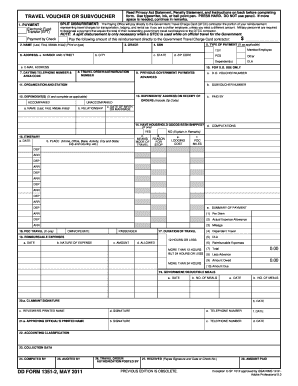
E in remarks. TRAVEL VOUCHER OR SUBVOUCHER SPLIT DISBURSEMENT: The Paying Office will pay directly to the Government Travel Charge Card (GTCC) contractor the portion of your reimbursement 1. PAYMENT Electronic Fund Transfer (EFT) representing travel charges for transportation, lodging, and rental car if you are a civilian employee, unless you elect a different amount. Military personnel are required to designate a payment that equals the total of their outstanding government travel card bala.

How it works

  1. Open form

    Open form follow the instructions

  2. Easily sign form

    Easily sign the form with your finger

  3. Share form

    Send filled & signed form or save

How to fill out the Blank Travel Voucher online

Filling out the Blank Travel Voucher is an important step in ensuring you receive reimbursement for travel expenses incurred during official government business. This guide provides a comprehensive walkthrough of each section of the form to simplify the process for all users.

Follow the steps to successfully complete your travel voucher.

  1. Click ‘Get Form’ button to access the Blank Travel Voucher and open it in your preferred editor.
  2. Begin by reviewing the Privacy Act Statement, Penalty Statement, and Instructions on the back of the form. Make sure to understand the significance of providing accurate information.
  3. In section 1, indicate whether you are opting for electronic fund transfer by specifying the amount to be disbursed directly to the Government Travel Charge Card contractor. If you prefer payment by check, complete that section accordingly.
  4. Provide your full name in section 2 (Last, First, Middle Initial) and your grade in section 3. Ensure all entries are clear and legible.
  5. In section 4, enter your Social Security Number (SSN). Ensure the accuracy of this information to avoid processing delays.
  6. Fill out your complete address in section 6, including street number, city, state, and ZIP code.
  7. Enter your daytime telephone number in section 7 and the travel order/authorization number in section 8.
  8. If applicable, complete section 12 regarding dependents. This includes providing their full names, relationships, and whether they accompanied you on your travel.
  9. In section 15, outline your travel itinerary. List each date of travel, places visited, means of travel, and any lodging costs incurred.
  10. Proceed to section 18 to itemize any reimbursable expenses, entering the date, nature of expense, and amount for each entry.
  11. Complete the remaining sections, ensuring that you provide all necessary information for review and approval by relevant officials.
  12. Finally, review all entered information for accuracy. Save your changes, then opt to download, print, or share the completed form as needed.

Begin filling out your Blank Travel Voucher online today to ensure timely processing of your travel reimbursements.

Get form

Experience a faster way to fill out and sign forms on the web. Access the most extensive library of templates available.
Get form

Related content

Travel Voucher | GSA
DOWNLOAD THIS FORM: Choose a link below to begin downloading. OF1012-​16c.pdf [PDF - 843...
Learn more
DD Form 1351- 2, Travel Voucher or Subvoucher, May...
SPLIT DISBURSEMENT: The Paying Office will pay directly to the Government Travel Charge...
Learn more
distribution is unlimited. DEPARTMENT OF THE ......
Jan 29, 2014 — Sensitive/Controlled Blank Forms Accountability.6-1. 5. Personal...
Learn more

Related links form

Request For Reimbursement/Repayment Form And ... - CCCSFAAA - Cccsfaaa HRA Reimbursement Request Form Image - Amherst HEALTH CARE SPENDING ACCOUNT REIMBURSEMENT ... - Sunyit Graduate Processing Fee Reimbursement - Asgsa Missouri

Questions & Answers

Get answers to your most pressing questions about US Legal Forms API.

Contact support

To fill out a travel expense report accurately, use a Blank Travel Voucher as your guide. Start by listing all travel-related expenses, including lodging, meals, and transportation. Attach relevant receipts to validate your claims. Finally, review your report before submission to minimize errors and ensure quick reimbursement.

When filling out a voucher in the Defense Travel System (DTS), you will encounter the option for a Blank Travel Voucher. Log into your DTS account, select the appropriate trip, and navigate to the expense section. Carefully input your expenses, attaching any necessary documentation for verification. Once complete, submit for approval to ensure timely processing.

Filling out an expense voucher, such as a Blank Travel Voucher, involves several key steps. Begin by entering your personal information at the top of the form, including your name and department. Next, itemize each expense along with receipts, ensuring all information is accurate. Double-check your entries, as this will facilitate a smoother reimbursement process.

Using a Blank Travel Voucher is straightforward. Start by reviewing the terms specified on the voucher to understand any requirements. Present your voucher during your travel expenses process, whether for flights or accommodations. This method helps simplify your travel reimbursements, making your experience more efficient and rewarding.

Submitting a travel claim starts with gathering all relevant receipts and information about your travel. Use a Blank Travel Voucher to clearly outline your expenses and submit it along with your receipts. This organized approach will help streamline your claim through the appropriate channels, ensuring faster reimbursement.

To amend a DTS travel voucher, access the original voucher in the Defense Travel System. You can edit details such as expenses and travel dates. After making your changes, ensure you resubmit the corrected Blank Travel Voucher for processing. This step helps avoid any reimbursement delays.

You typically have up to 60 days to file a travel voucher after completing your travel. This timeline is crucial to ensure you receive your reimbursement smoothly. For government employees, following the deadline is essential to comply with regulations. Utilize a Blank Travel Voucher to streamline your filing process.

DFAS Rome TDY Travel Pay Last Update: February 10, 2022 Page 2 DD Form 1351-2 Travel Voucher Instructions 2 The DD Form 1351-2 (May 2011) is the primary form used to record travel itineraries and claim expenses for government travel.

Upon completion of your FUNDED travel authorization/orders you must file a travel voucher/claim within 5 days of return. Click on Official Travel; Select 'Vouchers' you will see a hyperlink 'Create New Voucher from Authorization'. Select the appropriate trip to create the voucher against.

Go to https://efinance.sso.cce.af.mil/, sign in using the. Enter a. Enter 'Travel Order. If your dependents came from the SAME location per your orders and. Select 'Arrival Worksheet' on the left side. ... Select the 'Dislocation Allowance (DLA)' tab. Select the 'Temporary Lodging Expense (TLE)' form on the left side.

Get This Form Now!

Use professional pre-built templates to fill in and sign documents online faster. Get access to thousands of forms.
Get form
If you believe that this page should be taken down, please follow our DMCA take down processhere.
Get Blank Travel Voucher
Get form
  • Adoption
  • Bankruptcy
  • Contractors
  • Divorce
  • Home Sales
  • Employment
  • Identity Theft
  • Incorporation
  • Landlord Tenant
  • Living Trust
  • Name Change
  • Personal Planning
  • Small Business
  • Wills & Estates
  • Packages A-Z
  • Affidavits
  • Bankruptcy
  • Bill of Sale
  • Corporate - LLC
  • Divorce
  • Employment
  • Identity Theft
  • Internet Technology
  • Landlord Tenant
  • Living Wills
  • Name Change
  • Power of Attorney
  • Real Estate
  • Small Estates
  • Wills
  • All Forms
  • Forms A-Z
  • Other Templates
  • Legal Hub
  • About Us
  • Help Portal
  • Legal Resources
  • Blog
  • Affiliates
  • Contact Us
  • Delete My Account
  • Site Map
  • Industries
  • Forms in Spanish
  • Localized Forms
  • State-specific Forms
  • Forms Kit
  • Real Estate Handbook
  • All Guides
  • Notarize
  • Incorporation services
  • For Consumers
  • For Small Business
  • For Attorneys
  • USLegal
  • FormsPass
  • pdfFiller
  • signNow
  • altaFlow
  • DocHub
  • Instapage
Form Packages
  • Adoption
  • Bankruptcy
  • Contractors
  • Divorce
  • Home Sales
  • Employment
  • Identity Theft
  • Incorporation
  • Landlord Tenant
  • Living Trust
  • Name Change
  • Personal Planning
  • Small Business
  • Wills & Estates
  • Packages A-Z
Form Categories
  • Affidavits
  • Bankruptcy
  • Bill of Sale
  • Corporate - LLC
  • Divorce
  • Employment
  • Identity Theft
  • Internet Technology
  • Landlord Tenant
  • Living Wills
  • Name Change
  • Power of Attorney
  • Real Estate
  • Small Estates
  • Wills
  • All Forms
  • Forms A-Z
  • Other Templates
Customer Service
  • Legal Hub
  • About Us
  • Help Portal
  • Legal Resources
  • Blog
  • Affiliates
  • Contact Us
  • Delete My Account
  • Site Map
  • Industries
  • Forms in Spanish
  • Localized Forms
  • State-specific Forms
  • Forms Kit
Legal Guides
  • Real Estate Handbook
  • All Guides
Prepared for you
  • Notarize
  • Incorporation services
Our Customers
  • For Consumers
  • For Small Business
  • For Attorneys
Our Sites
  • USLegal
  • FormsPass
  • pdfFiller
  • signNow
  • altaFlow
  • DocHub
  • Instapage
Social Media
Call us now toll free:
+1 833 426 79 33
As seen in:
© Copyright 1999-2026 airSlate Legal Forms, Inc. 17 Station Street, Suite 303, Brookline, MA 02445
  • Your Privacy Choices
  • Terms of Service
  • Privacy Notice
  • Content Takedown Policy
  • Bug Bounty Program