Loading
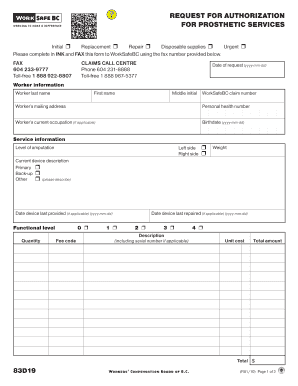
Get Form 83d19, Worksafebc. Request For Authorization For Prosthetic Services
How it works
-

Open form follow the instructions
-

Easily sign the form with your finger
-

Send filled & signed form or save
How to fill out the Form 83D19, WorkSafeBC. Request For Authorization For Prosthetic Services online
Filling out the Form 83D19 is an essential step in requesting authorization for prosthetic services through WorkSafeBC. This guide will provide a clear, step-by-step approach to ensure that you complete the form accurately and efficiently.
Follow the steps to successfully complete the form.
- Click ‘Get Form’ button to obtain the form and open it in your editing tool.
- Begin by entering the date of request in the format yyyy-mm-dd at the top of the form.
- In the worker information section, fill out the necessary details including the worker's last name, first name, middle initial, WorkSafeBC claim number, mailing address, personal health number, current occupation (if applicable), and birthdate.
- Provide service information by indicating the level of amputation and whether it is on the left or right side. Describe the current device including if it is primary, back-up, or other, and include the date the device was last provided if applicable.
- Fill in the functional level, quantity, fee code, weight, and the date the device was last repaired if applicable, along with a description of the device including the serial number.
- In the justification section, provide the necessary subjective and objective justification for repair, replacement, or change clearly and concisely.
- In provider information, input the name of the prosthetist, their signature, the name of the clinic, clinic mailing address, payee number, telephone number, and fax number.
- Finally, leave space for the WorkSafeBC officer to complete their section, including their name, the date of authorization, and any additional comments.
- Once you have completed all sections of the form, review the information for accuracy. Users can save changes, download, print, or share the form as needed.
Complete your Form 83D19 online today to ensure your request for prosthetic services is processed promptly.