Loading
Get Sehbp Waiver Form
How it works
-

Open form follow the instructions
-

Easily sign the form with your finger
-

Send filled & signed form or save
How to fill out the Sehbp Waiver Form online
Navigating the Sehbp Waiver Form can be straightforward with the right guidance. This guide provides clear, step-by-step instructions to help you complete the form accurately online.
Follow the steps to fill out the Sehbp Waiver Form online with ease.
- Press the ‘Get Form’ button to access the Sehbp Waiver Form and open it in the editor.
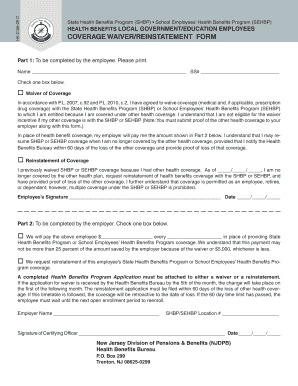
- In Part 1, start by entering your full name and Social Security number in the designated fields.
- Indicate whether you are waiving coverage or requesting reinstatement by selecting the appropriate box.
- If waiving coverage, provide proof of other health coverage to your employer and understand the implications of your decision.
- If requesting reinstatement, fill in the date you are no longer covered by your other health plan.
- Sign and date the form in the Employee’s Signature section, confirming your request.
- In Part 2, your employer will fill out the payment information or request reinstatement, as applicable.
- Ensure that your employer signs and dates the form in the Signature of Certifying Officer section.
- Once all sections are complete, save changes, download, print, or share the completed form as needed.
Complete the Sehbp Waiver Form online today for a smooth process.
Creating an online Sehbp Waiver Form can be easily done using user-friendly platforms like USLegalForms. Start by selecting a template that fits your needs, then customize it with your details and the specific rights to be waived. Finally, publish the form online for easy access and signing, ensuring you maintain copies of the completed waivers for your records.