Loading
Get Akauti
How it works
-

Open form follow the instructions
-

Easily sign the form with your finger
-

Send filled & signed form or save
How to fill out the Akauti online
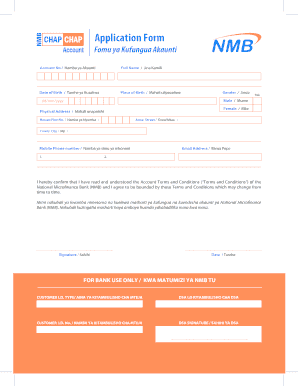
Filling out the Akauti application form is a straightforward process that allows users to open an account with the National Microfinance Bank. This guide will walk you through each section of the form, ensuring that you provide the necessary information accurately and efficiently.
Follow the steps to successfully complete the Akauti form.
- Click ‘Get Form’ button to retrieve the application form and access it in the online editor.
- Enter your account number in the 'Account No' field. This number is essential for account identification.
- In the 'Full Name' section, provide your complete name as it appears in official documents.
- Fill in your date of birth in the 'Date of Birth' section using the format dd/mm/yyyy.
- Specify your place of birth in the 'Place of Birth' section, including city or town.
- Indicate your gender by ticking the appropriate box for 'Male' or 'Female'.
- In the 'Physical Address' section, fill out the necessary details including 'House/Plot No.', 'Area/Street', and 'Town/City'.
- Provide your mobile phone number in the 'Mobile Phone number' field.
- Enter your email address in the 'Email Address' field to receive correspondence.
- Read and confirm that you understand the terms and conditions by checking the agreement box. Sign the form where prompted and date it.
- Once all fields are completed, you can save your changes, download the form, print it for your records, or share it as needed.
Complete your Akauti application form online today for a smooth banking experience.