Loading
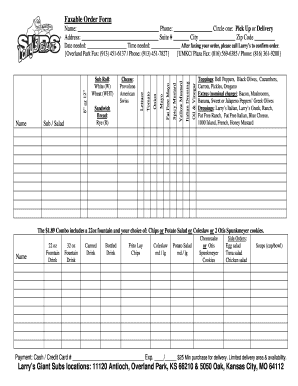
Get Larrys Giant Subs Order Online Form
How it works
-

Open form follow the instructions
-

Easily sign the form with your finger
-

Send filled & signed form or save
How to use or fill out the Larrys Giant Subs Order Online Form online
Filling out the Larrys Giant Subs Order Online Form is a simple process that enables users to place their orders conveniently. This guide will walk you through each section of the form to ensure that you complete your order accurately.
Follow the steps to fill out the form effectively.
- Click 'Get Form' button to obtain the form and open it in the editor.
- Enter your name in the designated field at the top of the form.
- Choose between 'Pick Up' or 'Delivery' by circling your preferred option.
- Fill in your address details, including the street address, suite number (if applicable), city, and zip code.
- Select your desired oil and vinegar options by marking your choices, or opt for additional condiments like mustard or mayo.
- Indicate whether you would like a sub or salad and select the bread type from the provided options.
- Choose your cheese selection by marking the type of cheese you prefer.
- Specify the size of your sandwich (8” or 12”) and any toppings you wish to add by checking the appropriate boxes.
- Fill out the date and time needed for your order.
- After completing your order form, ensure that you save, download, or print for your records as necessary.
- Remember to call Larry's to confirm your order after faxing it.
Complete your order form online today and enjoy your meal!
Larry's Giant Subs offers a wide range of toppings to choose from, allowing you to customize your sandwich to your liking. Fresh vegetables, various cheeses, and an assortment of meats are available, giving you unlimited combinations. To explore all the delicious options and create your perfect sandwich, you can utilize the Larrys Giant Subs Order Online Form.