We use cookies to improve security, personalize the user experience, enhance our marketing activities (including cooperating with our marketing partners) and for other business use.
Click "here" to read our Cookie Policy. By clicking "Accept" you agree to the use of cookies. Read less
Read more
Accept
Loading
Form preview
  • US Legal Forms
  • Form Library
  • More Forms
  • More Uncategorized Forms
  • Usmle Transcript

Get Usmle Transcript

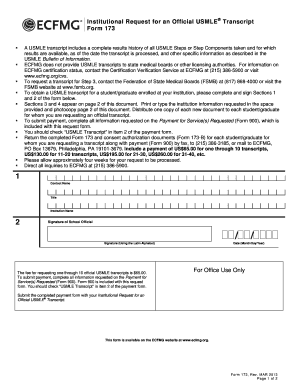
Institutional Request for an Official USMLE Transcript Form 173 A USMLE transcript includes a complete results history of all USMLE Steps or Step Components taken and for which results are available,.

How it works

  1. Open form

    Open form follow the instructions

  2. Easily sign form

    Easily sign the form with your finger

  3. Share form

    Send filled & signed form or save

How to fill out the Usmle Transcript online

This guide provides clear and comprehensive instructions on how to fill out the Usmle Transcript online. By following these steps, users can efficiently complete the form and submit it for processing.

Follow the steps to successfully complete the Usmle Transcript form

  1. Press the ‘Get Form’ button to access the Usmle Transcript and open it in your preferred editor.
  2. Begin filling out the required information in Sections 1 and 2. This includes providing the contact name, title, and institution name. Ensure the signature of the school official is included, along with the date formatted as month/day/year.
  3. Proceed to Section 3, where the recipient information must be completed. Users need to enter the contact name, title, institution name, mailing address, city, state or province, ZIP or postal code, country, and relevant contact numbers.
  4. In Section 4, the student or graduate must provide authorization for the release of their USMLE transcript. They should sign using the Latin alphabet, enter their name, USMLE/ECFMG ID number, and date of birth.
  5. Ensure that all sections are completed accurately. Then prepare the payment by filling out Form 900, which is included with the transcript request form. Indicate 'USMLE Transcript' in item 2 of the payment form.
  6. Collect all documents, including the completed Form 173, consent authorization documents (Form 173-B), and the completed payment form (Form 900). Submit these materials via fax or mail to ECFMG as directed.
  7. Once the forms are submitted, allow approximately four weeks for processing. Users can check back with ECFMG for any inquiries or follow-up.

Start completing your Usmle Transcript online today and ensure accurate submission.

Get form

Experience a faster way to fill out and sign forms on the web. Access the most extensive library of templates available.
Get form

Related content

Are United States Medical Licensing Exam Step 1...
The validity argument about using USMLE Step 1 and 2 scores for postgraduate residency...
Learn more
Request a Transcript of USMLE Scores - UMass...
To obtain your USMLE transcript or have it sent to a third party, you must contact one of...
Learn more
Residency Application Guide - UserManual.wiki
Once you have released your USMLE scores, assigned it to a program and paid the transcript...
Learn more

Related links form

Targethiv Patient Agreement To Participate In Treatment 2011 WellStar Physicians Group Patient History Form 2004 Franciscan Medical Group Form 600 095 2011 Cardinal Health Patient Delivery Receipt 2016

Questions & Answers

Get answers to your most pressing questions about US Legal Forms API.

Contact support

You should request your USMLE transcript as soon as you have completed your exams. This ensures you have access to your results when you need them for residency applications or other professional opportunities. Planning ahead will help you avoid any last-minute issues.

To obtain your USMLE results, visit the official USMLE portal and access your account. Your results will be posted there, usually within a few weeks after your exam. Make sure to check your account regularly for timely updates.

You can request your USMLE transcript by completing the appropriate form available on the USMLE website. Once filled out, submit it according to the outlined instructions. Be mindful of any processing times and ensure you provide accurate information to facilitate a smooth request.

Releasing your USMLE transcript to ERAS is straightforward. First, log into your ERAS account and find the transcript submission section. Follow the prompts to authorize the release of your USMLE transcript, ensuring all necessary details are entered correctly to avoid delays.

To find helpful guidance on obtaining your USMLE transcript on Reddit, join relevant subreddits such as r/MedicalSchool or r/Step1. You can ask questions, share your concerns, and learn from the experiences of other users. This peer support can offer you advice on the best practices to follow.

You can get a USMLE transcript form by visiting the official website of the USMLE. They provide downloadable forms and instructions on how to fill them out properly. Be sure to check their website for the most current updates and requirements.

To obtain your USMLE transcript on Reddit, search for specific threads or discussions related to the USMLE. Users often share their experiences and steps they've taken to access their transcripts. Additionally, consider reaching out to community members who may have insight into the process or who can guide you towards useful resources.

To send your USMLE transcript, you need to determine whether it will be sent electronically or via mail. Follow the instructions provided by the official USMLE site and prepare your transcript accordingly. If you're looking for a more efficient way, consider using US Legal Forms to manage your sending process smoothly.

To update your USMLE transcript, you must first gather any new information you wish to include. Next, visit the official website and follow the instructions for submitting an updated request. If you're using a platform like US Legal Forms, you can easily fill out the required forms and submit them online, streamlining the entire process.

You should request an USMLE transcript as soon as you complete your exams, but it is best to do so well in advance of your application deadlines. Receiving your transcript early allows you to prepare and finalize your application without rushing. Additionally, if there are any errors, requesting it ahead of time gives you room to address these issues promptly. Utilizing the USLegalForms platform can simplify the process by providing templates and guidance tailored to transcript requests.

Get This Form Now!

Use professional pre-built templates to fill in and sign documents online faster. Get access to thousands of forms.
Get form
If you believe that this page should be taken down, please follow our DMCA take down processhere.

Industry-leading security and compliance

US Legal Forms protects your data by complying with industry-specific security standards.
  • In businnes since 1997
    25+ years providing professional legal documents.
  • Accredited business
    Guarantees that a business meets BBB accreditation standards in the US and Canada.
  • Secured by Braintree
    Validated Level 1 PCI DSS compliant payment gateway that accepts most major credit and debit card brands from across the globe.
Get Usmle Transcript
Get form
Form Packages
Adoption
Bankruptcy
Contractors
Divorce
Home Sales
Employment
Identity Theft
Incorporation
Landlord Tenant
Living Trust
Name Change
Personal Planning
Small Business
Wills & Estates
Packages A-Z
Form Categories
Affidavits
Bankruptcy
Bill of Sale
Corporate - LLC
Divorce
Employment
Identity Theft
Internet Technology
Landlord Tenant
Living Wills
Name Change
Power of Attorney
Real Estate
Small Estates
Wills
All Forms
Forms A-Z
Form Library
Customer Service
Terms of Service
Privacy Notice
Legal Hub
Content Takedown Policy
Bug Bounty Program
About Us
Help Portal
Legal Resources
Blog
Affiliates
Contact Us
Delete My Account
Site Map
Industries
Forms in Spanish
Localized Forms
State-specific Forms
Forms Kit
Legal Guides
Real Estate Handbook
All Guides
Prepared for You
Notarize
Incorporation services
Our Customers
For Consumers
For Small Business
For Attorneys
Our Sites
US Legal Forms
USLegal
FormsPass
pdfFiller
signNow
airSlate WorkFlow
DocHub
Instapage
Social Media
Call us now toll free:
+1 833 426 79 33
As seen in:
  • USA Today logo picture
  • CBC News logo picture
  • LA Times logo picture
  • The Washington Post logo picture
  • AP logo picture
  • Forbes logo picture
© Copyright 1997-2025
airSlate Legal Forms, Inc.
3720 Flowood Dr, Flowood, Mississippi 39232
Form Packages
Adoption
Bankruptcy
Contractors
Divorce
Home Sales
Employment
Identity Theft
Incorporation
Landlord Tenant
Living Trust
Name Change
Personal Planning
Small Business
Wills & Estates
Packages A-Z
Form Categories
Affidavits
Bankruptcy
Bill of Sale
Corporate - LLC
Divorce
Employment
Identity Theft
Internet Technology
Landlord Tenant
Living Wills
Name Change
Power of Attorney
Real Estate
Small Estates
Wills
All Forms
Forms A-Z
Form Library
Customer Service
Terms of Service
Privacy Notice
Legal Hub
Content Takedown Policy
Bug Bounty Program
About Us
Help Portal
Legal Resources
Blog
Affiliates
Contact Us
Delete My Account
Site Map
Industries
Forms in Spanish
Localized Forms
State-specific Forms
Forms Kit
Legal Guides
Real Estate Handbook
All Guides
Prepared for You
Notarize
Incorporation services
Our Customers
For Consumers
For Small Business
For Attorneys
Our Sites
US Legal Forms
USLegal
FormsPass
pdfFiller
signNow
airSlate WorkFlow
DocHub
Instapage
Social Media
Call us now toll free:
+1 833 426 79 33
As seen in:
  • USA Today logo picture
  • CBC News logo picture
  • LA Times logo picture
  • The Washington Post logo picture
  • AP logo picture
  • Forbes logo picture
© Copyright 1997-2025
airSlate Legal Forms, Inc.
3720 Flowood Dr, Flowood, Mississippi 39232