Loading
Form preview
  • US Legal Forms
  • Other Templates
  • More Forms
  • More Multi-State Forms
  • Cardinal Health Patient Delivery Receipt 2016

Get Cardinal Health Patient Delivery Receipt 2016-2026

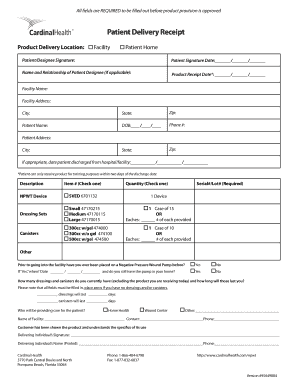
All fields are REQUIRED to be filled out before product provision is approved Patient Delivery Receipt Product Delivery Location: Facility Patient Home Patient/Designee Signature: Patient Signature.

How it works

  1. Open form

    Open form follow the instructions

  2. Easily sign form

    Easily sign the form with your finger

  3. Share form

    Send filled & signed form or save

How to fill out the Cardinal Health Patient Delivery Receipt online

The Cardinal Health Patient Delivery Receipt is a vital document used to confirm the delivery of medical products to a patient. This guide will provide step-by-step instructions to help you fill out the form accurately and efficiently.

Follow the steps to successfully complete the form.

  1. Press the ‘Get Form’ button to access the Patient Delivery Receipt and open it in your preferred editor.
  2. Fill out the Product Delivery Location by selecting either 'Facility' or 'Patient Home'.
  3. In the Patient/Designee Signature field, have the patient or their designee sign the form to confirm receipt.
  4. Enter the 'Patient Signature Date' using the format MM/DD/YYYY.
  5. If applicable, provide the Name and Relationship of the Patient Designee.
  6. Complete the 'Product Receipt Date' using the format MM/DD/YYYY, noting that the patient can only receive products for training purposes within two days of discharge.
  7. Fill in the Facility Name, Facility Address, City, State, and Zip code.
  8. Input the Patient Name, Date of Birth (DOB) using the format MM/DD/YYYY, and the Patient Phone Number.
  9. Provide the Patient Address, City, State, and Zip code.
  10. If applicable, indicate the date the patient was discharged from the hospital or facility using MM/DD/YYYY format.
  11. Select the appropriate Description of the products being delivered, providing details for the Item #, Quantity, and Serial#/Lot#, ensuring all required fields are completed.
  12. Answer the question regarding prior use of a Negative Pressure Wound Pump, indicating 'Yes' or 'No', and if 'Yes', provide the date and whether the pump is still at home.
  13. Report the current number of dressings and canisters on hand, including how long they will last, using zeros if none are available.
  14. Specify who will be providing care for the patient, selecting from Home Health, Wound Center, or Other, and providing relevant details.
  15. The delivering individual must sign the form, providing their printed name and phone number.
  16. Review all entries for completeness, ensuring all fields are filled. Once verified, save your changes, and choose to download, print, or share the filled form.

Start filling out the Cardinal Health Patient Delivery Receipt online today to ensure timely product delivery.

Get form

Experience a faster way to fill out and sign forms on the web. Access the most extensive library of templates available.
Get form

Related content

Untitled
All payments due from Buyer to Cardinal Health for Merchandise delivered and services...
Learn more
Career Entry Development Program
The program is geared towards recent college graduates interested in the healthcare...
Learn more
Manufacturer reference manual
Dec 31, 2020 — Cardinal Health generally sends the PO and the accompanying DEA blanks...
Learn more

Related links form

Martha's Health Clinic - College Of Medicine - Medicine Tamhsc AS 1319-1994 Safety Signs For The Occupational Environment Omb Number 1559 0021 Form University Of Minnesota Lamb Lead 4h

Questions & Answers

Get answers to your most pressing questions about US Legal Forms API.

Contact support

We are Essential to Care™

The new company will be named CareFusion®, reflecting a diverse blend of medical technologies the company will offer to improve the safety and quality of care.

We are Essential to Care™

Headquartered in Dublin, Ohio, Cardinal Health, Inc. (NYSE: CAH) is a distributor of pharmaceuticals, a global manufacturer and distributor of medical and laboratory products, and a provider of performance and data solutions for healthcare facilities.

We are a distributor of pharmaceuticals, a global manufacturer and distributor of medical and laboratory products, and a provider of performance and data solutions for healthcare facilities.

What is Cardinal Health Mission Statement? Cardinal Health's mission statement is "For those tasked with navigating the complexities of healthcare, Cardinal Health brings scaled solutions that help our customers thrive in a changing world."

Get This Form Now!

Use professional pre-built templates to fill in and sign documents online faster. Get access to thousands of forms.
Get form
If you believe that this page should be taken down, please follow our DMCA take down processhere.
Get Cardinal Health Patient Delivery Receipt
Get form
  • Adoption
  • Bankruptcy
  • Contractors
  • Divorce
  • Home Sales
  • Employment
  • Identity Theft
  • Incorporation
  • Landlord Tenant
  • Living Trust
  • Name Change
  • Personal Planning
  • Small Business
  • Wills & Estates
  • Packages A-Z
  • Affidavits
  • Bankruptcy
  • Bill of Sale
  • Corporate - LLC
  • Divorce
  • Employment
  • Identity Theft
  • Internet Technology
  • Landlord Tenant
  • Living Wills
  • Name Change
  • Power of Attorney
  • Real Estate
  • Small Estates
  • Wills
  • All Forms
  • Forms A-Z
  • Other Templates
  • Legal Hub
  • About Us
  • Help Portal
  • Legal Resources
  • Blog
  • Affiliates
  • Contact Us
  • Delete My Account
  • Site Map
  • Industries
  • Forms in Spanish
  • Localized Forms
  • State-specific Forms
  • Forms Kit
  • Real Estate Handbook
  • All Guides
  • Notarize
  • Incorporation services
  • For Consumers
  • For Small Business
  • For Attorneys
  • USLegal
  • FormsPass
  • pdfFiller
  • signNow
  • altaFlow
  • DocHub
  • Instapage
Form Packages
  • Adoption
  • Bankruptcy
  • Contractors
  • Divorce
  • Home Sales
  • Employment
  • Identity Theft
  • Incorporation
  • Landlord Tenant
  • Living Trust
  • Name Change
  • Personal Planning
  • Small Business
  • Wills & Estates
  • Packages A-Z
Form Categories
  • Affidavits
  • Bankruptcy
  • Bill of Sale
  • Corporate - LLC
  • Divorce
  • Employment
  • Identity Theft
  • Internet Technology
  • Landlord Tenant
  • Living Wills
  • Name Change
  • Power of Attorney
  • Real Estate
  • Small Estates
  • Wills
  • All Forms
  • Forms A-Z
  • Other Templates
Customer Service
  • Legal Hub
  • About Us
  • Help Portal
  • Legal Resources
  • Blog
  • Affiliates
  • Contact Us
  • Delete My Account
  • Site Map
  • Industries
  • Forms in Spanish
  • Localized Forms
  • State-specific Forms
  • Forms Kit
Legal Guides
  • Real Estate Handbook
  • All Guides
Prepared for you
  • Notarize
  • Incorporation services
Our Customers
  • For Consumers
  • For Small Business
  • For Attorneys
Our Sites
  • USLegal
  • FormsPass
  • pdfFiller
  • signNow
  • altaFlow
  • DocHub
  • Instapage
Social Media
Call us now toll free:
+1 833 426 79 33
As seen in:
© Copyright 1999-2026 airSlate Legal Forms, Inc. 17 Station Street, Ste. 203, Brookline, MA 02445
  • Your Privacy Choices
  • Terms of Service
  • Privacy Notice
  • Content Takedown Policy
  • Bug Bounty Program