Loading
Form preview
  • US Legal Forms
  • Other Templates
  • More Forms
  • More Uncategorized Forms
  • Form Bls 3020

Get Form Bls 3020

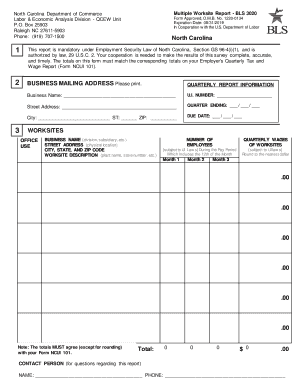
North Carolina Department of Commerce Labor Economic Analysis Division - QCEW Unit P. O. Box 25903 Raleigh NC 27611-5903 Phone 919 707-1500 Multiple Worksite Report - BLS 3020 Form Approved O. Total CONTACT PERSON for questions regarding this report NAME PHONE INSTRUCTIONS Please follow these steps to prepare your Multiple Worksite Report. 5. Using the enclosed envelope return your completed form to the central processing facility. 6. If you have.

How it works

  1. Open form

    Open form follow the instructions

  2. Easily sign form

    Easily sign the form with your finger

  3. Share form

    Send filled & signed form or save

How to fill out the Form Bls 3020 online

Filling out the Form Bls 3020, also known as the Multiple Worksite Report, is essential for employers operating multiple work locations. This guide will provide you with clear, step-by-step instructions to assist you in accurately completing this form online.

Follow the steps to successfully complete the Form Bls 3020.

  1. Press the ‘Get Form’ button to access the form and open it in your online editor.
  2. Review the business mailing address section for accuracy, including the business name, contact information, and mailing address. Make any necessary corrections.
  3. In the Worksites section, examine each worksite's name and address, making any needed corrections. Ensure each worksite has a unique description for identification.
  4. Enter the total number of employees for each month of the quarter, including both full-time and part-time employees who worked or received pay during the pay period that includes the 12th of the month.
  5. Record the quarterly wages for each worksite, rounding to the nearest dollar. Ensure these figures comply with state Unemployment Insurance laws.
  6. Address any significant changes in employment or wages beside the respective worksite entries. Provide explanations for changes due to store closings, layoffs, or seasonal fluctuations.
  7. Identify any missing worksites under your U.I. Number. Include newly opened or acquired worksites by providing detailed information: name, address, unique description, number of employees, and county.
  8. Complete the Totals section by summing the employees and wages across all worksites for each month and ensure these totals agree with your Employer's Quarterly Tax and Wage Report (Form NCUI 101).
  9. Finalize your form review, then save your changes. You can now download, print, or share the completed form as necessary.

Complete your Form Bls 3020 online today to ensure compliance and accurate reporting.

Get form

Experience a faster way to fill out and sign forms on the web. Access the most extensive library of templates available.
Get form

Related content

Multiple Worksite Report - BLS 3020 - Bureau of...
Multiple Worksite Report - BLS 3020. Form Approved, O.M.B. No. 1220-0134. Expiration Date:...
Learn more
BLS 3020 - Ambulatory, Communication, and...
Search form. Search. Academics · Admissions · Financial Aid · Student Life ·...
Learn more
motorola - Elektronikjk
All rights reserved. No part of this book may be reproduced in any form ... The Z bit can...
Learn more

Related links form

Charge Slip Sample Application Limited Registration For An Area Of Need As A Medical Practitioner - AANG-30. Form One-Page Personal Plan (OPPP) Chennai Corporation AE Application Form PDF

Questions & Answers

Get answers to your most pressing questions about US Legal Forms API.

Contact support

Yes, Form Bls 3020 is mandatory for specific employers, especially those with multiple worksites required to report employment and wage data. This form is crucial for compliance with federal regulations and ensuring your business meets its reporting obligations. To avoid misunderstandings about your responsibilities, it's beneficial to consult resources like uslegalforms to clarify your obligations. Compliance protects your business from penalties and contributes positively to labor statistics.

The worksite ID code is a unique identifier assigned to each worksite that you report on Form Bls 3020. This code helps in accurately tracking employment data across multiple locations, ensuring clarity and organization in reporting. By correctly using the worksite ID code, your submissions will be more efficient, and it will facilitate better data management. Our platform, uslegalforms, offers guidance on how to determine and use these codes effectively.

To submit data to the BLS, you will typically need to fill out Form Bls 3020 and follow the submission guidelines provided by the Bureau of Labor Statistics. The data can often be submitted online through their official portal, which ensures secure and efficient processing. Using resources like uslegalforms can help you navigate the submission process and ensure that your data meets the required standards. Accurate submission plays a key role in the overall integrity of the labor statistics.

Form Bls 3020 is a specialized document used by businesses to report employment data across multiple worksites. This form collects vital information on employment, wages, and industry for businesses with multiple locations. Completing the Form Bls 3020 accurately is crucial for compliance with federal reporting requirements. To simplify the completion process, many find our platform at uslegalforms helpful in providing the necessary templates and guidance.

While participation in the BLS survey may not be strictly mandatory for all businesses, it is highly essential for those required to submit Form Bls 3020. By participating, you contribute valuable data that benefits the overall economy and your industry. Moreover, compliance with these surveys can enhance your business credibility. Therefore, it’s advisable to review whether your organization falls under the mandatory reporting category.

Yes, the BLS 3020 multiple worksite report is mandatory in Texas for certain employers. If your business meets specific criteria, you will need to complete this form to report employment data accurately. Utilizing tools like the uslegalforms platform can streamline this process, ensuring you meet all requirements without any hassle. Timely and accurate reporting helps in maintaining compliance and avoiding potential fines.

Several states require businesses to engage in mandatory multiple worksite reporting. This includes states such as California, New York, and Texas among others. If your business operates in these states, ensuring compliance with the Form Bls 3020 is essential for accurate reporting. Staying informed about regulatory requirements can help you avoid penalties and maintain good standing.

BLS reporting refers to the collection of employment statistics and data by the Bureau of Labor Statistics. Employers use Form Bls 3020 to report essential workforce information for multiple worksites. This reporting aids in understanding labor market trends and economic conditions. By participating in BLS reporting, you contribute to vital economic insights that benefit the broader community.

OMB: 1220-0134 StateAbbreviationMandatoryAlaskaAKNArizonaAZNCaliforniaCAYHawaiiHIY49 more rows

(1) Does every employer have to send data to the BLS? No. Each year, the BLS sends injury and illness survey forms to randomly selected employers and uses the information to create the Nation's occupational injury and illness statistics. In any year, some employers will receive a BLS survey form and others will not.

Get This Form Now!

Use professional pre-built templates to fill in and sign documents online faster. Get access to thousands of forms.
Get form
If you believe that this page should be taken down, please follow our DMCA take down processhere.
Get Form Bls 3020
Get form
  • Adoption
  • Bankruptcy
  • Contractors
  • Divorce
  • Home Sales
  • Employment
  • Identity Theft
  • Incorporation
  • Landlord Tenant
  • Living Trust
  • Name Change
  • Personal Planning
  • Small Business
  • Wills & Estates
  • Packages A-Z
  • Affidavits
  • Bankruptcy
  • Bill of Sale
  • Corporate - LLC
  • Divorce
  • Employment
  • Identity Theft
  • Internet Technology
  • Landlord Tenant
  • Living Wills
  • Name Change
  • Power of Attorney
  • Real Estate
  • Small Estates
  • Wills
  • All Forms
  • Forms A-Z
  • Other Templates
  • Legal Hub
  • About Us
  • Help Portal
  • Legal Resources
  • Blog
  • Affiliates
  • Contact Us
  • Delete My Account
  • Site Map
  • Industries
  • Forms in Spanish
  • Localized Forms
  • State-specific Forms
  • Forms Kit
  • Real Estate Handbook
  • All Guides
  • Notarize
  • Incorporation services
  • For Consumers
  • For Small Business
  • For Attorneys
  • USLegal
  • FormsPass
  • pdfFiller
  • signNow
  • altaFlow
  • DocHub
  • Instapage
Form Packages
  • Adoption
  • Bankruptcy
  • Contractors
  • Divorce
  • Home Sales
  • Employment
  • Identity Theft
  • Incorporation
  • Landlord Tenant
  • Living Trust
  • Name Change
  • Personal Planning
  • Small Business
  • Wills & Estates
  • Packages A-Z
Form Categories
  • Affidavits
  • Bankruptcy
  • Bill of Sale
  • Corporate - LLC
  • Divorce
  • Employment
  • Identity Theft
  • Internet Technology
  • Landlord Tenant
  • Living Wills
  • Name Change
  • Power of Attorney
  • Real Estate
  • Small Estates
  • Wills
  • All Forms
  • Forms A-Z
  • Other Templates
Customer Service
  • Legal Hub
  • About Us
  • Help Portal
  • Legal Resources
  • Blog
  • Affiliates
  • Contact Us
  • Delete My Account
  • Site Map
  • Industries
  • Forms in Spanish
  • Localized Forms
  • State-specific Forms
  • Forms Kit
Legal Guides
  • Real Estate Handbook
  • All Guides
Prepared for you
  • Notarize
  • Incorporation services
Our Customers
  • For Consumers
  • For Small Business
  • For Attorneys
Our Sites
  • USLegal
  • FormsPass
  • pdfFiller
  • signNow
  • altaFlow
  • DocHub
  • Instapage
Social Media
Call us now toll free:
+1 833 426 79 33
As seen in:
© Copyright 1999-2026 airSlate Legal Forms, Inc. 17 Station Street, Suite 303, Brookline, MA 02445
  • Your Privacy Choices
  • Terms of Service
  • Privacy Notice
  • Content Takedown Policy
  • Bug Bounty Program