Loading
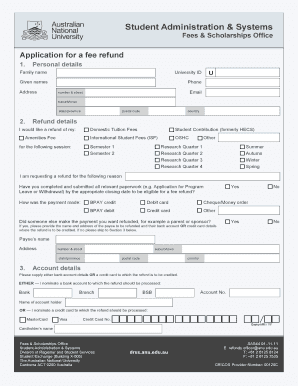
Get Application For A Fee Refund - Students - Australian National University - Anu
How it works
-

Open form follow the instructions
-

Easily sign the form with your finger
-

Send filled & signed form or save
How to fill out the application for a fee refund - students - Australian National University - Anu online
Filling out the application for a fee refund can be a straightforward process if you follow the correct steps. This guide is designed to help you navigate through the online application effectively and ensure that you provide all necessary information for a successful refund.
Follow the steps to complete your refund application.
- Click the ‘Get Form’ button to obtain the refund application form and open it in your document editor.
- Begin by entering your personal details in Section 1. Include your family name, given names, university ID, phone number, address (including number & street, suburb/town, state/province, postal code, and country), and email address.
- In Section 2, specify the refund details. Indicate whether you are seeking a refund for domestic tuition fees, international student fees, amenities fee, student contribution, OSHC, or other fees. Select the relevant session, such as Semester 1, Semester 2, or any other applicable term.
- Provide the reason for your refund request. Ensure that you have completed and submitted all necessary paperwork by the relevant closing date for your request to be eligible.
- Indicate how the payment was originally made by selecting the appropriate option, such as BPAY credit, debit card, cheque/money order, BPAY debit, or credit card.
- If someone else made the payment, please provide their name and address. If not, proceed to Section 3.
- In Section 3, supply your bank account details or credit card information to which the refund should be processed. Select whether you are providing bank account details or credit card information, and fill in the required fields accordingly.
- Read and understand the conditions of the refund before signing the application. Acknowledge that any inaccurate or incomplete information may delay the processing of your refund.
- Sign and date the application to confirm your understanding of the conditions and to submit your application.
- Once all information has been filled out accurately, save your changes, then you can download, print, or share the completed form as needed.
Complete your refund application online today for a timely and efficient processing experience.
To ask for a refund, you need to submit a formal request through the 'Application For A Fee Refund - Students - Australian National University - Anu'. Gather all required documentation and provide a clear reason for your refund request. By following the established procedures, you enhance your chances of receiving your refund efficiently.
Industry-leading security and compliance
US Legal Forms protects your data by complying with industry-specific security standards.
-
In businnes since 199725+ years providing professional legal documents.
-
Accredited businessGuarantees that a business meets BBB accreditation standards in the US and Canada.
-
Secured by BraintreeValidated Level 1 PCI DSS compliant payment gateway that accepts most major credit and debit card brands from across the globe.