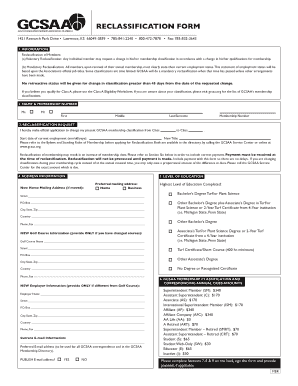
Get Gcsaa Online Reclassification Form
How it works
-

Open form follow the instructions
-

Easily sign the form with your finger
-

Send filled & signed form or save
How to fill out the Gcsaa Online Reclassification Form online
Filling out the Gcsaa Online Reclassification Form is an important step for members looking to update their membership classification. This guide provides a clear and supportive approach to completing the form online, ensuring that you have all the information needed for a successful submission.
Follow the steps to complete the Gcsaa Online Reclassification Form.
- Click ‘Get Form’ button to obtain the form and open it for editing.
- Begin by providing your personal information. Fill in your first name, middle name (if applicable), and last surname. Select the appropriate title from the options provided.
- Indicate your current membership classification by entering your membership number and specify the new classification you are seeking.
- Input the start date of your current employment in the mm/dd/yyyy format, and enter your new job title.
- Complete the section regarding your home mailing address. If you have moved, ensure that your new address is correctly filled out. Choose your preferred mailing address, either home or business.
- Provide your highest level of education completed from the options listed, ensuring you accurately represent your qualifications.
- If you have changed your golf course, include the new golf course information. Fill in the golf course name, street address, city, state, zip code, country, and phone and fax numbers.
- Complete the new employer information section only if your employer has changed. Provide the necessary details as requested.
- Update your contact information by entering your preferred email address. Decide whether you would like to publish this email address in the GCSAA Membership Directory.
- Fill in your past positions held in the golf course management industry if applying for reclassification to Superintendent Member status. Include details like employment dates, titles, and places of employment.
- State whether you are a member of a GCSAA affiliated chapter and provide the chapter's name if applicable.
- Designate a beneficiary for your term life insurance program, providing their full name and relationship to you.
- Fill in your Social Security number and date of birth. Make sure to sign and date the form to validate your application.
- Select your payment method, either by credit card or check. Provide the necessary details accordingly. Ensure payment accompanies the form to avoid processing delays.
- Once you have completed all sections, review the form for accuracy. You can then save changes, download, print, or share the completed form as needed.
Take action today and complete your documents online to ensure your membership classification is accurately reflected.
The GCSAA Conference in 2027 will be in San Diego, California, drawing a wide array of golf management professionals. This gathering will feature an extensive lineup of seminars, product showcases, and networking opportunities. Engage with industry experts and gain insights that can elevate your career. Registering is made easier with the Gcsaa Online Reclassification Form available on the US Legal Forms platform.
Industry-leading security and compliance
-
In businnes since 199725+ years providing professional legal documents.
-
Accredited businessGuarantees that a business meets BBB accreditation standards in the US and Canada.
-
Secured by BraintreeValidated Level 1 PCI DSS compliant payment gateway that accepts most major credit and debit card brands from across the globe.