Loading
Get Advance Settlement Form
How it works
-

Open form follow the instructions
-

Easily sign the form with your finger
-

Send filled & signed form or save
How to fill out the Advance Settlement Form online
Filling out the Advance Settlement Form online is a straightforward process that helps you document travel expenses efficiently. This guide will walk you through each section of the form to ensure you provide all necessary information accurately.
Follow the steps to complete your Advance Settlement Form
- Click 'Get Form' button to obtain the form and open it in the editor.
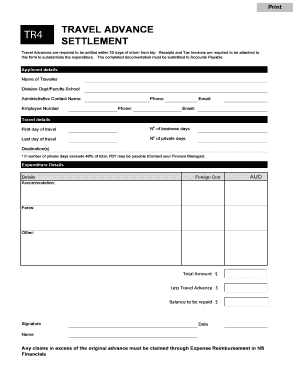
- Begin by filling out the applicant details section. Include your name, division, administrative contact name, employee number, phone, and email.
- Next, provide the travel details. Enter the first day of travel, the number of business days, the last day of travel, the number of private days, and the destination(s). Note that if the number of private days exceeds 40% of total, Fringe Benefits Tax (FBT) may be applicable; contact your finance manager for clarification.
- In the expenditure details section, list the specifics of your expenses. Record the amounts for accommodation, fares, and any other relevant costs. Be sure to specify the currency for foreign transactions.
- Calculate the total amount spent, then subtract the travel advance to determine the balance to be repaid. Ensure these calculations are accurate to avoid discrepancies.
- Finally, sign and date the form, and print or save your copy. Review all entries for accuracy prior to submission.
Complete your Advance Settlement Form online today to streamline your expense reporting!
Related links form
Settling a payment involves completing the agreed-upon financial exchange between parties. This includes fulfilling any outstanding balances as specified in the terms defined in an Advance Settlement Form. Once settled, the transaction is complete, and both parties can proceed without financial concerns hanging over their heads.