Loading
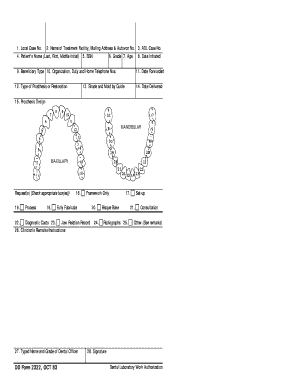
Get Dd Form 2322
How it works
-

Open form follow the instructions
-

Easily sign the form with your finger
-

Send filled & signed form or save
How to fill out the Dd Form 2322 online
Filling out the Dd Form 2322 online is a straightforward process designed to assist users in managing dental laboratory work authorization. This guide will provide you with clear, step-by-step instructions to ensure you complete the form accurately and efficiently.
Follow the steps to complete the Dd Form 2322 seamlessly.
- Click ‘Get Form’ button to access the form and open it in the editor.
- Begin by entering the local case number in the designated field. This number typically identifies your specific case.
- Fill in the name of the treatment facility along with the mailing address and AUTOVON number in the next section to ensure proper communication.
- Provide the ADL case number. This number is crucial for tracking and referencing your case.
- Input the patient's name in the format of last name, first name, and middle initial. Accurate identification is essential.
- Enter the Social Security Number (SSN) of the patient in the appropriate field.
- Fill in the grade and age of the patient to provide context regarding the patient’s demographic details.
- Indicate the date the case was initiated. This date is important for record-keeping.
- Select the beneficiary type to describe the patient’s relationship to the coverage.
- Provide details regarding the organization, along with duty and home telephone numbers for further communication.
- Detail the type of prosthesis or restoration required in the form, specifying any particular needs.
- State the date the form was forwarded for processing.
- Indicate the shade and mold by guide that is suitable for the patient's needs.
- Record the date the prosthesis was delivered to ensure proper tracking of the timeline.
- Describe the prosthesis design by selecting appropriate options like mandibular or maxillary.
- Specify the request(s) by checking the relevant box(es) that pertain to your submission.
- Fill in the framework specifications if applicable and clarify whether to fully fabricate or handle as a framework only.
- If necessary, include additional diagnostic casts or jaw relation records as required.
- Enter any clinician's remarks or instructions that might help clarify the case requirements.
- Complete the typed name and grade of the dental officer who is overseeing the case.
- Affix the signature confirming the details provided are accurate.
- Review all entered information for accuracy before proceeding to save changes, download, print, or share the form.
Complete your Dd Form 2322 online now to streamline your dental laboratory authorization process.
To complete the DD Form 1172, you will generally need your identification documents and proof of eligibility for benefits. This may include your military ID or other supporting documents. Having a checklist can simplify this process, and utilizing services from US Legal Forms can ensure you have everything in order before submission.