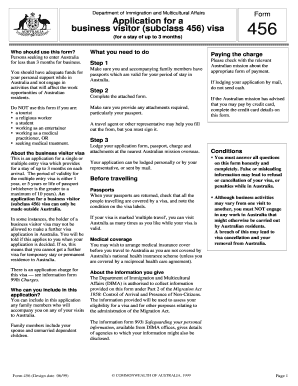
Department of Immigration and Multicultural Affairs Form Application for a business visitor subclass 456 visa for a stay of up to 3 months Who should use this form Persons seeking to enter Australia for less than 3 months for business. You should have adequate funds for your personal support while in Australia and not engage in activities that will affect the work opportunities of Australian residents. Do NOT use this form if you are s a tourist .
Open form follow the instructions
Easily sign the form with your finger
Send filled & signed form or save
How to fill out the Form 456 online
Filling out the Form 456 online can be a straightforward process if you follow the correct steps. This guide will help you navigate the components of the form and ensure that all necessary information is provided correctly for your application for a business visitor visa.
Follow the steps to complete your Form 456 online.
- Click ‘Get Form’ button to obtain the form and open it in the provided interface.
- Provide your personal details as shown in your passport, including your surname, given names, date of birth, nationality, passport number, and expiry date.
- Indicate whether you will be in paid employment in Australia. If yes, provide the relevant details of your occupation and employer.
- Complete your current address, including postal code and telephone numbers.
- Make a declaration confirming the accuracy of the information provided and affirm that you have adequate funds to meet all costs associated with your visit.
- Describe your intended principal business activity in Australia.
- If applicable, provide details of any family members included in your application, including their names and passport information.
- If any family members will be in paid employment or studying in Australia, indicate this and provide the necessary details.
- If you are paying the application charge by credit card, complete the required credit card information section.
- After completing the form, ensure all entries are correct, save your changes, and prepare to submit your application.
Complete your application for a business visitor visa online now.
Experience a faster way to fill out and sign forms on the web. Access the most extensive library of templates available.
Related content
Department of the Treasury – Internal Revenue Service. Form 4564 – Information...
Please visit us at IRS.gov and click on “Get a Tax Transcript...” under “Tools” or...
have to include the refund in income on Form 1040, line 21. ... 456. 476. 275. 292. 303...
Get answers to your most pressing questions about US Legal Forms API.
How to submit form 4506 to the IRS?
To submit Form 4506 to the IRS, first, complete the form with all necessary information regarding your tax records. Once filled out, you need to mail it to the appropriate IRS address corresponding to your state. Ensure you check the latest guidelines since submission methods or addresses may change. If you're looking for more help, US Legal Forms has resources to assist in this procedure.
Does form 4562 need to be filed?
Yes, Form 4562 needs to be filed if you are claiming depreciation or Section 179 expenses for the tax year. If you have qualifying assets, this form will help you report the deductions appropriately. Not filing might result in losing potential tax benefits, so it is essential to complete it if applicable. For assistance, US Legal Forms provides the necessary tools to help guide you through filing correctly.
Who fills out form 4562?
Form 4562 is typically filled out by business owners who wish to claim depreciation or Section 179 deductions for qualifying assets. If you acquired assets like machinery or vehicles for your business, this form is essential. Accurate completion ensures that you capture all eligible deductions, ultimately benefiting your tax situation. To simplify this process, consider US Legal Forms to access user-friendly templates and instructions.
How do I request verification of non-filing with the IRS?
To request verification of non-filing, you need to submit Form 4506-T to the IRS, specifically requesting a transcript that reflects your non-filing status. This form allows you to verify your tax history easily. Make sure to provide all necessary information, including your Social Security number and the year to which your request pertains. If you need further guidance, consider using US Legal Forms for clearer instructions.
How to complete a withholding form?
To complete a withholding form accurately, start by gathering your personal information, including your Social Security number and filing status. You'll need to fill out your expected income and the number of allowances you're claiming. Make sure to double-check all information for accuracy, as errors can delay processing. If you need assistance, platforms like US Legal Forms offer easy-to-follow guides to help you through the process.
How to fill out a transcript request form?
To fill out a transcript request form, first obtain the correct form from the IRS website or tax office. Provide your identifying information, including your name, Social Security number, and address. Specify the type of transcript you need, making sure to include your tax year of interest. This form can help you gather necessary data, which may also relate to your filings like Form 456.
Which of the following should fill out a schedule C?
Anyone who is self-employed or runs a sole proprietorship should fill out Schedule C. This includes freelancers, independent contractors, and small business owners. If your business generates income and you are responsible for paying taxes on that income, you need to report it on Schedule C. Completing this form also ties into other documents you may be filing, such as Form 456.
How do I fill out a schedule C form?
Filling out Schedule C begins with entering personal and business information at the top. Proceed to report all income earned and then list your business expenses categorized by type. Accurate record-keeping of receipts is essential for this process. After completing the form, ensure that you double-check all information before submitting, as accuracy will impact any forms associated, including Form 456.
Do I put 0 or leave blank on tax forms?
When filling out tax forms, it’s important to avoid leaving fields blank. If an amount is zero, indicate this by writing '0'. Leaving fields blank can lead to confusion and potential processing delays. Ensure you review your entire document to maintain clarity and accuracy, specifically in forms like Form 456 where detailed information is crucial.
How do I get the biggest tax refund when self-employed?
To maximize your tax refund as a self-employed person, ensure you claim all legitimate business expenses. Use Schedule C to accurately report income and expenses and keep detailed receipts. Consider contributing to a retirement account, which can lower your taxable income. Leveraging Form 456 benefits can also enhance your deductions and therefore increase your overall refund.
Use professional pre-built templates to fill in and sign documents online faster. Get access to thousands of forms.
If you believe that this page should be taken down, please follow our DMCA take down process here.