Loading
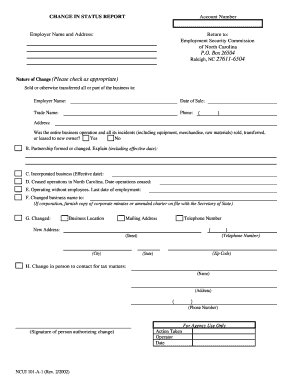
Get Amended Ncui 101
How it works
-

Open form follow the instructions
-

Easily sign the form with your finger
-

Send filled & signed form or save
How to fill out the Amended Ncui 101 online
Filling out the Amended Ncui 101 is a crucial step in reporting changes related to your business status. This guide provides a clear and supportive overview of how to complete the form online efficiently.
Follow the steps to successfully complete your Amended Ncui 101
- Press the ‘Get Form’ button to access the Amended Ncui 101 form and open it in your document editor.
- Enter your account number in the designated field at the top of the form.
- Fill in the employer name and address section, ensuring all information is current.
- Indicate the nature of change by checking the appropriate box, providing necessary details such as the name of the new owner and date of sale if applicable.
- If applicable, elaborate on any changes to partnerships or incorporation dates in the provided sections.
- Complete the section regarding business operations, answering questions about the sale, cessation of operations, or changes in employee status.
- If your business name, location, mailing address, or contact details have changed, fill in the new information in the respective sections.
- Identify and enter the new contact person for tax matters, including their name, address, and phone number.
- Review the information you have provided for accuracy and completeness before finalizing your submission.
- Once you have confirmed all details are correct, you can save changes, download, print, or share the form as needed.
Complete your documents online today to ensure timely updates to your business status.
To receive a North Carolina unemployment tax ID, you must register through the North Carolina Division of Employment Security’s online platform. Be sure to provide all necessary business information to avoid processing delays. Consulting the Amended Ncui 101 guidelines will also enhance your understanding of this procedure.