Loading
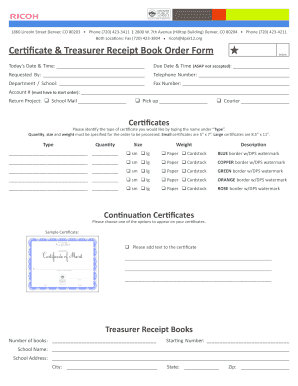
Get Printable Receipt Book
How it works
-

Open form follow the instructions
-

Easily sign the form with your finger
-

Send filled & signed form or save
How to fill out the Printable Receipt Book online
Filling out the Printable Receipt Book online is a straightforward process. This guide will provide you with step-by-step instructions to ensure that you correctly complete all necessary sections of the form.
Follow the steps to successfully complete your Printable Receipt Book
- Press the ‘Get Form’ button to acquire the Printable Receipt Book. This action will allow you to open the document in an editable format.
- Enter your initial in the designated initials field at the top of the form.
- Record today’s date and time in the appropriate fields, ensuring accuracy.
- Specify the due date and time for your request, noting that 'ASAP' is not acceptable.
- Fill in the 'Requested By' section with your name.
- Provide your telephone number to facilitate communication regarding your order.
- Indicate the department or school associated with your request.
- If applicable, include your fax number in the allotted space.
- Fill out the account number field, which is mandatory to start the order.
- Select the return project option: 'School Mail', 'Pick up', or 'Courier' as per your need.
- For certificates, specify the type, quantity, size, and weight by filling out each corresponding section, ensuring to indicate whether the certificate is on paper or cardstock.
- Choose the desired border color for the certificates from the options provided.
- If adding text to the certificate, clearly type the requested information in the text box provided.
- Indicate the number of treasurer receipt books needed and include the starting number in the specified fields.
- Complete the school name and address fields accurately.
- Incorporate any special instructions or additional notes in the designated area.
- Review the entire form for completeness and accuracy.
- Once all fields are filled, save your changes, and choose whether to download, print, or share the form as needed.
Complete your Printable Receipt Book online today to streamline your order process.
To send a receipt in PDF format, first ensure your receipt is saved correctly as a PDF file. Then, you can attach it to an email or use a file-sharing service. Sending receipts in PDF format keeps the document intact and professional, ensuring your customers receive what they need from you efficiently.