We use cookies to improve security, personalize the user experience, enhance our marketing activities (including cooperating with our marketing partners) and for other business use.
Click "here" to read our Cookie Policy. By clicking "Accept" you agree to the use of cookies. Read less
Read more
Accept
Loading
Form preview
  • US Legal Forms
  • Form Library
  • More Forms
  • More Uncategorized Forms
  • Asb Kiwisaver Subsequent Retirement Withdrawal Form

Get Asb Kiwisaver Subsequent Retirement Withdrawal Form

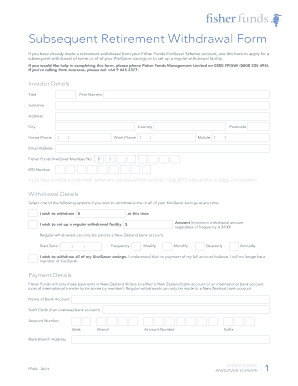
Subsequent Retirement Withdrawal Form If you have already made a retirement withdrawal from your Fisher Funds KiwiSaver Scheme account, use this form to apply for a subsequent withdrawal of some or.

How it works

  1. Open form

    Open form follow the instructions

  2. Easily sign form

    Easily sign the form with your finger

  3. Share form

    Send filled & signed form or save

How to fill out the Asb Kiwisaver Subsequent Retirement Withdrawal Form online

Filling out the Asb Kiwisaver Subsequent Retirement Withdrawal Form online is a straightforward process that allows users to manage their KiwiSaver savings efficiently. This guide provides step-by-step instructions to help users complete the form accurately and confidently.

Follow the steps to fill out the Asb Kiwisaver Subsequent Retirement Withdrawal Form online.

  1. Press the ‘Get Form’ button to access the form and open it in your document management tool.
  2. Provide your investor details, including your title, first name or names, surname, address, city, country, and phone numbers. Ensure all contact information is current to avoid any issues with communication.
  3. Input your Fisher Funds KiwiSaver member number and IRD number in the respective fields. This information is crucial for identifying your account.
  4. In the withdrawal details section, select one of the options for your withdrawal: specify the amount you wish to withdraw, set up regular withdrawals, or indicate that you wish to withdraw all your savings.
  5. If you choose to set up regular withdrawals, enter the amount, start date, and frequency (weekly, monthly, quarterly, or annually) in the fields provided. Regular payments can only be made to a New Zealand bank account.
  6. For payment details, fill in your bank account information. Indicate if your account is a New Zealand or international bank account, and provide the necessary details, including bank name, branch, account number, and any required swift code for overseas accounts.
  7. Read the declaration carefully and confirm that the information provided is correct. Affix your signature and date the form to validate your application.
  8. Once you have completed the form and attached any required supporting documents, save your changes, and prepare to share or print the form as needed.

Start completing your Asb Kiwisaver Subsequent Retirement Withdrawal Form online now!

Get form

Experience a faster way to fill out and sign forms on the web. Access the most extensive library of templates available.
Get form

Related content

New Zealand - United States Department of State
Successive governments accept that foreign investment is an important ... has continued...
Learn more
[PDF] annual report 2011 - NZ Super Fund
Sep 12, 2011 · The NZ Superannuation and Retirement Income Act 2001 (the Act)...
Learn more

Related links form

Re- Registration Form Cwc Police Telangana Court Fees And Suit Valuation Act Resignation Letter Sample Format With 15 Days Notice Period. Resignation Letter Sample Format With

Questions & Answers

Get answers to your most pressing questions about US Legal Forms API.

Contact support

Yes, you can withdraw from your KiwiSaver while overseas, but conditions apply. Typically, you can access your funds if you have permanently moved abroad or in cases of serious illness or significant financial hardship. Utilize the ASB KiwiSaver Subsequent Retirement Withdrawal Form to guide you through the process, ensuring you meet the necessary requirements.

Yes, you can withdraw from ASB KiwiSaver while overseas. The process involves completing the ASB KiwiSaver Subsequent Retirement Withdrawal Form and providing proof of your overseas residency. Contact ASB for detailed instructions on how to proceed, ensuring you have all necessary documentation ready.

To get a KiwiSaver withdrawal letter, you should reach out to your KiwiSaver provider directly. They will guide you through the process, which often requires filling out the ASB KiwiSaver Subsequent Retirement Withdrawal Form. Make sure to ask for any specific requirements they might have for issuing your withdrawal letter.

Yes, there are several ways to withdraw from KiwiSaver. You can access your funds under specific circumstances, such as retirement, purchasing your first home, or experiencing financial hardship. To begin the process, complete the ASB KiwiSaver Subsequent Retirement Withdrawal Form, ensuring you meet the withdrawal criteria.

To withdraw KiwiSaver at age 65 through ASB online, visit the ASB website and locate the ASB KiwiSaver Subsequent Retirement Withdrawal Form. Fill out the form with your details and submit it online. After submission, ASB will guide you through the remaining steps and confirm your eligibility.

Withdrawing from KiwiSaver while overseas requires additional steps. You will need to complete the ASB KiwiSaver Subsequent Retirement Withdrawal Form and provide proof of your overseas status. It’s essential to ensure that all your documentation is accurate to avoid any delays, so consider using platforms like uslegalforms for guidance throughout the process.

While KiwiSaver is primarily designed for retirement savings, you may be able to access funds for specific purposes, including major health expenses, depending on your circumstances. For dental procedures, it is advisable to check the eligibility criteria outlined by ASB and complete the ASB KiwiSaver Subsequent Retirement Withdrawal Form to initiate the process.

Generally, you can expect the withdrawal process from KiwiSaver to take between 10 to 15 business days once the ASB KiwiSaver Subsequent Retirement Withdrawal Form is submitted. However, delays may occur if additional information or documentation is needed. It's best to keep an eye on your application status to avoid surprises.

You can obtain the KiwiSaver withdrawal form from ASB's official website, where it is readily available for download. Alternatively, you can visit your nearest ASB branch to request a physical copy of the ASB KiwiSaver Subsequent Retirement Withdrawal Form. Having the correct form will ensure your application progresses smoothly.

To apply for a KiwiSaver withdrawal with ASB, you should first complete the ASB KiwiSaver Subsequent Retirement Withdrawal Form. Make sure to include all necessary documentation that supports your withdrawal reason. Once you have everything ready, submit the form to ASB either online or in person at a local branch.

Get This Form Now!

Use professional pre-built templates to fill in and sign documents online faster. Get access to thousands of forms.
Get form
If you believe that this page should be taken down, please follow our DMCA take down processhere.

Industry-leading security and compliance

US Legal Forms protects your data by complying with industry-specific security standards.
  • In businnes since 1997
    25+ years providing professional legal documents.
  • Accredited business
    Guarantees that a business meets BBB accreditation standards in the US and Canada.
  • Secured by Braintree
    Validated Level 1 PCI DSS compliant payment gateway that accepts most major credit and debit card brands from across the globe.
Get Asb Kiwisaver Subsequent Retirement Withdrawal Form
Get form
Form Packages
Adoption
Bankruptcy
Contractors
Divorce
Home Sales
Employment
Identity Theft
Incorporation
Landlord Tenant
Living Trust
Name Change
Personal Planning
Small Business
Wills & Estates
Packages A-Z
Form Categories
Affidavits
Bankruptcy
Bill of Sale
Corporate - LLC
Divorce
Employment
Identity Theft
Internet Technology
Landlord Tenant
Living Wills
Name Change
Power of Attorney
Real Estate
Small Estates
Wills
All Forms
Forms A-Z
Form Library
Customer Service
Terms of Service
Privacy Notice
Legal Hub
Content Takedown Policy
Bug Bounty Program
About Us
Help Portal
Legal Resources
Blog
Affiliates
Contact Us
Delete My Account
Site Map
Industries
Forms in Spanish
Localized Forms
State-specific Forms
Forms Kit
Legal Guides
Real Estate Handbook
All Guides
Prepared for You
Notarize
Incorporation services
Our Customers
For Consumers
For Small Business
For Attorneys
Our Sites
US Legal Forms
USLegal
FormsPass
pdfFiller
signNow
airSlate WorkFlow
DocHub
Instapage
Social Media
Call us now toll free:
+1 833 426 79 33
As seen in:
  • USA Today logo picture
  • CBC News logo picture
  • LA Times logo picture
  • The Washington Post logo picture
  • AP logo picture
  • Forbes logo picture
© Copyright 1997-2025
airSlate Legal Forms, Inc.
3720 Flowood Dr, Flowood, Mississippi 39232
Form Packages
Adoption
Bankruptcy
Contractors
Divorce
Home Sales
Employment
Identity Theft
Incorporation
Landlord Tenant
Living Trust
Name Change
Personal Planning
Small Business
Wills & Estates
Packages A-Z
Form Categories
Affidavits
Bankruptcy
Bill of Sale
Corporate - LLC
Divorce
Employment
Identity Theft
Internet Technology
Landlord Tenant
Living Wills
Name Change
Power of Attorney
Real Estate
Small Estates
Wills
All Forms
Forms A-Z
Form Library
Customer Service
Terms of Service
Privacy Notice
Legal Hub
Content Takedown Policy
Bug Bounty Program
About Us
Help Portal
Legal Resources
Blog
Affiliates
Contact Us
Delete My Account
Site Map
Industries
Forms in Spanish
Localized Forms
State-specific Forms
Forms Kit
Legal Guides
Real Estate Handbook
All Guides
Prepared for You
Notarize
Incorporation services
Our Customers
For Consumers
For Small Business
For Attorneys
Our Sites
US Legal Forms
USLegal
FormsPass
pdfFiller
signNow
airSlate WorkFlow
DocHub
Instapage
Social Media
Call us now toll free:
+1 833 426 79 33
As seen in:
  • USA Today logo picture
  • CBC News logo picture
  • LA Times logo picture
  • The Washington Post logo picture
  • AP logo picture
  • Forbes logo picture
© Copyright 1997-2025
airSlate Legal Forms, Inc.
3720 Flowood Dr, Flowood, Mississippi 39232