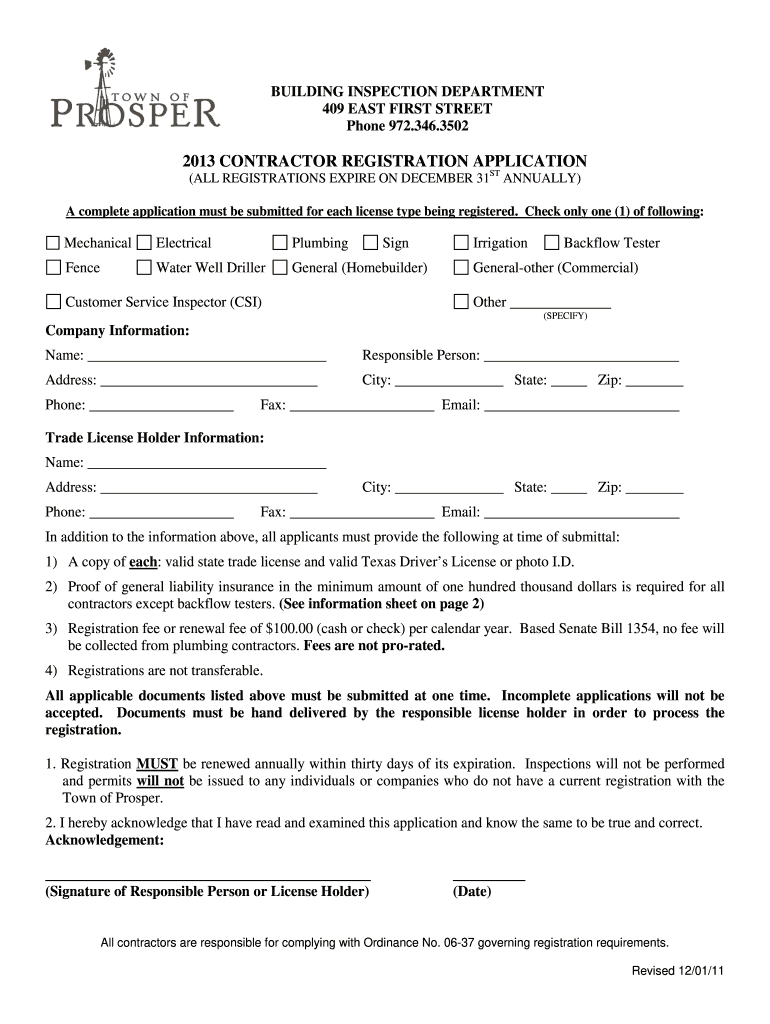
Be submitted for each license type being registered. Check only one (1) of following: Mechanical Electrical Plumbing Sign Fence Water Well Driller General (Homebuilder) Customer Service Inspector (CSI) Irrigation Backflow Tester General-other (Commercial) Other (SPECIFY) Company Information: Name: Responsible Person: Address: City: State: Zip:.
Loading

Open form follow the instructions

Easily sign the form with your finger

Send filled & signed form or save
How to fill out the City Of Prosper Contractor Registration online
This guide provides detailed instructions on completing the City Of Prosper Contractor Registration application online. Follow these steps to ensure a successful submission and compliance with local regulations.
Follow the steps to complete your contractor registration application.
- Click ‘Get Form’ button to obtain the form and open it in the editor.
- Select the type of registration you are applying for by checking only one of the categories listed (e.g., mechanical, electrical, plumbing, etc.).
- In the company information section, fill in your company name, the responsible person's name, and provide the complete address, including city, state, and zip code.
- Enter the phone number, fax, and email address for your company.
- For the trade license holder information, repeat the process by providing the name, address, phone number, city, state, and zip code of the licensed individual.
- Attach the required documents including a copy of the valid state trade license and a valid Texas Driver’s License or photo I.D., as well as proof of general liability insurance.
- Indicate your payment for the registration fee or renewal fee of $100.00, ensuring that you understand plumbing contractors will not incur this fee.
- Review all information for accuracy, ensuring that the form is complete since incomplete applications will be rejected.
- Finally, sign and date the application to acknowledge that the information provided is true and correct.
- Once completed, save your changes, download a copy for your records, and prepare to hand deliver the application and required documents to the office.
Complete your contractor registration application online today to ensure compliance and avoid any delays.
Experience a faster way to fill out and sign forms on the web. Access the most extensive library of templates available.
Related content
How do I register as a contractor in the CSS portal? Please go to the Citizens...
Because contracts below $50,000.00 do not need to be executed by a licensed contractor, a...
Feb 24, 2018 — For late registration or for courses that require the instructor's...
Get answers to your most pressing questions about US Legal Forms API.
How to start a contractor?
Starting as a contractor begins with researching your market and defining your services. Next, you should register your business and obtain any required licenses, including those outlined in the City Of Prosper Contractor Registration. Once you have set up the groundwork, focus on networking and building a portfolio that showcases your work to attract clients.
What is required to get a contractor's license in Texas?
In Texas, acquiring a contractor's license involves several steps, including registering your business and obtaining the right insurance coverage. You must also pass the relevant exams, which demonstrate your knowledge of local building codes and safety regulations. The City Of Prosper Contractor Registration outlines these requirements and can guide you through the application process efficiently.
What are the requirements to get a contractor's license in Texas?
To obtain a contractor's license in Texas, you must first complete the necessary education and training. You need to provide proof of general liability insurance and pass a background check. Additionally, the City Of Prosper Contractor Registration may require you to submit specific documentation such as your business credentials and financial statements.
Does Pasco County require a business license?
Yes, Pasco County requires a business license for most contractors operating within the area. This ensures compliance with local regulations and enhances your credibility. Verify the specific requirements for the City Of Prosper Contractor Registration to ensure you meet all necessary standards for operating your contracting business.
What permits does Pasco County require?
Pasco County requires various permits based on the type of work you are performing. Common permits include building, electrical, plumbing, and mechanical permits. Ensure you understand the requirements for your projects, and align them with the City Of Prosper Contractor Registration to prevent delays.
How to register as a contractor in Pasco County?
To register as a contractor in Pasco County, begin by visiting their official website for specific registration instructions. Collect necessary documents, such as proof of experience and identification, then submit your application. Compliance with the City Of Prosper Contractor Registration is crucial for operating legally in this region.
How to become a licensed contractor in Texas?
Becoming a licensed contractor in Texas involves several steps. First, gather the required experience and education, then complete an application for licensing. It is important to comply with the City Of Prosper Contractor Registration requirements to legally operate within that area and to ensure your projects meet safety standards.
How to become a registered contractor in Florida?
To become a registered contractor in Florida, you must complete a few steps. Start by meeting the required experience, followed by passing the appropriate exams. After that, apply for the City Of Prosper Contractor Registration, ensuring you provide the necessary documents and fees for your application.
Which contractor's license is the easiest to get?
The easiest contractor license to acquire typically depends on your state's requirements. In general, handyman or general contractor licenses often have more straightforward pathways. Research the specific criteria for the City Of Prosper Contractor Registration, as some states have minimal requirements for small projects.
How do I register a construction company in PA?
Registration Instructions Click on .dot2.state.pa.us to access the online registration. ... Click on Business Partner on the navigation pane on the left side of the screen. Click on Registration. ... Select the radio button next to "Private Sector Organization" if your organization is a business.
Use professional pre-built templates to fill in and sign documents online faster. Get access to thousands of forms.
If you believe that this page should be taken down, please follow our DMCA take down process here.