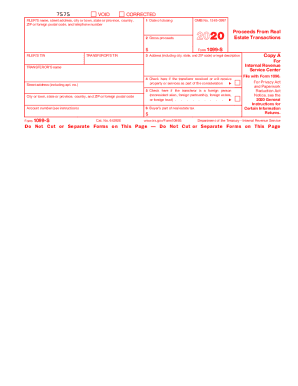
But the online version of it, printed from this website, is not. Do not print and file copy A downloaded from this website; a penalty may be imposed for filing with the IRS information return forms that can t be scanned. See part O in the current General Instructions for Certain Information Returns, available at www.irs.gov/form1099, for more information about penalties. Please note that Copy B and other copies of this form, which appear in black, may be downloaded and printed and used to sat.
Open form follow the instructions
Easily sign the form with your finger
Send filled & signed form or save
How to fill out the 1099 Form 2019 online
Filling out the 1099 Form 2019 online can be a straightforward process with the right guidance. This guide will walk you through each section of the form to ensure accurate completion and compliance with tax regulations.
Follow the steps to fill out the 1099 Form 2019 online effectively.
- Press the ‘Get Form’ button to access the 1099 Form 2019 and open it in your preferred online editor.
- Enter the filer's name, along with their street address, city, state, province, zip code or foreign postal code, and telephone number in the designated fields.
- In Box 1, input the date of closing for the real estate transaction.
- Fill in Box 2 with the gross proceeds from the real estate transaction.
- Enter the filer's taxpayer identification number (TIN) in the appropriate field.
- Record the transferor’s TIN in the designated area.
- In Box 3, input the address including city, state, and zip code or provide a legal description of the property.
- If applicable, check Box 4 to indicate that the transferor received or will receive property or services as part of the consideration.
- If the transferor is a foreign person, check Box 5.
- Input the amount for the buyer's part of real estate tax in Box 6.
- Review all entered information for accuracy.
- Once completed, save your changes, and then you may download, print, or share the form as necessary.
Complete your 1099 Form 2019 online promptly to stay tax compliant.
Experience a faster way to fill out and sign forms on the web. Access the most extensive library of templates available.
Related content
To complete Form 1099-MISC, use: • The 2019 General Instructions for Certain...
The official printed version of Copy A of this IRS form is scannable, but the online...
For your protection, this form may show only the last four digits of your TIN (social...
Get answers to your most pressing questions about US Legal Forms API.
Can I print out 1099 forms?
Yes, you can print out 1099 forms if you have the correct format. The IRS requires that certain 1099 forms be printed on special paper, which is available from the IRS or certain retailers. Furthermore, using USLegalForms can simplify this process, allowing you to download and print the 1099 Form 2019 correctly for your needs.
Where can I find the 1099 form?
You can find the 1099 form on the IRS website or through your tax preparation software. Additionally, if you are a contractor or freelancer, your clients should provide you with this form. If you want a reliable source for easy access, consider using USLegalForms, where you can download the 1099 Form 2019 quickly and efficiently.
What is a 1099 form in the US?
A 1099 form in the US is an information return used to report various types of income other than wages, salaries, and tips. This includes payments made to independent contractors, rental income, and interest income, among others. The 1099 Form 2019 consists of several variations, each serving a different purpose. Understanding the specifics of each type can help you stay compliant with tax laws.
What is a 1099 B form for 2019?
The 1099 B form for 2019 is used to report gains or losses from the sale of stocks, bonds, and other securities. If you sold any investments during the year, the brokerage firm is required to send you this form. This information is crucial for accurately reporting your income to the IRS. You can manage your tax obligations better by using the 1099 Form 2019.
What is the difference between a 1099-MISC and a 1099-NEC?
The 1099-MISC was the standard form for reporting various types of income, but now the 1099-NEC is specifically designated for non-employee compensation. If you received a 1099 Form 2019 and it's a 1099-NEC, this indicates earnings from freelance work or services. The change aims to simplify reporting and facilitate accurate processing. Familiarizing yourself with these differences can help you stay compliant when filing your taxes.
Will the IRS catch a missing 1099?
Yes, the IRS has systems in place to detect missing 1099s. When you receive a 1099 Form 2019, the information is also sent to the IRS. Failing to report any income may trigger an audit or penalty. Therefore, you should always report all income to avoid any complications with the IRS.
What if I received a 1099-NEC but I am not self employed?
Receiving a 1099-NEC can be confusing if you are not self-employed. This form reports non-employee compensation, which may apply to freelance work or side gigs. Even if you believe you aren't self-employed, you should report the income listed on the 1099 Form 2019 on your tax return. It's important to consult a tax professional to ensure compliance and to explore your tax obligations.
What is the minimum 1099 income to file taxes?
The minimum income requirement for issuing a 1099 Form 2019 is typically $600 for most types of payments. This threshold may vary based on specific circumstances, so it's essential to check IRS guidelines for your situation. Regardless, keeping accurate records helps maintain compliance.
How to generate a 1099?
To generate a 1099, start by collecting the necessary information about the recipient, including their tax ID. You can then use an online tool or software to fill out the 1099 Form 2019 easily. Make sure to review the completed form for accuracy before submission.
Can I generate my own 1099?
Yes, you can generate your own 1099. Online tools and form generators are available to help you create a customized 1099 Form 2019. By using a reputable service like USLegalForms, you can ensure you have an accurate and compliant form.
Use professional pre-built templates to fill in and sign documents online faster. Get access to thousands of forms.
If you believe that this page should be taken down, please follow our DMCA take down process here.
This form is available in several versions. Select the version you need from the drop-down list below.