Loading
Get Ct K-89 2018-2026
How it works
-

Open form follow the instructions
-

Easily sign the form with your finger
-

Send filled & signed form or save
How to fill out the CT K-89 online
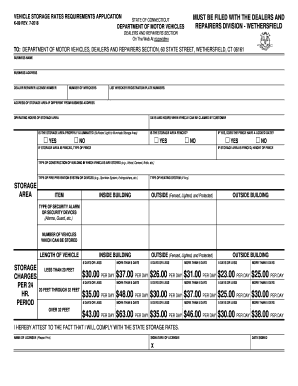
The CT K-89 form is essential for vehicle storage rates requirements in Connecticut. This guide will lead you through the process of filling out the form online, ensuring that you complete each section accurately and efficiently.
Follow the steps to complete the CT K-89 form online.
- Press the ‘Get Form’ button to access the form and open it in your editing tool.
- Begin with the 'Business Name' field. Enter the full legal name of your business as registered with the Department of Motor Vehicles.
- In the 'Business Address' field, provide the complete address, including street, city, and zip code.
- Fill in your 'Dealer/Repairer License Number'. Ensure this number is accurate and corresponds to your license.
- Indicate the 'Number of Wreckers' you operate, ensuring the number matches your inventory.
- List the 'Wrecker Registration Plate Numbers' accurately, one per line, for all applicable vehicles.
- If your storage area differs from your business address, fill in the 'Address of Storage Area'.
- Provide the 'Operating Hours of Storage Area'. State the relevant times when your storage area is accessible.
- Specify the 'Days and Hours When Vehicles Can Be Claimed by Customer'.
- Respond to the questions regarding the illumination and fencing of your storage area by selecting 'Yes' or 'No'.
- If applicable, provide details about your fencing, including whether it has a locked gate, type of fence, and height.
- Describe the 'Type of Construction of Building in Which Vehicles Are Stored', such as wood, cement, or brick.
- Indicate the 'Type of Fire Prevention System or Devices' you have installed, specifying if it includes sprinklers or extinguishers.
- Fill in the storage area details, including the 'Type of Heating System', 'Security Alarm', and the number of vehicles you can store.
- Finally, attest to compliance by printing your name, signing the form, and indicating the date signed.
- Once all information is complete, make sure to save your changes. You have the option to download, print, or share the completed form.
Complete your forms online today for a hassle-free submission process.