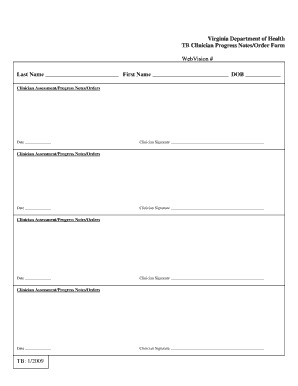
Virginia Department of Health TB Clinician Progress Notes/Order Form WebVision # Last Name First Name DOB Clinician Assessment/Progress Notes/Orders Date Clinician Signature Clinician Assessment/Progress.
Loading
Open form follow the instructions
Easily sign the form with your finger
Send filled & signed form or save
How to fill out the Physician Progress Notes/Order Form - Vdh Virginia online
Filling out the Physician Progress Notes/Order Form - Vdh Virginia online is essential for effective patient management and documentation. This guide provides clear, step-by-step instructions to help you complete the form accurately and efficiently.
Follow the steps to complete the Physician Progress Notes/Order Form online.
- Click the ‘Get Form’ button to access the form and open it in your chosen editor.
- Begin filling out the first section, which includes the patient's last name, first name, and date of birth. Ensure that this information is accurate to avoid any processing delays.
- Proceed to the clinician assessment section. For each entry, record the date of assessment followed by the clinician's signature in the designated fields.
- Repeat the clinician assessment step for as many entries as necessary, ensuring each assessment is dated and signed appropriately.
- Once all necessary fields are completed, you have the option to save your changes, download the completed form, or print it for sharing.
Complete your documents online for efficient and effective management!
Experience a faster way to fill out and sign forms on the web. Access the most extensive library of templates available.
Related content
Virginia Department of Health. TB Clinician Progress Notes/Order Form. WebVision #. TB:...
The VDH Internship Academy is a structured program that allows current or recent students...
Apr 1, 2020 — IMPORTANT: This guidance document was developed for use on the web. Please...
Get answers to your most pressing questions about US Legal Forms API.
How to start a clinical note?
Starting a clinical note involves logging the date and patient identification at the top. Next, provide a brief introduction about the patient's current condition, including any symptoms they may have reported. To make the process smoother, you can use the structured layout of the Physician Progress Notes/Order Form - Vdh Virginia, ensuring you cover all necessary aspects efficiently.
What is a physician's progress note?
A physician's progress note is a documented summary of a patient's ongoing care and treatment provided during medical visits. It typically includes observations, treatment updates, and any changes in the patient's condition. Using the Physician Progress Notes/Order Form - Vdh Virginia helps ensure that these notes are detailed, allowing healthcare providers to give the best care possible.
How to write a clinical note?
To write a clinical note, start by gathering all relevant patient information, such as medical history and current symptoms. Structure your note with clear sections, including subjective and objective data, assessments, and plans for future care. The Physician Progress Notes/Order Form - Vdh Virginia provides a user-friendly template that can guide you in writing comprehensive clinical notes.
What is a clinical note?
A clinical note is a formal record used by healthcare providers to document patient interactions, observations, and treatment plans. It captures essential information about a patient's health status, including assessments and recommendations. Utilizing the Physician Progress Notes/Order Form - Vdh Virginia ensures that your clinical notes are thorough, organized, and compliant with medical standards.
How to start a written note?
A written note should begin with a clear heading that includes the date and the subject of the note. Following this, state your main message succinctly, keeping it to the point. If you require a structured approach, consider the Physician Progress Notes/Order Form - Vdh Virginia, which offers a comprehensive format for various types of written communications.
How to start a sick note?
To start a sick note, begin by clearly stating the date and your name, followed by the recipient's name, such as your employer or school. You should then express the purpose of the note by explaining your absence due to illness. Using the Physician Progress Notes/Order Form - Vdh Virginia can simplify this process, providing you with a structured format to communicate your situation effectively.
Which is a common format for progress notes within the physician's office?
A common format for progress notes in a physician's office includes sections for subjective observations, objective findings, assessment, and plan of care (often referred to as SOAP notes). This structured approach helps ensure that all important aspects of a patient’s progress are covered. The Physician Progress Notes/Order Form - Vdh Virginia can streamline note-taking, making adherence to this format easier.
How do I fill out a progress note?
To fill out a progress note, gather all relevant patient data, such as the date of the session and specific interventions provided. Document the patient’s progress toward their treatment goals, including any new concerns. Using the Physician Progress Notes/Order Form - Vdh Virginia helps standardize this process, ensuring comprehensive and useful documentation.
How to write progress notes as a therapist?
As a therapist, writing progress notes involves documenting therapy sessions with focus on the patient's goals, progress, and any challenges they face. Be specific and clear, describing interventions used and the patient’s responses. The Physician Progress Notes/Order Form - Vdh Virginia can assist you in crafting thorough notes that enhance treatment continuity.
What is an example of a progress note?
An example of a progress note may include sections for identifying information, current medications, and a summary of any changes in the patient’s condition. For instance, you could note, 'Patient reports improvement in mobility since last visit.' Using the Physician Progress Notes/Order Form - Vdh Virginia ensures your example stays consistent with professional standards.
Use professional pre-built templates to fill in and sign documents online faster. Get access to thousands of forms.
If you believe that this page should be taken down, please follow our DMCA take down process here.
This form is available in several versions. Select the version you need from the drop-down list below.