We use cookies to improve security, personalize the user experience, enhance our marketing activities (including cooperating with our marketing partners) and for other business use.
Click "here" to read our Cookie Policy. By clicking "Accept" you agree to the use of cookies. Read less
Read more
Accept
Loading
Form preview
  • US Legal Forms
  • Form Library
  • More Forms
  • More Uncategorized Forms
  • District Of Columbiaamendment Of Foreign Regisation Statement Form Fn2

Get District Of Columbiaamendment Of Foreign Regisation Statement Form Fn2

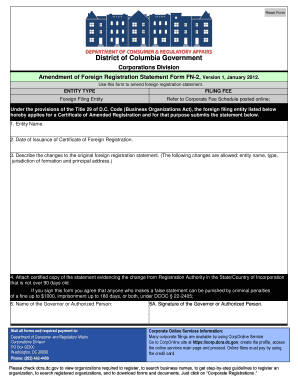
Reset Form District of Columbia Government Corporations Division Amendment of Foreign Registration Statement Form FN-2, Version 1, January 2012. Use this form to amend foreign registration statement.

How it works

  1. Open form

    Open form follow the instructions

  2. Easily sign form

    Easily sign the form with your finger

  3. Share form

    Send filled & signed form or save

How to fill out the District Of Columbia amendment Of Foreign Registration Statement Form Fn2 online

Completing the District Of Columbia amendment Of Foreign Registration Statement Form Fn2 online can streamline the process of amending your foreign registration statement. This guide provides clear and detailed instructions for each step involved, ensuring you can complete the form accurately and efficiently.

Follow the steps to successfully complete the form online

  1. Click ‘Get Form’ button to access the form and open it in your preferred editor.
  2. Begin by entering the entity name in the designated field. Ensure that the name matches the registered entity to avoid discrepancies.
  3. Input the date of issuance of the Certificate of Foreign Registration accurately. This date is essential for processing your amendment.
  4. Describe the changes to the original foreign registration statement in the specified section. You can amend details such as the entity name, type, jurisdiction of formation, or principal address.
  5. Attach a certified copy of the statement evidencing the change from the Registration Authority in the State or Country of Incorporation. This document should be dated within the last 90 days.
  6. Provide the name of the Governor or Authorized Person in the required field. This individual will be responsible for the information provided.
  7. Obtain the signature of the Governor or Authorized Person, confirming the accuracy of the statements made on the form.
  8. Once all sections are completed, save changes to the form. You can then download, print, or share the completed form as needed.

Take the next step in updating your registration by completing the form online today.

Get form

Experience a faster way to fill out and sign forms on the web. Access the most extensive library of templates available.
Get form

Related content

Application for Construction Permits on Private...
District of Columbia Government. Corporations Division. Amendment of Foreign Registration...
Learn more
Annual Report 1936 - SEC.gov
... offices of brokers and dealers registered on Form I-M, as of May 27, 1936,by form of...
Learn more
securities offering reform - Securities Mosaic
2. Exchange Act Reporting Standards. II. Well-Known Seasoned Issuers; Other Categories of...
Learn more

Related links form

Audio Visual Order Sheet - Reno Tahoe Taft Hartley Report Form Carrier Account Master Service Agreement - Integra Telecom Alien Periodic Table - Aurora High School

Questions & Answers

Get answers to your most pressing questions about US Legal Forms API.

Contact support

To register as a foreign entity in the District of Columbia, you need to submit the District Of Columbia amendment Of Foreign Registration Statement Form Fn2. This form requires essential information about your business and its legal structure. After filling out the form, you must file it with the Department of Consumer and Regulatory Affairs. Using uslegalforms can simplify this process, providing guidance while ensuring all necessary steps are completed accurately.

To register as a foreign entity in the District of Columbia, you will need to complete the District Of Columbia amendment Of Foreign Registration Statement Form Fn2 and gather documentation from your home state. Submit all required materials to the appropriate regulatory authority. This registration is vital to maintaining compliance while operating in the district.

A foreign qualification in the District of Columbia allows businesses established outside the district to legally operate within its boundaries. This process involves submitting specific forms like the District Of Columbia amendment Of Foreign Registration Statement Form Fn2. Obtaining this qualification ensures that businesses comply with local regulations.

No, Washington, D.C. is not considered a foreign entity. It is a federal district and operates under its own local government. However, entities from other states must register in D.C. to qualify as a foreign entity when conducting business.

Registering a foreign corporation in the District of Columbia involves submitting the District Of Columbia Amendment Of Foreign Registration Statement Form Fn2. This form requires important company information, including your business name, formation state, and registered agent details. Once you have all necessary documents, file them with the Department of Consumer and Regulatory Affairs. Proper registration enables your corporation to operate legally in the District.

To register a foreign corporation in Washington State, begin by securing a certificate of existence or good standing from your home state. Prepare and submit the Washington foreign corporation application along with any required fees. Ensure that you comply with Washington state-specific naming rules and documentation requirements. Once approved, your foreign corporation can legally conduct business there.

Registering a foreign corporation in the District of Columbia starts with obtaining a certificate of good standing from your home state. You then need to complete the District Of Columbia Amendment Of Foreign Registration Statement Form Fn2, which outlines your business details. After preparing this form, submit it alongside any required documents to the Department of Consumer and Regulatory Affairs. This process allows your foreign corporation to legally operate within the District.

To file articles of incorporation in the District of Columbia, you need to prepare the necessary documents, including the articles themselves and any required supplementary forms. Submit these forms to the District of Columbia Department of Consumer and Regulatory Affairs, either online or in person. Ensure you comply with all naming conventions and entity requirements. For additional guidance, consider utilizing the District Of Columbia amendment Of Foreign Registration Statement Form Fn2 as part of the filing process.

Foreign qualification in the District of Columbia allows a business entity formed in another state or country to legally operate in DC. This involves registering your business with the appropriate local authorities and obtaining a Certificate of Authority. It is crucial to comply with DC's regulations to ensure your operation is lawful. Platforms like USLegalForms offer expert help and resources for successfully navigating this process.

To register as a foreign LLC in Washington, DC, you need to apply for a Certificate of Authority through the DCRA. Complete the Application for Authority to Transact Business in the District of Columbia and submit it with the required documents, including your Certificate of Good Standing from your home state. Understanding this process can be complicated, but USLegalForms can streamline it for you.

Get This Form Now!

Use professional pre-built templates to fill in and sign documents online faster. Get access to thousands of forms.
Get form
If you believe that this page should be taken down, please follow our DMCA take down processhere.

Industry-leading security and compliance

US Legal Forms protects your data by complying with industry-specific security standards.
  • In businnes since 1997
    25+ years providing professional legal documents.
  • Accredited business
    Guarantees that a business meets BBB accreditation standards in the US and Canada.
  • Secured by Braintree
    Validated Level 1 PCI DSS compliant payment gateway that accepts most major credit and debit card brands from across the globe.
Get District Of Columbiaamendment Of Foreign Regisation Statement Form Fn2
Get form
Form Packages
Adoption
Bankruptcy
Contractors
Divorce
Home Sales
Employment
Identity Theft
Incorporation
Landlord Tenant
Living Trust
Name Change
Personal Planning
Small Business
Wills & Estates
Packages A-Z
Form Categories
Affidavits
Bankruptcy
Bill of Sale
Corporate - LLC
Divorce
Employment
Identity Theft
Internet Technology
Landlord Tenant
Living Wills
Name Change
Power of Attorney
Real Estate
Small Estates
Wills
All Forms
Forms A-Z
Form Library
Customer Service
Terms of Service
Privacy Notice
Legal Hub
Content Takedown Policy
Bug Bounty Program
About Us
Help Portal
Legal Resources
Blog
Affiliates
Contact Us
Delete My Account
Site Map
Industries
Forms in Spanish
Localized Forms
State-specific Forms
Forms Kit
Legal Guides
Real Estate Handbook
All Guides
Prepared for You
Notarize
Incorporation services
Our Customers
For Consumers
For Small Business
For Attorneys
Our Sites
US Legal Forms
USLegal
FormsPass
pdfFiller
signNow
airSlate WorkFlow
DocHub
Instapage
Social Media
Call us now toll free:
+1 833 426 79 33
As seen in:
  • USA Today logo picture
  • CBC News logo picture
  • LA Times logo picture
  • The Washington Post logo picture
  • AP logo picture
  • Forbes logo picture
© Copyright 1997-2025
airSlate Legal Forms, Inc.
3720 Flowood Dr, Flowood, Mississippi 39232
Form Packages
Adoption
Bankruptcy
Contractors
Divorce
Home Sales
Employment
Identity Theft
Incorporation
Landlord Tenant
Living Trust
Name Change
Personal Planning
Small Business
Wills & Estates
Packages A-Z
Form Categories
Affidavits
Bankruptcy
Bill of Sale
Corporate - LLC
Divorce
Employment
Identity Theft
Internet Technology
Landlord Tenant
Living Wills
Name Change
Power of Attorney
Real Estate
Small Estates
Wills
All Forms
Forms A-Z
Form Library
Customer Service
Terms of Service
Privacy Notice
Legal Hub
Content Takedown Policy
Bug Bounty Program
About Us
Help Portal
Legal Resources
Blog
Affiliates
Contact Us
Delete My Account
Site Map
Industries
Forms in Spanish
Localized Forms
State-specific Forms
Forms Kit
Legal Guides
Real Estate Handbook
All Guides
Prepared for You
Notarize
Incorporation services
Our Customers
For Consumers
For Small Business
For Attorneys
Our Sites
US Legal Forms
USLegal
FormsPass
pdfFiller
signNow
airSlate WorkFlow
DocHub
Instapage
Social Media
Call us now toll free:
+1 833 426 79 33
As seen in:
  • USA Today logo picture
  • CBC News logo picture
  • LA Times logo picture
  • The Washington Post logo picture
  • AP logo picture
  • Forbes logo picture
© Copyright 1997-2025
airSlate Legal Forms, Inc.
3720 Flowood Dr, Flowood, Mississippi 39232