Loading
Get Oath Registered Representative
How it works
-

Open form follow the instructions
-

Easily sign the form with your finger
-

Send filled & signed form or save
How to fill out the Oath Registered Representative online
This guide will assist you in completing the Oath Registered Representative form accurately and efficiently. Filling out this form online allows for a streamlined process to authorize a representative to appear on your behalf at OATH Hearings.
Follow the steps to effectively complete the Oath Registered Representative form
- Press the ‘Get Form’ button to access the form and open it in your chosen digital editor.
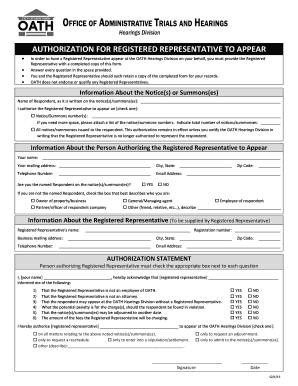
- Begin filling in the 'Information About the Notice(s) or Summons(es)' section. Provide the name of the respondent exactly as it appears on the notice or summons. Indicate whether you authorize the registered representative to appear on specific notices/summons numbers or all notices issued.
- In the 'Information About the Person Authorizing the Registered Representative to Appear' section, enter your name, mailing address, city, state, zip code, telephone number, and email address. Confirm whether you are the named respondent by checking 'YES' or 'NO' and select the appropriate description if not.
- Complete the 'Information About the Registered Representative' section. The registered representative should provide their name, business mailing address, telephone number, registration number, city, state, zip code, and email address.
- In the 'Authorization Statement' section, read the information provided by the registered representative carefully. Check 'YES' or 'NO' for each statement regarding their qualifications and your understanding of the charges against the respondent.
- Authorize the registered representative by checking the appropriate box for their authority regarding the matters connected to the notice(s)/summons(es). Include your signature and the date of signing.
- Once completed, review all information for accuracy. Save changes, download, print, or share the form as needed to retain copies for your records.
Complete your Oath Registered Representative form online today for a smooth representation process.
To become a registered rep, or Oath Registered Representative, you must complete specific qualifications and training. This often includes submitting an application, along with proof of your qualifications and any necessary fees. After fulfilling all requirements, you can receive your designation. Platforms like USLegalForms offer resources to guide you through this process efficiently.