We use cookies to improve security, personalize the user experience, enhance our marketing activities (including cooperating with our marketing partners) and for other business use.
Click "here" to read our Cookie Policy. By clicking "Accept" you agree to the use of cookies. Read less
Read more
Accept
Loading
Form preview
  • US Legal Forms
  • Form Library
  • More Forms
  • More Multi-State Forms
  • Natwest Bankline

Get Natwest Bankline

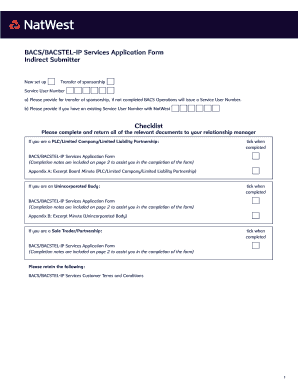
BACS/BACSTEL-IP Services Application Form Indirect Submitter New set up Transfer of sponsorship Service User Number a) Please provide for transfer of sponsorship, if not completed BACS Operations.

How it works

  1. Open form

    Open form follow the instructions

  2. Easily sign form

    Easily sign the form with your finger

  3. Share form

    Send filled & signed form or save

How to fill out the Natwest Bankline online

The Natwest Bankline online is a crucial tool for businesses that wish to streamline their banking processes. This guide will provide you with a clear step-by-step approach to filling out the Natwest Bankline form effectively.

Follow the steps to complete the Natwest Bankline application form online.

  1. Click the ‘Get Form’ button to obtain the Natwest Bankline application form. This will allow you to access the document for further completion.
  2. In Section 1, enter your full registered trading name and address if you are a Limited Company, along with your contact email where BACS notifications will be sent.
  3. Proceed to Section 2 to input the Bureau details. Make sure to collect the necessary information from your chosen Bureau that will handle payments on your behalf.
  4. In Section 3, provide your account details including the sort code and account number that will be used for funding your payments. Indicate suggested credit and item limits for submissions.
  5. Complete Section 4 by nominating at least two Primary Security Contacts, ensuring you provide their names, contact information, and security details.
  6. In Section 5, read and confirm your authorization to use the BACSTEL-IP service. Sign the appropriate Excerpt Minute if applicable.
  7. Review the entire form for accuracy, and ensure all required fields and attachments are completed before finalizing your submission.
  8. Once you have filled out the form, you can save your changes, download a copy, print it, or share it with your Relationship Manager.

Complete your Natwest Bankline application form online today and streamline your banking processes.

Get form

Experience a faster way to fill out and sign forms on the web. Access the most extensive library of templates available.
Get form

Related content

Report of Foreign Private Issuer - SEC.gov
Indicate by check mark if the registrant is submitting the Form 6-K in paper as permitted...
Learn more
information technology service - CiteSeerX
It forms part of the wider. Modernisation ... The survey forms were distributed to around...
Learn more
ING Group - Wikipedia
The ING Group (Dutch: ING Groep) is a Dutch multinational banking and financial services...
Learn more

Related links form

Running Record Conversion Table Sharon Wanted To Make Some Money Cass County 4-H - NDSU Agriculture Apprenticeship Manitoba - Province Of Manitoba

Questions & Answers

Get answers to your most pressing questions about US Legal Forms API.

Contact support

NatWest Bankline supports several modern browsers to ensure a seamless user experience. Typically, users can expect compatibility with the latest versions of Chrome, Firefox, Safari, and Microsoft Edge. Always check for updates, as utilizing the most recent browser versions enhances security and performance when accessing your NatWest Bankline account.

To contact NatWest Bankline, you can visit the official NatWest website and find the customer support section dedicated to Bankline users. They provide various channels such as phone support, email, and live chat to assist with any inquiries. It's advisable to have your account details ready to expedite the process when reaching out for help.

Yes, you can use NatWest Bankline on your phone. The platform is designed to be mobile-friendly, enabling business users to manage their accounts and transactions from their smartphones. Simply access the NatWest Bankline website through your mobile browser or utilize the mobile banking app for a seamless experience. This flexibility helps you stay connected to your banking needs, even on the go.

Filling out a check at NatWest requires some basic steps. Start by writing the date at the top right corner. Next, write the name of the recipient on the 'Payee' line, followed by the amount in words and numerals. Finally, sign the check at the bottom. By following these steps accurately, you can ensure that your check is processed without issues.

Making a payment on NatWest Bankline is straightforward. First, log into your NatWest Bankline account, then select the payment option you wish to utilize. You can enter the payment details, confirm the amount, and specify the recipient. NatWest Bankline ensures a secure transaction process, allowing you to make payments efficiently and with confidence.

NatWest Bankline is a powerful and user-friendly online banking platform designed specifically for businesses. It allows users to access their business accounts, make secure payments, and manage transactions conveniently. Through NatWest Bankline, businesses can streamline their banking processes, increase efficiency, and enhance financial oversight. This platform stands as a vital tool for any business looking to optimize banking operations.

NatWest is often simply referred to as 'National Westminster Bank.' This full name reflects its origins, as it was formed from a merger of the National Bank and Westminster Bank. However, in everyday conversation, people widely use 'NatWest' to refer to the bank. The nickname effectively communicates its services and reputation in the banking sector.

No, NatWest Bankline and NatWest are not the same. NatWest is the traditional banking institution offering personal and business accounts as well as loans and mortgages. NatWest Bankline represents a tailored online banking solution, allowing businesses to handle their banking needs seamlessly over the internet. Thus, while both share the NatWest name, they cater to distinct banking requirements.

NatWest is a prominent bank in the UK that offers various financial services to individuals and businesses. NatWest Bankline, on the other hand, is a specialized online banking platform designed for businesses to manage their accounts and transactions efficiently. While NatWest provides a broad range of banking services, NatWest Bankline focuses on facilitating secure online banking for business users. Therefore, they serve different purposes but are interconnected.

Yes, NatWest Bankline is available 24/7, allowing you to manage your business finances at your convenience. You can monitor transactions, manage payments, and access reports anytime you need. This flexibility makes NatWest Bankline a valuable tool for busy business owners who require constant access.

Get This Form Now!

Use professional pre-built templates to fill in and sign documents online faster. Get access to thousands of forms.
Get form
If you believe that this page should be taken down, please follow our DMCA take down processhere.

Industry-leading security and compliance

US Legal Forms protects your data by complying with industry-specific security standards.
  • In businnes since 1997
    25+ years providing professional legal documents.
  • Accredited business
    Guarantees that a business meets BBB accreditation standards in the US and Canada.
  • Secured by Braintree
    Validated Level 1 PCI DSS compliant payment gateway that accepts most major credit and debit card brands from across the globe.
Get Natwest Bankline
Get form
Form Packages
Adoption
Bankruptcy
Contractors
Divorce
Home Sales
Employment
Identity Theft
Incorporation
Landlord Tenant
Living Trust
Name Change
Personal Planning
Small Business
Wills & Estates
Packages A-Z
Form Categories
Affidavits
Bankruptcy
Bill of Sale
Corporate - LLC
Divorce
Employment
Identity Theft
Internet Technology
Landlord Tenant
Living Wills
Name Change
Power of Attorney
Real Estate
Small Estates
Wills
All Forms
Forms A-Z
Form Library
Customer Service
Terms of Service
Privacy Notice
Legal Hub
Content Takedown Policy
Bug Bounty Program
About Us
Help Portal
Legal Resources
Blog
Affiliates
Contact Us
Delete My Account
Site Map
Industries
Forms in Spanish
Localized Forms
State-specific Forms
Forms Kit
Legal Guides
Real Estate Handbook
All Guides
Prepared for You
Notarize
Incorporation services
Our Customers
For Consumers
For Small Business
For Attorneys
Our Sites
US Legal Forms
USLegal
FormsPass
pdfFiller
signNow
airSlate WorkFlow
DocHub
Instapage
Social Media
Call us now toll free:
+1 833 426 79 33
As seen in:
  • USA Today logo picture
  • CBC News logo picture
  • LA Times logo picture
  • The Washington Post logo picture
  • AP logo picture
  • Forbes logo picture
© Copyright 1997-2025
airSlate Legal Forms, Inc.
3720 Flowood Dr, Flowood, Mississippi 39232
Form Packages
Adoption
Bankruptcy
Contractors
Divorce
Home Sales
Employment
Identity Theft
Incorporation
Landlord Tenant
Living Trust
Name Change
Personal Planning
Small Business
Wills & Estates
Packages A-Z
Form Categories
Affidavits
Bankruptcy
Bill of Sale
Corporate - LLC
Divorce
Employment
Identity Theft
Internet Technology
Landlord Tenant
Living Wills
Name Change
Power of Attorney
Real Estate
Small Estates
Wills
All Forms
Forms A-Z
Form Library
Customer Service
Terms of Service
Privacy Notice
Legal Hub
Content Takedown Policy
Bug Bounty Program
About Us
Help Portal
Legal Resources
Blog
Affiliates
Contact Us
Delete My Account
Site Map
Industries
Forms in Spanish
Localized Forms
State-specific Forms
Forms Kit
Legal Guides
Real Estate Handbook
All Guides
Prepared for You
Notarize
Incorporation services
Our Customers
For Consumers
For Small Business
For Attorneys
Our Sites
US Legal Forms
USLegal
FormsPass
pdfFiller
signNow
airSlate WorkFlow
DocHub
Instapage
Social Media
Call us now toll free:
+1 833 426 79 33
As seen in:
  • USA Today logo picture
  • CBC News logo picture
  • LA Times logo picture
  • The Washington Post logo picture
  • AP logo picture
  • Forbes logo picture
© Copyright 1997-2025
airSlate Legal Forms, Inc.
3720 Flowood Dr, Flowood, Mississippi 39232