Loading
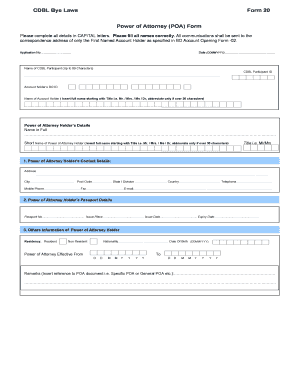
Get Cdbl Bye Laws Form 20 Power Of Attorney (poa) Form
How it works
-

Open form follow the instructions
-

Easily sign the form with your finger
-

Send filled & signed form or save
How to fill out the CDBL Bye Laws Form 20 Power Of Attorney (POA) Form online
This guide provides a step-by-step approach to completing the CDBL Bye Laws Form 20 Power Of Attorney (POA) Form online. By following these comprehensive instructions, users can easily navigate through the form and ensure that all necessary information is correctly entered.
Follow the steps to complete the form accurately.
- Click ‘Get Form’ button to obtain the form and open it in the editor.
- Fill in the application number in the space provided at the beginning of the form. This number is essential for tracking the application.
- Enter the date in the specified format (DDMMYYYY). Ensure the date corresponds to when you are filling out the form.
- Provide the name of the CDBL participant, limited to 99 characters, followed by the CDBL participant ID.
- Insert your account holder's BO ID followed by your full name, including the appropriate title (e.g., Mr., Mrs., Ms., Dr). Abbreviations are allowed if the name exceeds 30 characters.
- Enter the power of attorney holder’s details, including their full name and a short name. Repeat the title format used in step 5.
- Complete the power of attorney holder’s contact details, including address, city, postal code, state or division, country, telephone, mobile phone, fax, and email. Make sure the information is accurate and up to date.
- Provide the passport details of the power of attorney holder, including passport number, issue place, issue date, and expiry date.
- Indicate the residency status of the power of attorney holder by selecting 'Resident' or 'Non Resident'.
- Specify the effective date for the power of attorney, followed by the holder's nationality and date of birth (in the format DDMMYYYY).
- Make any necessary remarks related to the type of power of attorney, such as 'Specific POA' or 'General POA'.
- Attach a recent passport-size photograph of the power of attorney holder in the designated area.
- Read and complete the declaration section by acknowledging the rules and regulations. Each applicant or authorized signatory must provide their name, signature, and the date.
- Review all entered information for accuracy and completeness before finalizing the form.
- Once completed, you can save changes to the form, download it, print it, or share it as necessary.
Complete and submit your documents online for a streamlined experience.
Industry-leading security and compliance
US Legal Forms protects your data by complying with industry-specific security standards.
-
In businnes since 199725+ years providing professional legal documents.
-
Accredited businessGuarantees that a business meets BBB accreditation standards in the US and Canada.
-
Secured by BraintreeValidated Level 1 PCI DSS compliant payment gateway that accepts most major credit and debit card brands from across the globe.