Loading
Get Dhhs Vr B Form
How it works
-

Open form follow the instructions
-

Easily sign the form with your finger
-

Send filled & signed form or save
How to fill out the Dhhs Vr B Form online
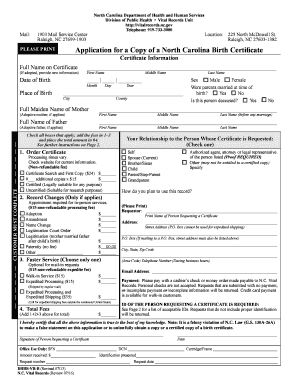
Completing the Dhhs Vr B Form online is a straightforward process designed to help users request a copy of a North Carolina birth certificate. This guide provides step-by-step instructions to ensure a smooth completion of the form.
Follow the steps to successfully complete the Dhhs Vr B Form online.
- Click ‘Get Form’ button to obtain the form and open it in your online document editor.
- Begin by entering the full name as it appears on the certificate. Ensure accuracy to avoid processing delays.
- Indicate the sex of the individual by checking the appropriate box. Also, specify whether the parents were married at the time of birth and if the person is deceased.
- For your request, select the type of certificate(s) you are ordering (certified or uncertified) and list the appropriate fees in the sections provided.
- If requesting any changes to the record, such as adoption or name change, check the relevant boxes and include the fees.
- Specify how you plan to use the record and provide your contact information, including address, telephone number, and email address.
- Before submitting, review your entries for accuracy and completeness. Save any changes made to the form.
Complete your Dhhs Vr B Form online today to request your birth certificate efficiently.
Yes, you can obtain a B form online through various state health department websites or third-party services. Confirm that the online platform is reliable to ensure the security of your personal information. Completing a Dhhs Vr B Form can often be included in the online request process, making it easier to gather the necessary details for your application.