Loading
Get Live Scan Service Request (applicant/petitioner)
How it works
-

Open form follow the instructions
-

Easily sign the form with your finger
-

Send filled & signed form or save
How to fill out the Live Scan Service Request (Applicant/Petitioner) online
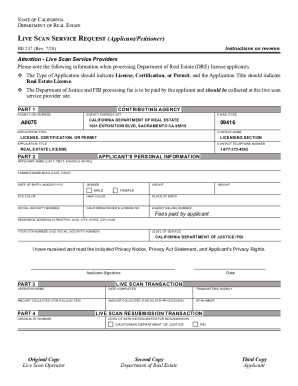
Filling out the Live Scan Service Request is an essential step for individuals seeking a real estate license in California. This guide provides clear instructions to help you navigate the form easily and accurately, ensuring you understand each section and its purpose.
Follow the steps to complete the Live Scan Service Request form online.
- Click ‘Get Form’ button to access the Live Scan Service Request (Applicant/Petitioner) and open it for editing.
- In Part 1, fill in the agency ORI number, contributing agency, and agency address set. This information is critical for proper identification in the processing of your application.
- Complete Part 2 with your personal details: enter your full name, previous names if applicable, date of birth, gender, height, weight, eye color, hair color, place of birth, Social Security number, and California driver’s license number. Provide your residence address and indicate your OCA number, which should be the same as your Social Security number.
- Select the level of service required for the Live Scan transaction as specified in the form. Ensure that you provide accurate information.
- Sign and date the form as confirmation that you have received, read, and understood the Privacy Notice and related documents.
- Once you have filled in all necessary sections, review the form for accuracy and completeness. Ensure that all required fields are completed.
- Save your changes, download a copy for your records, and prepare to print or share the form as necessary.
Complete your Live Scan Service Request online to streamline your application process today!
Get form
Experience a faster way to fill out and sign forms on the web. Access the most extensive library of templates available.
Individuals can obtain a Request for Live Scan form LIC 9163 or from any local Community Care Licensing Division office.
Get This Form Now!
Use professional pre-built templates to fill in and sign documents online faster. Get access to thousands of forms.