Loading
Get Application For Excursion
How it works
-

Open form follow the instructions
-

Easily sign the form with your finger
-

Send filled & signed form or save
How to fill out the Application For Excursion online
Completing the Application For Excursion is an important step in ensuring your child’s participation in school activities. This guide will help you fill out the form accurately and efficiently, guiding you through each section and field.
Follow the steps to effectively complete the Application For Excursion online.
- Click ‘Get Form’ button to access the Application For Excursion and open it in the editor.
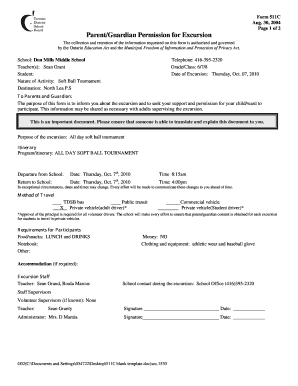
- Fill in the school name, which is Don Mills Middle School, followed by the teacher's name, Sean Grant. This identifies the supervising faculty member for the excursion.
- Indicate your child's name in the designated section to specify which student will participate in the excursion.
- Provide the nature of the activity, which in this case is a soft ball tournament, and the destination, North Lea P.S.
- Input the relevant telephone number, 416-395-2320, which serves as a point of contact for any inquiries.
- Specify the grade/class of your child, which is 6/7/8, to ensure proper categorization.
- Enter the date of the excursion: Thursday, Oct. 07, 2010, to confirm when the activity is scheduled.
- Review the detailed itinerary section, where you note the departure and return information for the excursion. This includes the departure time at 8:15 AM and return time at 4:00 PM on the same date.
- Select the method of travel. You can indicate the preferred option by marking the appropriate box next to TDSB bus, public transit, or other transportation means.
- Check the requirements for participants section, ensuring to note specific items your child should bring such as lunch, drinks, athletic wear, and a baseball glove.
- Fill out the information for emergency contacts and phone numbers as a precaution for any unforeseen situations during the excursion.
- Sign in the appropriate areas to provide your consent, either granting or withholding permission for your child to participate, by marking the YES or NO box.
- Complete the date and your signature for additional verification, confirming the permission provided for the excursion.
- Once all fields are completed, save the changes, download a copy for your records, or print the form to return to the school.
Begin filling out the Application For Excursion online today to ensure your child’s participation!
In writing a simple letter of request, clearly state your request at the beginning. Follow this with a brief explanation of the context and importance of your request. Ensure to express appreciation for the recipient's attention and willingness to consider your request. Using templates from US Legal Forms for your Application For Excursion can help simplify this process and ensure clarity.