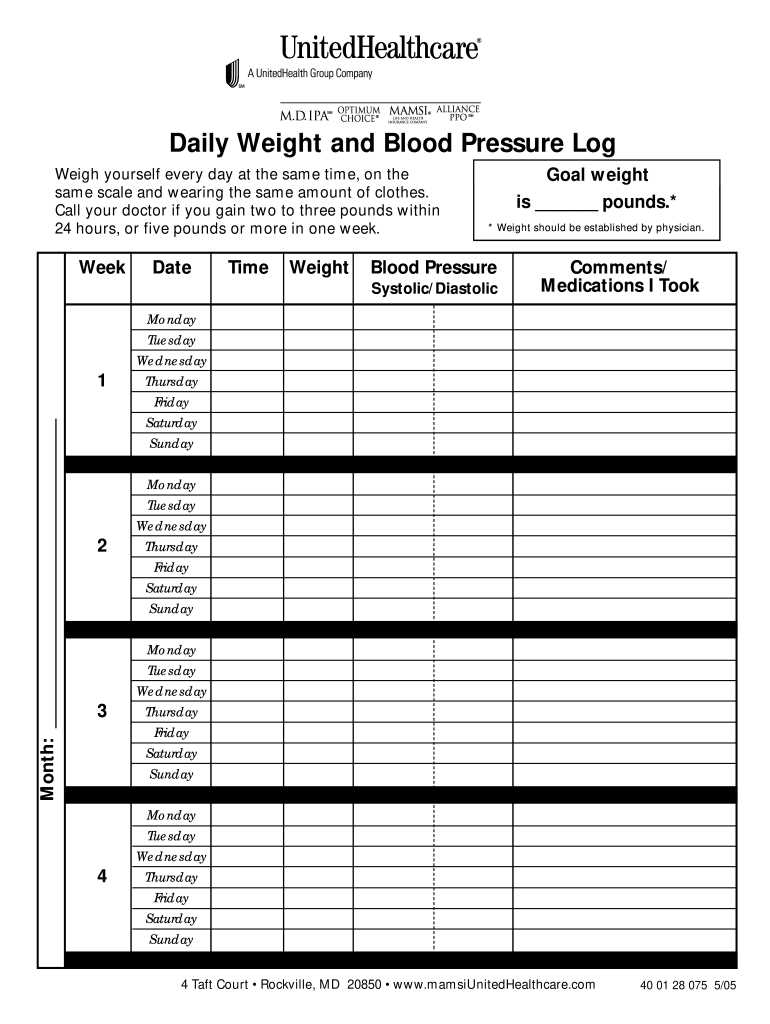
Daily Weight and Blood Pressure Log Weigh yourself every day at the same time, on the same scale and wearing the same amount of clothes. Call your doctor if you gain two to three pounds within 24.

Open form follow the instructions

Easily sign the form with your finger

Send filled & signed form or save
How to fill out the Daily Weight Log online
This guide provides clear instructions for users who wish to complete the Daily Weight Log online. By following these steps, you will effectively track your daily weight and blood pressure, ensuring you maintain a record that supports your health management.
Follow the steps to accurately complete your Daily Weight Log online.
- Click ‘Get Form’ button to retrieve the Daily Weight Log and open it in your browser's editing tool.
- Begin by filling in the 'Date' field with the specific date you are logging your weight.
- In the 'Time' section, note the time of day when you weigh yourself; consistency is key.
- Enter your 'Weight' in the corresponding field, ensuring you weigh yourself at the same time daily and with the same clothing each day.
- Document your 'Goal weight' as established by your physician; write this number in the designated area.
- In the 'Blood Pressure' section, enter your blood pressure readings labeled as Systolic/Diastolic.
- For each day of the week, continue documenting your weight and blood pressure as per the designated rows.
- At the bottom of the form, use the 'Comments/Medications I Took' section to note any relevant information about medications or observations related to your weight or blood pressure.
- Once completed, review all entries for accuracy. You may then save your changes, download the completed log, print a copy, or share it with your healthcare provider.
Start filling out your Daily Weight Log online today to stay on top of your health!
Experience a faster way to fill out and sign forms on the web. Access the most extensive library of templates available.
Related content
Use this log to record these numbers. It will help you track your progress over time...
Check your symptoms every day. Make notes in the columns below. • Bring this record with...
Set a daily calorie goal. The best place to start is by reducing your TDEE by 10-20% (TDEE...
Get answers to your most pressing questions about US Legal Forms API.
How to track daily expenses worksheet?
To track your daily expenses, create a worksheet that categorizes your spending, such as food, transportation, and entertainment. Update this worksheet regularly to maintain an accurate overview of your finances. While it may seem unrelated, managing your expenses effectively can support your wellness goals alongside keeping a Daily Weight Log.
Should I record my weight daily?
Recording your weight daily can provide valuable feedback on your health journey. It helps you stay accountable and enables you to recognize trends. A Daily Weight Log is an effective tool for this purpose, as it allows you to reflect on your progress and make necessary adjustments.
How to create a fitness spreadsheet?
Creating a fitness spreadsheet involves deciding on the key metrics you want to track, such as weight, workouts, and dietary intake. Use Excel or Google Sheets to set up columns for each metric, and regularly enter your data. A fitness spreadsheet complements your Daily Weight Log by providing insights into your overall wellness.
How to make a weight chart in Excel?
To make a weight chart in Excel, start by entering your dates and corresponding weights in a spreadsheet. Highlight your data and use the chart feature to create a visual representation of your progress. This chart can serve as a compelling addition to your Daily Weight Log, making it easier to track changes over time.
How to record daily weight?
To effectively record your daily weight, choose a method such as a notebook, app, or online tracker. Make it a habit to log your weight each morning before breakfast for consistency. Utilizing a Daily Weight Log can simplify this process while helping you visualize your progress.
How to track daily weight?
You can track your daily weight by recording it in a dedicated Daily Weight Log, either physically or digitally. Find a method that suits your lifestyle, whether it’s a notebook, an app, or a spreadsheet. Regularly entering your weight will help you identify patterns and stay focused on your fitness goals.
How to check weight every day?
To check your weight daily, establish a routine that fits seamlessly into your schedule. Weigh yourself in a consistent manner, preferably in the morning after waking up. Using a Daily Weight Log allows you to easily track these daily entries and observe changes that may occur.
How do you record your weight?
To record your weight, begin by weighing yourself at the same time each day, ideally in the morning before eating or drinking. Use a reliable digital scale to ensure accuracy. Document your weight in a Daily Weight Log, which helps you see trends over time and make informed decisions about your health journey.
How to log daily weight myfitnesspal?
To log your daily weight in MyFitnessPal, open the app and navigate to the 'Progress' tab. Tap on 'Add Weight' and enter your current weight. By maintaining a Daily Weight Log in MyFitnessPal, you can visualize your progress and set weight goals. This integration fosters accountability and helps you stay organized.
Should I record my weight every day?
Recording your weight daily can provide valuable insights into your weight trends over time. It allows you to spot fluctuations and adjust your habits accordingly. Also, a Daily Weight Log can motivate you to stay on track with your health and fitness goals. Overall, daily recordings promote awareness and help you make informed decisions.
Use professional pre-built templates to fill in and sign documents online faster. Get access to thousands of forms.
If you believe that this page should be taken down, please follow our DMCA take down process here.