Loading
Form preview
  • US Legal Forms
  • Form Library
  • More Forms
  • More Multi-State Forms
  • Vendor Information Sheet - Iom

Get Vendor Information Sheet - Iom

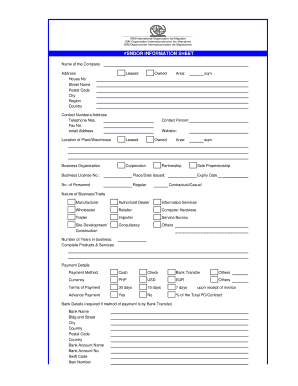
VENDOR INFORMATION SHEET Name of the Company Address House No Street Name Postal Code City Region Country Leased Owned Contact Numbers/Address Telephone Nos. Fax No. email Address Area: sqm Contact.

How it works

  1. Open form

    Open form follow the instructions

  2. Easily sign form

    Easily sign the form with your finger

  3. Share form

    Send filled & signed form or save

How to fill out the VENDOR INFORMATION SHEET - IOM online

The Vendor Information Sheet - IOM is an essential document for businesses aiming to collaborate with the International Organization for Migration. This guide provides step-by-step instructions to help you complete the form accurately and efficiently online.

Follow the steps to accurately fill out the Vendor Information Sheet online.

  1. Click the ‘Get Form’ button to obtain the form and open it in the editor.
  2. Begin by filling out the company details section. Include the name of the company, address, house number, street name, postal code, city, region, and country. Indicate whether the facility is leased or owned.
  3. Provide contact information, including telephone numbers, fax number, email address, and website, as well as the area in square meters.
  4. Insert details about the contact person and the location of the plant or warehouse, specifying if the location is leased or owned.
  5. Select the business organization type: Corporation, Partnership, Sole Proprietorship, etc. Enter the business license number and the place/date issued. Include the number of personnel, indicating regular, contractual/casual, or other categories, as well as the expiry date of licenses.
  6. Describe the nature of your business/trade by checking all applicable options such as manufacturer, authorized dealer, retailer, etc. Also, include the number of years in business and a list of complete products and services offered.
  7. Fill in the payment details, specifying the payment method (cash, check, bank transfer, or others), currency, and terms of payment.
  8. If payment is to be made via bank transfer, complete the bank details section, including the bank name, account name, and account number, along with the swift code and IBAN number.
  9. List key personnel and contacts authorized to sign and accept purchase orders or contracts, including their name, title/position, and signature.
  10. Document your trade references, including the company name, contact person, and their contact number for each reference.
  11. Answer yes or no regarding previous dealings with IOM and provide specific details if applicable. Additionally, disclose any familial relationships with individuals currently working at IOM.
  12. Complete any applicable requirements checklist by submitting accompanying documents, ensuring to mark each as submitted or not applicable.
  13. Finally, certify that all information provided is true and correct, sign the document, and include your printed name, position/title, and date.
  14. After completing the form, save changes, download, print, or share the document as necessary.

Complete your Vendor Information Sheet - IOM online today to ensure your information is accurately submitted.

Get form

Experience a faster way to fill out and sign forms on the web. Access the most extensive library of templates available.
Get form

Related content

CHAPTER 5 - ESTABLISHMENT INSPECTIONS
List the "Special Information Sheet" in the FACTS endorsement ... The key is to cover the...
Learn more
CP 7348.810 Sponsors and CROs
Sep 15, 2021 — 17 Information Sheet Guidance for Sponsors, Clinical Investigators...
Learn more
Regulatory Procedures Manual, Chapter 7: Recall...
7-1 PURPOSE. This chapter provides definitions, responsibilities, and procedures for...
Learn more

Related links form

Bs7671 Model Forms Holt Mcdougal Larson Algebra 2 Pdf Cr Dvhe100 For Hennepin County Pesticide Use Inspection Report - UF/IFAS Office Of Conferences ... - Conference Ifas Ufl

Questions & Answers

Get answers to your most pressing questions about US Legal Forms API.

Contact support

Filling out a vendor application form requires careful attention to details, including business structure, contact information, and specific requirements. Leverage the VENDOR INFORMATION SHEET - Iom to accurately input data necessary for your application. This form is crucial in establishing a solid foundation for your vendor partnership.

To fill out a vendor setup form, gather all essential business details, such as contact information and tax IDs before starting. The VENDOR INFORMATION SHEET - Iom serves as a useful tool to compile this information accurately. Completing this form ensures that your organization has all necessary vendor-related data on hand.

Filling out a vendor agreement involves clearly stating the terms and conditions of your business relationship. Start by listing the services or products you require, specifying any relevant regulations. Use the VENDOR INFORMATION SHEET - Iom to reference the vendor's details, ensuring clarity and mutual understanding in your arrangements.

To fill out a vendor evaluation form, begin by gathering relevant data regarding the vendor's performance and reliability. Use the VENDOR INFORMATION SHEET - Iom to document vital details such as service quality and delivery timelines. This form helps evaluate the vendor’s suitability for your needs and aids in making informed decisions.

The vendor setup process involves a few key steps to ensure compliance and efficiency. First, you must gather necessary information, including business details and tax identification numbers. Next, complete the VENDOR INFORMATION SHEET - Iom to facilitate your vendor registration. This process helps your organization maintain accurate vendor records and streamline future transactions.

Vendor registration typically involves filling out specific forms provided by the organization you wish to engage with. This can often be initiated online, where you submit your qualifications and other information. Completing your vendor registration accurately is key to maintaining updated records, which will further enhance the quality of your VENDOR INFORMATION SHEET - Iom.

You can obtain supplier information through various means such as online research, direct contact, or using business information services. Engaging with platforms like UsLegalForms can significantly expedite this process, providing ready access to reliable supplier data. This streamlined approach can be valuable in enhancing your VENDOR INFORMATION SHEET - Iom.

Requesting information from a supplier should be straightforward. You can send them an email or make a phone call, clearly stating what information you need and why it is important. Including reference to your VENDOR INFORMATION SHEET - Iom in your request can help clarify your needs, leading to quicker and more accurate responses from the supplier.

To access vendor information in SAP, navigate to the vendor master record through the SAP interface. You will typically find it under the Logistics or Accounts Payable modules. Ensuring you have the right permissions is crucial, as this will allow you to view and edit the necessary data effectively, such as what's outlined in your VENDOR INFORMATION SHEET - Iom.

Identifying a supplier involves confirming their business details, such as their legal name, business address, and tax identification number. You can also verify their reputation through reviews, references, and credit checks. Ultimately, compiling this data into a VENDOR INFORMATION SHEET - Iom strengthens your record-keeping and enhances supplier relationships.

Get This Form Now!

Use professional pre-built templates to fill in and sign documents online faster. Get access to thousands of forms.
Get form
If you believe that this page should be taken down, please follow our DMCA take down processhere.
Get VENDOR INFORMATION SHEET - Iom
Get form
  • Adoption
  • Bankruptcy
  • Contractors
  • Divorce
  • Home Sales
  • Employment
  • Identity Theft
  • Incorporation
  • Landlord Tenant
  • Living Trust
  • Name Change
  • Personal Planning
  • Small Business
  • Wills & Estates
  • Packages A-Z
  • Affidavits
  • Bankruptcy
  • Bill of Sale
  • Corporate - LLC
  • Divorce
  • Employment
  • Identity Theft
  • Internet Technology
  • Landlord Tenant
  • Living Wills
  • Name Change
  • Power of Attorney
  • Real Estate
  • Small Estates
  • Wills
  • All Forms
  • Forms A-Z
  • Form Library
  • Legal Hub
  • About Us
  • Help Portal
  • Legal Resources
  • Blog
  • Affiliates
  • Contact Us
  • Delete My Account
  • Site Map
  • Industries
  • Forms in Spanish
  • Localized Forms
  • State-specific Forms
  • Forms Kit
  • Real Estate Handbook
  • All Guides
  • Notarize
  • Incorporation services
  • For Consumers
  • For Small Business
  • For Attorneys
  • USLegal
  • FormsPass
  • pdfFiller
  • signNow
  • altaFlow
  • DocHub
  • Instapage
Form Packages
  • Adoption
  • Bankruptcy
  • Contractors
  • Divorce
  • Home Sales
  • Employment
  • Identity Theft
  • Incorporation
  • Landlord Tenant
  • Living Trust
  • Name Change
  • Personal Planning
  • Small Business
  • Wills & Estates
  • Packages A-Z
Form Categories
  • Affidavits
  • Bankruptcy
  • Bill of Sale
  • Corporate - LLC
  • Divorce
  • Employment
  • Identity Theft
  • Internet Technology
  • Landlord Tenant
  • Living Wills
  • Name Change
  • Power of Attorney
  • Real Estate
  • Small Estates
  • Wills
  • All Forms
  • Forms A-Z
  • Form Library
Customer Service
  • Legal Hub
  • About Us
  • Help Portal
  • Legal Resources
  • Blog
  • Affiliates
  • Contact Us
  • Delete My Account
  • Site Map
  • Industries
  • Forms in Spanish
  • Localized Forms
  • State-specific Forms
  • Forms Kit
Legal Guides
  • Real Estate Handbook
  • All Guides
Prepared for you
  • Notarize
  • Incorporation services
Our Customers
  • For Consumers
  • For Small Business
  • For Attorneys
Our Sites
  • USLegal
  • FormsPass
  • pdfFiller
  • signNow
  • altaFlow
  • DocHub
  • Instapage
Social Media
Call us now toll free:
+1 833 426 79 33
As seen in:
© Copyright 1999-2026 airSlate Legal Forms, Inc. 3720 Flowood Dr, Flowood, Mississippi 39232
  • Your Privacy Choices
  • Terms of Service
  • Privacy Notice
  • Content Takedown Policy
  • Bug Bounty Program