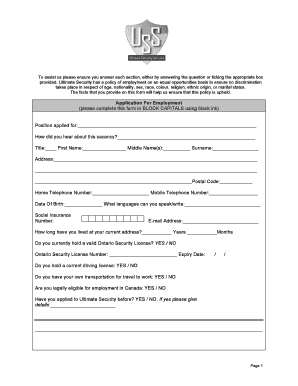
Get Ultimate Security Services Application Form
How it works
-

Open form follow the instructions
-

Easily sign the form with your finger
-

Send filled & signed form or save
How to fill out the Ultimate Security Services Application Form online
Filling out the Ultimate Security Services Application Form online is an essential step towards your employment application process. This guide will provide you with clear and supportive instructions to ensure you accurately complete each section of the form.
Follow the steps to effectively complete the application form online.
- Click ‘Get Form’ button to obtain the form and open it in the editor.
- Begin by entering the position you are applying for in the specified field. Clearly indicate how you learned about the vacancy.
- Fill in your personal information by entering your title, first name, middle name(s), and surname. Complete your address details, including your postal code.
- Provide your home and mobile telephone numbers, email address, and date of birth. List any languages you can speak or write.
- Indicate how long you have lived at your current address, and check 'YES' or 'NO' regarding your Ontario Security License status. If you have one, include the license number and its expiry date.
- Next, answer questions regarding your driving license status and whether you have transportation for work. Confirm your legal eligibility for employment in Canada.
- If you have applied to Ultimate Security before, provide relevant details.
- In the Employment Record section, start with your most recent employer and provide comprehensive information about your employment history for the past five years, including details of your job title, reasons for leaving, and contact information for each employer.
- Complete the Education and Training section, detailing your secondary school and any relevant qualifications gained over the last five years.
- Provide information about any other training courses you attended, including the qualifications obtained.
- In the Personal References section, list two individuals who can verify your employment history. Ensure they are not related to you.
- If you have been self-employed, provide the details of a professional reference who can confirm your employment information.
- Complete the Offences and Convictions segment truthfully. If applicable, provide details for any criminal or civil offenses, bankruptcies, or outstanding court judgments.
- Review and agree to the Declaration section by confirming that all provided information is accurate. Sign, print your name, and date the form.
- After completing the form, save your changes. You may download, print, or share the completed application as necessary.
Complete your application and take the next step towards your future with Ultimate Security Services.
Writing an application for security involves a few important steps. First, ensure that you gather all necessary information, including your personal details and any relevant experience. Next, clearly state your purpose for applying and why you are a suitable candidate. Finally, consider using the Ultimate Security Services Application Form, as it can simplify the process and ensure you include all essential information.