Loading
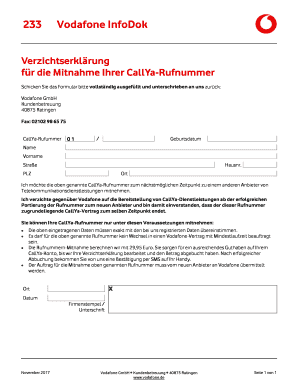
Get Fr Die Mitnahme Ihrer Callya-rufnummer
How it works
-

Open form follow the instructions
-

Easily sign the form with your finger
-

Send filled & signed form or save
How to fill out the Fr Die Mitnahme Ihrer CallYa-Rufnummer online
This guide provides clear instructions on how to complete the Fr Die Mitnahme Ihrer CallYa-Rufnummer form online. By following these steps, you can ensure that your request to transfer your CallYa number to another service provider is handled smoothly.
Follow the steps to fill out the form correctly.
- Click the ‘Get Form’ button to obtain the form and open it in the editor.
- Fill in your CallYa number in the designated field. This is the number you wish to transfer.
- Enter your birth date in the specified format. Ensure that the date matches the information registered with Vodafone.
- Provide your last name as it appears in your Vodafone account in the corresponding section.
- Fill in your first name in the next field, ensuring it is also consistent with your account details.
- Complete your street address and house number. This must match the address associated with your Vodafone account.
- Input your postal code and city in the appropriate fields.
- Acknowledge your desire to transfer the CallYa number by checking the appropriate box or signing where indicated.
- Sign and date the form in the designated areas to validate your request.
- Once the form is fully filled out, save the changes and prepare to download, print, or share the form as needed.
Complete your Fr Die Mitnahme Ihrer CallYa-Rufnummer form online today!
Related links form
Die Dauer der Rufnummernmitnahme bei Vodafone Prepaid beträgt in der Regel zwischen zwei und fünf Werktagen. Diese Zeit kann jedoch je nach Situation variieren, daher ist es ratsam, sich frühzeitig um alles zu kümmern. Achten Sie darauf, alle erforderlichen Daten bereitzustellen, um Fr Die Mitnahme Ihrer CallYa-Rufnummer schnell abzuwickeln. Informationen erhalten Sie bequem über die Webseite oder den Kundendienst.