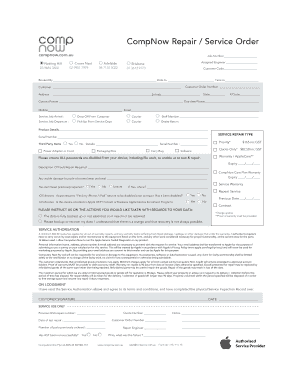
Get Compnow Repair Service Form
How it works
-

Open form follow the instructions
-

Easily sign the form with your finger
-

Send filled & signed form or save
How to fill out the CompNow Repair Service Form online
This guide provides comprehensive instructions for users on how to complete the CompNow Repair Service Form online. By following these steps, you can ensure that all necessary information is accurately submitted for efficient service.
Follow the steps to successfully complete your form.
- Press the ‘Get Form’ button to access the CompNow Repair Service Form, allowing you to open it in your preferred format.
- Begin filling in the job number at the top of the form and select the relevant branch location by entering the correct contact number based on your locality.
- Enter the assigned engineer’s name if applicable, followed by your customer code, and the details of who booked the service along with the date and time when the device was received.
- Fill out the customer information section, including your name, address, suburb, state, postcode, and contact details such as daytime phone, mobile, and email.
- Indicate how the service job arrived by selecting one of the options provided — whether it was dropped off by the customer, sent via courier, or received by a staff member.
- Complete the section related to the product details by entering a description, the serial number, and whether any third-party items are involved.
- Choose the service repair type that applies to your request, ensuring you understand the associated fees. If necessary, indicate whether you have an active warranty.
- Provide a detailed description of the fault or repair needed, ensuring clarity so that the service team understands your concerns.
- If applicable, detail any previous repairs and the location where they were performed. Confirm whether the item has been previously repaired, providing as much information as possible.
- Read and acknowledge the service authorization section, ensuring you understand the terms, including the potential for fees, data handling, and warranty information.
- Finally, review the form for accuracy before submitting it. Make sure all sections are filled out correctly. You can then save your changes, download, print, or share the completed form as necessary.
Start filling out the CompNow Repair Service Form online today to ensure your device is serviced promptly.
To fill out a service request form like the CompNow Repair Service Form, start by entering your complete contact details at the top of the document. Next, describe the issue you’re experiencing, providing all necessary specifications and relevant information. It’s helpful to outline the timeline of the problem, and include any troubleshooting steps you’ve attempted. Finally, check all entries for accuracy before submitting the form to ensure a prompt and effective response.