Get Request For Hecs Or Domestic Fee Related Letters Or Documents - Sydney Edu
How it works
-

Open form follow the instructions
-

Easily sign the form with your finger
-

Send filled & signed form or save
How to use or fill out the Request For HECS Or Domestic Fee Related Letters Or Documents - Sydney Edu online
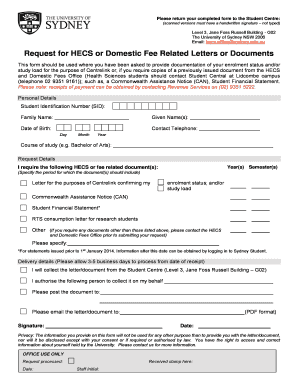
Filling out the Request For HECS Or Domestic Fee Related Letters Or Documents form can be a straightforward process if you follow the steps provided in this guide. This document is essential for individuals needing verification of their enrolment status or requesting related documentation.
Follow the steps to complete your request effectively.
- Click ‘Get Form’ button to obtain the form and open it in your preferred editor.
- Begin by filling out your personal details. Include your Student Identification Number (SID), family name, given name(s), date of birth, and contact telephone number.
- Specify your course of study, such as ‘Bachelor of Arts’. This helps in identifying your enrolment status accurately.
- In the request details section, indicate the year(s) and semester(s) for which you require the document(s). Select the type of document you are requesting, such as a letter confirming your enrolment status for Centrelink or a Commonwealth Assistance Notice (CAN). If applicable, provide any additional specification for documents outside the provided options.
- In the delivery details section, choose how you would like to receive the documents. You can select to collect them from the Student Centre, have someone else collect them on your behalf, or request the documents be mailed or emailed to you.
- Ensure to sign and date the form. Remember, scanned versions must have a handwritten signature to be accepted.
- After completing the form, review all the provided information for accuracy. Once verified, you can save changes, download, print, or share the form as needed.
Complete your requests online today for a smooth document management experience.
You can find the Confirmation of Enrollment (CoE) for the University of Sydney by logging into your Student Portal. After logging in, navigate to the 'Enrolment' section where the CoE document will be available for download. If you need assistance with this process, you can also contact the Student Services for detailed help. This is particularly important when you request for HECS or domestic fee related letters or documents - Sydney Edu, as the CoE is often essential.
Industry-leading security and compliance
-
In businnes since 199725+ years providing professional legal documents.
-
Accredited businessGuarantees that a business meets BBB accreditation standards in the US and Canada.
-
Secured by BraintreeValidated Level 1 PCI DSS compliant payment gateway that accepts most major credit and debit card brands from across the globe.