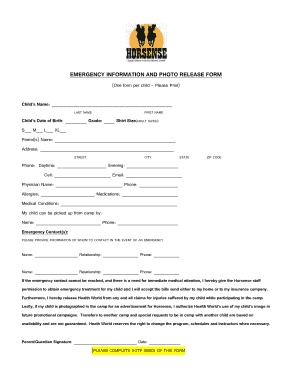
Get Horsense Emergency Information And Photo Release Form 2020-2025
How it works
-

Open form follow the instructions
-

Easily sign the form with your finger
-

Send filled & signed form or save
How to fill out the Horsense Emergency Information And Photo Release Form online
Filling out the Horsense Emergency Information And Photo Release Form online is a straightforward process that ensures the safety and well-being of your child during their participation in camp activities. This guide provides step-by-step instructions to assist you in accurately completing the form.
Follow the steps to successfully complete the form online.
- Press the ‘Get Form’ button to acquire the form and open it in your online document editor.
- Begin entering your child’s personal information in the designated fields, including their full name, date of birth, grade, and shirt size.
- Provide your name as the parent or guardian, along with your complete address including street, city, state, and zip code.
- Fill in your contact information, noting your daytime phone number, evening phone number, cell phone number, and email address.
- Enter your child's physician's name and their contact number to ensure prompt medical attention if needed.
- Document any allergies, ongoing medications, or medical conditions your child may have, ensuring that all crucial information is clearly noted.
- List who is authorized to pick up your child from camp, providing their name and phone number.
- Enter emergency contact information, including names, relationships to your child, and corresponding phone numbers for two contacts.
- Review the permissions regarding emergency medical treatment and photo release, ensuring you understand and consent to each section.
- Sign and date the form at the bottom, confirming that all information is accurate and up to date.
- Once completed, you can save the changes, download and print the form, or share it as necessary.
Complete the Horsense Emergency Information And Photo Release Form online to ensure your child's safety during camp.
To complete the Horsense Emergency Information And Photo Release Form, you will typically need the individual's name, contact information, and details about the photos being released. Ensure you also include any relevant event information or locations related to the images. Also, gather the signatures of all parties involved, which confirms their consent and understanding of how the photos will be used.
Industry-leading security and compliance
-
In businnes since 199725+ years providing professional legal documents.
-
Accredited businessGuarantees that a business meets BBB accreditation standards in the US and Canada.
-
Secured by BraintreeValidated Level 1 PCI DSS compliant payment gateway that accepts most major credit and debit card brands from across the globe.