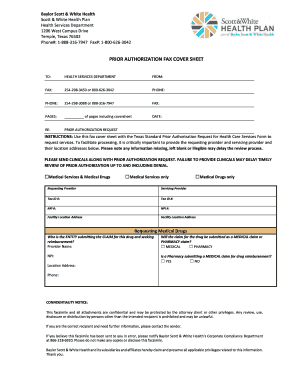
Baylor Scott & White Health Scott & White Health Plan Health Services Department 1206 West Campus Drive Temple, Texas 76502 Phone#: 18883167947 Fax#: 18006263042PRIOR AUTHORIZATION FAX COVER.
Open form follow the instructions
Easily sign the form with your finger
Send filled & signed form or save
How to fill out the SWHP Prior Authorization Fax Cover Sheet online
Completing the SWHP Prior Authorization Fax Cover Sheet accurately is essential for the timely processing of your prior authorization requests. This guide provides clear, step-by-step instructions for filling out the form online with the necessary attention to detail.
Follow the steps to complete the SWHP Prior Authorization Fax Cover Sheet online.
- Press the ‘Get Form’ button to access the SWHP Prior Authorization Fax Cover Sheet and open it in your preferred editor.
- In the 'To' section, enter the recipient's information, which should be the Health Services Department, ensuring the name is correctly spelled.
- Fill in the 'From' section with your name and contact information, including your fax number and phone number.
- Indicate the total number of pages being sent, including the cover sheet, in the 'Pages' field.
- Enter the current date in the 'Date' field, using the format MM/DD/YYYY.
- Specify the subject of your fax by writing 'Prior Authorization Request' in the 'Re' field.
- Provide the details of the requesting provider and servicing provider, including their Tax Identification Numbers (Tax ID #) and National Provider Identifiers (NPI #).
- Fill in the facility location addresses for both the requesting provider and servicing provider.
- If applicable, complete the section regarding medical drugs, entering information about the entity submitting the claim and the type of claim (medical or pharmacy).
- Lastly, review all entered information for accuracy and completeness. This includes ensuring that clinical documentation is attached as required.
- Once you have filled out the entire cover sheet and ensured all necessary details are included, save your changes, download, print, or share the completed form as needed.
Complete your SWHP Prior Authorization Fax Cover Sheet online today for a streamlined process.
Experience a faster way to fill out and sign forms on the web. Access the most extensive library of templates available.
Related content
Intended Use: Use this form to request authorization by fax or mail when an issuer...
Coverage: Prior authorization necessary for the following: 1) Gastric bypass;. 2) Gastric...
Jan 4, 1990 — Digital Equipment Corporation and DECUS assume no responsibility for any...
Get answers to your most pressing questions about US Legal Forms API.
Is a fax cover sheet mandatory?
While a fax cover sheet is not legally required, it is highly recommended for professional communication. Including the 'SWHP Prior Authorization Fax Cover Sheet' adds clarity and context to your fax, helping ensure that it reaches the right recipient and is understood correctly. Not using a cover sheet can lead to confusion and potentially delay important processes.
How do I make a cover sheet for a fax?
To create a cover sheet for a fax, start with a blank document and include key details such as the recipient's name, fax number, and your contact information. You can add a brief message and the date. Using the 'SWHP Prior Authorization Fax Cover Sheet' template can simplify this process, as it provides a structured layout that meets standard requirements.
Where is the fax cover sheet template in Word?
In Microsoft Word, you can find fax cover sheet templates by clicking on 'File' and then selecting 'New.' Type 'fax cover sheet' in the search bar to explore available templates. Consider using the 'SWHP Prior Authorization Fax Cover Sheet' template for your specific needs, as it ensures you have the right format for your documents.
Does Medicare Part B require prior authorizations?
Many services and medications covered by Medicare Part B do require prior authorizations. This is to ensure that the treatment provided is necessary and appropriate for the patient's condition. If you need help managing these requests, consider using the SWHP Prior Authorization Fax Cover Sheet for a streamlined and efficient submission process.
What is the fax number for Express Scripts prior authorization?
The fax number for Express Scripts prior authorization submissions can vary, so it is crucial to consult their website or contact customer service for the latest details. This will help you ensure your paperwork is sent to the right location. Always include the SWHP Prior Authorization Fax Cover Sheet to provide all required information.
What is the fax number for Express Scripts prior authorization form?
The fax number for submitting the Express Scripts prior authorization form is typically listed on their official website. Make sure to double-check for updates and changes. When submitting your request, remember to include the SWHP Prior Authorization Fax Cover Sheet to ensure all necessary information is communicated.
Does express script require prior authorization?
Yes, Express Scripts often requires prior authorization for certain medications. This process helps ensure that patients receive the most effective treatments while managing costs. To smoothly navigate this requirement, you should utilize the SWHP Prior Authorization Fax Cover Sheet when preparing your submission.
What is the fax number for True Scripts prior authorization?
The fax number for submitting prior authorizations to True Scripts generally varies, so it's essential to check their most current contact information. Usually, you can find the correct fax number on the True Scripts website or on their prior authorization guidelines. Don't forget to include the SWHP Prior Authorization Fax Cover Sheet with your submission.
How to submit prior authorization express script?
To submit a prior authorization for Express Scripts, start by collecting the necessary patient and medication information. You will need to fill out the SWHP Prior Authorization Fax Cover Sheet to ensure all required details are included. After completing the cover sheet, fax it along with any supporting documentation to the designated number provided by Express Scripts.
How to submit a preauthorization?
Submitting a preauthorization typically involves completing a designated form and sending it to the appropriate insurance or provider's fax number. Refer to the SWHP Prior Authorization Fax Cover Sheet for specific guidance on where to send your request. Following these steps ensures a higher likelihood of approval.
Use professional pre-built templates to fill in and sign documents online faster. Get access to thousands of forms.
If you believe that this page should be taken down, please follow our DMCA take down process here.