Loading
Form preview
  • US Legal Forms
  • Other Templates
  • More Forms
  • More Uncategorized Forms
  • Uspa New Or Renewing Membership Application Form

Get Uspa New Or Renewing Membership Application Form

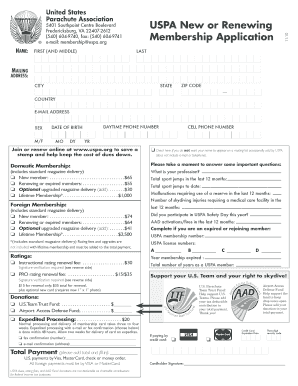
B C D Total number of years as a USPA member: Support your U.S. Team and your right to skydive! Airport Access Defense Fund! Help support the fund to keep drop zones open. Please add your donation to your total payment. U.S. Parachute Team Trust Fund! Help support U.S. Teams. Please add your tax deductible contribution to your total payment. Thank you! Donations: U.S.T eam Trust Fund:. . .

How it works

  1. Open form

    Open form follow the instructions

  2. Easily sign form

    Easily sign the form with your finger

  3. Share form

    Send filled & signed form or save

How to fill out the USPA new or renewing membership application form online

The USPA new or renewing membership application form is essential for individuals looking to join or renew their membership with the United States Parachute Association. This guide will provide you with clear instructions on how to complete the form online, ensuring a smooth and efficient process.

Follow the steps to fill out the USPA membership application form online.

  1. Click the ‘Get Form’ button to obtain the application form and open it in your preferred editor.
  2. Enter your first name and middle name in the designated field.
  3. Provide your last name as it appears on official documents.
  4. Fill in your mailing address, including the city, state, and ZIP code.
  5. Select your country from the dropdown list.
  6. Input your email address in the appropriate field.
  7. Indicate your sex by selecting the appropriate option (M/F).
  8. Enter your date of birth by using the day, month, and year fields.
  9. Provide your daytime phone number for contact purposes.
  10. Fill in your cell phone number if different from your daytime phone.
  11. Select your membership type by checking the appropriate box for new or renewing memberships, along with any optional upgrades or donations.
  12. Answer the questions regarding your profession, sport jumps, malfunctions, injuries, and participation in USPA Safety Day.
  13. If applicable, provide your USPA membership number and license numbers along with any ratings.
  14. Complete the payment section, indicating your preferred payment method and total amount.
  15. Review all your entries for accuracy, save your changes, and choose to download, print, or share the completed form.

Complete your USPA membership application online to ensure a seamless experience.

Get form

Experience a faster way to fill out and sign forms on the web. Access the most extensive library of templates available.
Get form

Related content

Notice - N 8900.526
Oct 10, 2019 — A new form must be submitted reflecting the change. ... member or a...
Learn more
Uspa B License Exam
application for the USPA B license involves: - Completing the official application form...
Learn more

Related links form

Cityfheps 01.2. Agenda A2 Training.docx SAP Hybris Suite (SAP C/4HANA)Book And E-Book Akron City Hospital Map

Questions & Answers

Get answers to your most pressing questions about US Legal Forms API.

Contact support

Yes, a USPA license does expire after a certain period if it is not maintained. To keep your license active, you may need to meet specific renewal requirements, which often include submitting the Uspa New Or Renewing Membership Application Form. It is crucial to stay updated on your license status to enjoy uninterrupted benefits and opportunities in the sport. Check with USPA for detailed guidelines on license renewal.

USPA currently boasts a significant number of members across the United States, reflecting a vibrant community of individuals engaged with parachuting. Membership numbers can fluctuate, but the USPA has consistently seen growth in its membership base. Being part of this community connects you with like-minded enthusiasts and professionals. Keep an eye on USPA announcements for the latest membership statistics.

Renewing your APA membership can be done by filling out the Uspa New Or Renewing Membership Application Form available on their website. Ensure that all your details are current for a smooth renewal process. After completing the form, submit it to stay in good standing with your association. This renewal helps maintain access to valuable resources and networks within the APA community.

To renew your US ski and snowboard membership, you will need to complete the Uspa New Or Renewing Membership Application Form. This step is essential to maintain your registration and avoid any interruption to your membership benefits. Once you submit the completed form, the organization will process your renewal and you will receive confirmation promptly. Stay ahead by renewing early before the expiration date.

Renewing your USPA membership is a straightforward process that involves completing the Uspa New Or Renewing Membership Application Form. You can access this form online, fill it out with your current details, and submit it for processing. The renewal ensures that you continue to enjoy all the benefits and coverage offered to members. It is important to renew on time to avoid any lapse in your membership status.

To get USPA membership, you need to fill out the Uspa New Or Renewing Membership Application Form. This form will guide you through the necessary information required for membership approval. Once submitted, the USPA will review your application and notify you about your membership status. Make sure to provide accurate details to avoid delays.

To fill out PS Form 3575, you need to provide your current address, new address, and the effective date of the change. Make sure that your entries are legible and accurate to avoid any delays in mail forwarding. The Uspa New Or Renewing Membership Application Form offers comprehensive instructions to assist with this process, making it easier for you to manage your membership details.

PS Form 3575 serves as a formal request to change your mailing address with the USPS. It ensures that your mail is forwarded to your new location without interruption. If you are submitting the Uspa New Or Renewing Membership Application Form, this form may provide critical support in keeping your information updated for your membership benefits. This way, you stay informed and connected.

To fill out USPS Form 1583, provide accurate personal information, including your name, address, and identification details. This form is essential for setting up a mail receiving service. Utilize the Uspa New Or Renewing Membership Application Form to help streamline any associated processes. Always verify that all information is correct before submitting.

When filling out PS Form 4232, clearly state your information in the designated fields. Include your signature and date where required. The Uspa New Or Renewing Membership Application Form can seamlessly guide you through paperwork, ensuring you complete everything accurately and efficiently. Don’t forget to save a copy for your records.

Get This Form Now!

Use professional pre-built templates to fill in and sign documents online faster. Get access to thousands of forms.
Get form
If you believe that this page should be taken down, please follow our DMCA take down processhere.
Get Uspa New Or Renewing Membership Application Form
Get form
  • Adoption
  • Bankruptcy
  • Contractors
  • Divorce
  • Home Sales
  • Employment
  • Identity Theft
  • Incorporation
  • Landlord Tenant
  • Living Trust
  • Name Change
  • Personal Planning
  • Small Business
  • Wills & Estates
  • Packages A-Z
  • Affidavits
  • Bankruptcy
  • Bill of Sale
  • Corporate - LLC
  • Divorce
  • Employment
  • Identity Theft
  • Internet Technology
  • Landlord Tenant
  • Living Wills
  • Name Change
  • Power of Attorney
  • Real Estate
  • Small Estates
  • Wills
  • All Forms
  • Forms A-Z
  • Other Templates
  • Legal Hub
  • About Us
  • Help Portal
  • Legal Resources
  • Blog
  • Affiliates
  • Contact Us
  • Delete My Account
  • Site Map
  • Industries
  • Forms in Spanish
  • Localized Forms
  • State-specific Forms
  • Forms Kit
  • Real Estate Handbook
  • All Guides
  • Notarize
  • Incorporation services
  • For Consumers
  • For Small Business
  • For Attorneys
  • USLegal
  • FormsPass
  • pdfFiller
  • signNow
  • altaFlow
  • DocHub
  • Instapage
Form Packages
  • Adoption
  • Bankruptcy
  • Contractors
  • Divorce
  • Home Sales
  • Employment
  • Identity Theft
  • Incorporation
  • Landlord Tenant
  • Living Trust
  • Name Change
  • Personal Planning
  • Small Business
  • Wills & Estates
  • Packages A-Z
Form Categories
  • Affidavits
  • Bankruptcy
  • Bill of Sale
  • Corporate - LLC
  • Divorce
  • Employment
  • Identity Theft
  • Internet Technology
  • Landlord Tenant
  • Living Wills
  • Name Change
  • Power of Attorney
  • Real Estate
  • Small Estates
  • Wills
  • All Forms
  • Forms A-Z
  • Other Templates
Customer Service
  • Legal Hub
  • About Us
  • Help Portal
  • Legal Resources
  • Blog
  • Affiliates
  • Contact Us
  • Delete My Account
  • Site Map
  • Industries
  • Forms in Spanish
  • Localized Forms
  • State-specific Forms
  • Forms Kit
Legal Guides
  • Real Estate Handbook
  • All Guides
Prepared for you
  • Notarize
  • Incorporation services
Our Customers
  • For Consumers
  • For Small Business
  • For Attorneys
Our Sites
  • USLegal
  • FormsPass
  • pdfFiller
  • signNow
  • altaFlow
  • DocHub
  • Instapage
Social Media
Call us now toll free:
+1 833 426 79 33
As seen in:
© Copyright 1999-2026 airSlate Legal Forms, Inc. 17 Station Street, Ste. 203, Brookline, MA 02445
  • Your Privacy Choices
  • Terms of Service
  • Privacy Notice
  • Content Takedown Policy
  • Bug Bounty Program