Loading
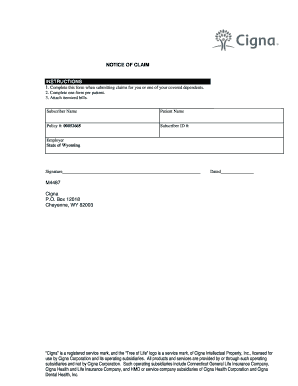
Get Po Box 12018 Cheyenne Wy 82003
How it works
-

Open form follow the instructions
-

Easily sign the form with your finger
-

Send filled & signed form or save
How to fill out the Po Box 12018 Cheyenne Wy 82003 online
This guide provides a clear overview of how to complete the form for submitting a Notice of Claim to Cigna. Follow the steps to ensure that your claim is filed accurately and efficiently online.
Follow the steps to complete your Notice of Claim form.
- Click ‘Get Form’ button to obtain the form and open it in the editor.
- Begin by filling in the subscriber name. This is the name of the person who holds the insurance policy.
- Next, enter the patient name. This should be the name of the person for whom the claim is being submitted.
- Provide the policy number: 00052665. This number is essential for identifying the specific coverage.
- Input the subscriber ID number in the designated field. This number is unique to the subscriber.
- Indicate the employer name, which in this case is the State of Wyoming.
- Add your signature in the specified area. This serves as an acknowledgment of the information provided.
- Finally, date the form to indicate when it was completed.
- If applicable, attach any necessary itemized bills to the form to support your claim.
- Once all fields are complete, save your changes, then download, print, or share the form as required.
Complete your documents online today for a smooth filing experience.