Loading
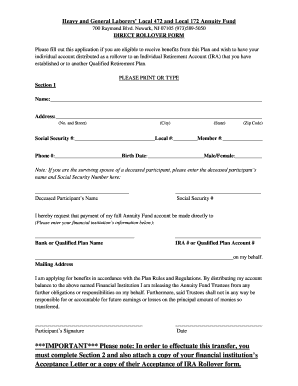
Get Hgl Funds
How it works
-

Open form follow the instructions
-

Easily sign the form with your finger
-

Send filled & signed form or save
How to fill out the Hgl Funds online
Filling out the Hgl Funds form is crucial for individuals wishing to have their annuity account distributed as a rollover. This guide provides detailed, step-by-step instructions to help users complete the online form accurately and efficiently.
Follow the steps to successfully complete the Hgl Funds online form.
- Press the ‘Get Form’ button to retrieve the form and open it for editing.
- Populate Section 1 with your personal details. Begin by entering your full name, mailing address, Social Security number, and contact information. For the 'Birth Date' field, provide your date of birth and indicate your gender.
- If applicable, enter the name and Social Security number of the deceased participant in the designated fields. Ensure all entries are accurate and clear.
- In the next section, detail the financial institution to which your account will be rolled over. Include the bank or qualified plan name and the account number.
- Sign the application, confirming your request for payment to the specified financial institution. Include the date of your signature.
- Proceed to Section 2. Select the appropriate checkbox to indicate your marital status and provide your signature along with the date. If you choose option B, your spouse must also sign the form to acknowledge the transfer.
- Obtain the necessary notarization for your signature if you are submitting the form by mail, or have it signed by a Fund representative if you submit it in person.
- Finally, attach a copy of your financial institution's acceptance letter or their acceptance of IRA rollover form to ensure your transfer is processed correctly.
- After reviewing your completed form for accuracy, save the changes, and proceed to download, print, or share the document as needed.
Complete your Hgl Funds online form today to ensure a smooth rollover process.
There are several types of retirement for which you may qualify. Available to Tier 1 and Tier 2 members upon reach- ing age 60 or older; or to Tier 3 and Tier 4 members upon reaching age 62 or older; or to Tier 5 members upon reaching age 65. No minimum amount of pen- sion service credit is required.